
Automation can organise property statements, but it won’t simplify a complex investment structure on its own. Automated statement processing for property investors reads documents from agents and inboxes, extracts income and expenses, and brings the data together for financial tracking. The result is a clearer view of the numbers for each rental property.
Automation can reduce repetitive handling and bring scattered records into one place. But extracting data is not the same as interpreting a deal: statements can support consistent reporting, while complex fees, capital accounts or distribution rules still need to be represented accurately in the system.
This article explains how statement data moves through an automated workflow, how accounting and property software can connect, and how extracted figures support performance reporting. It also covers automation’s limits, particularly when a deal involves multiple entities or bespoke fee and distribution structures. You’ll see what automation can streamline and where the underlying investment logic still matters. The integration and reporting examples below describe possible industry workflows, not features available in every product.
Key Takeaways
- Understand how statement data can be captured, organised and used to support property investment reporting.
- See how connected accounting and property management systems can reduce information gaps between records.
- Learn why reliable performance reporting depends on reconciled figures and a completed close.
- Recognise where complex fees, capital accounts and distribution rules may need tailored reporting logic.
- Identify how secure handling of property and investor information fits into an automated workflow.
How does real estate automation work?
Property statement automation converts documents into organised property data. For Australian investors, the workflow captures figures, validates them, then uses the approved information in reports and connected systems.
Validating data and flagging exceptions
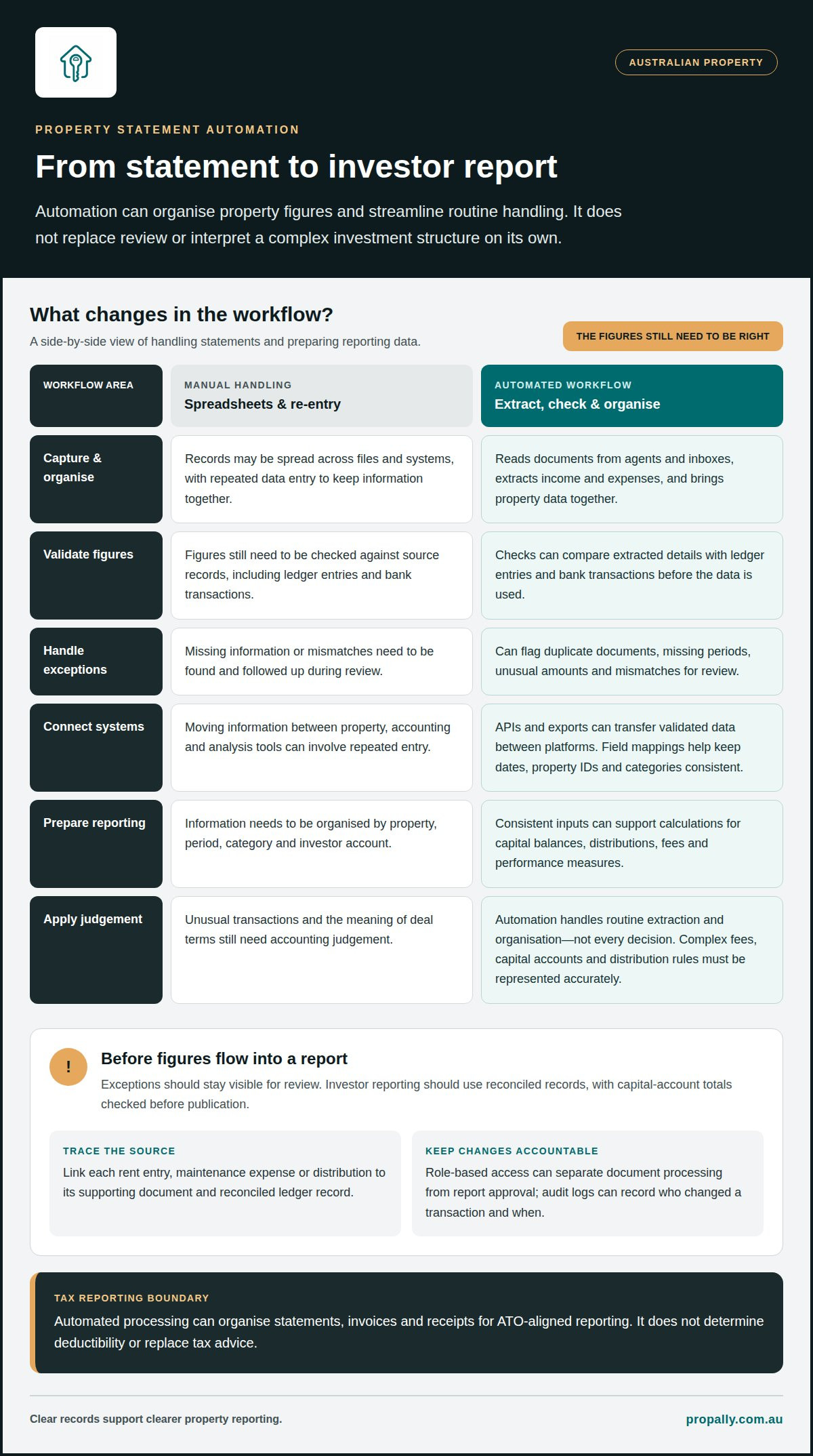
Validation compares extracted statement details with source records, such as ledger entries and bank transactions. This matters because an incorrect rent figure can distort cash flow, tax calculations and investment decisions. Checks can flag duplicate documents, missing periods, unusual amounts or mismatches between a recorded distribution and its bank payment. Exceptions remain visible for review instead of flowing silently into reports. Investor reports should use reconciled records, with capital-account totals checked before publication.
Connecting and exporting processed data
Integration transfers validated property data between systems, while exports package it for tools such as CRMs, spreadsheets and files. This is useful when you manage records across several properties or states. An API can move data between platforms, reducing manual re-entry and information gaps. For example, a processed rent statement can update a property record and feed a spreadsheet for portfolio analysis. Export formats and field mappings determine whether dates, property identifiers and transaction categories stay consistent.
Structuring investor reporting data
A reporting data structure organises transactions by property, period, category and investor account. Each report should have a traceable route back to its source. A rent entry, maintenance expense or distribution should link to its supporting document and reconciled ledger record. The reporting system can then calculate capital balances, distributions, fees and performance measures from consistent inputs. When a distribution is recorded, affected capital accounts can be recalculated before updated reports are prepared.
Security and privacy matter at every stage. Property statements can contain bank details, tenant information and financial records. Australian property businesses should protect sensitive information with measures such as role-based access, secure file transfer and audit logs. Access permissions can separate staff who process documents from those who approve reports. A record of changes also helps show who altered a transaction and when.
Compared with manual spreadsheets, automation can reduce repeated data entry and apply the same checks across multiple statements. A bookkeeper can still provide accounting judgement and investigate unusual transactions. Automation handles routine extraction and organisation, not every decision.
For Australian tax reporting, retain statements, invoices and receipts that support rental income and expenses, linked to the relevant calculations. Automated processing can organise these records for ATO-aligned reporting, but it doesn’t determine deductibility or replace tax advice.
Costs depend on the provider, document volume, integrations and any bookkeeping support. Some services use custom quotes; others publish subscription plans. Compare the current inclusions, usage limits and any additional charges before choosing a service.
Automating real estate investment company workflows
Automation links recurring tasks across an Australian property investment business. A statement arriving by email can enter document processing, have key details extracted, then move into a review queue. Once approved, its information can support portfolio analysis or trigger the next workflow. Each stage should have a clear status, so staff can see what needs attention.
Verification workflows organise checks before decisions are made. For example, an application or property file can be assessed for missing fields, inconsistent figures or documents that need follow-up. These checks identify gaps, but don’t replace underwriting judgement. An assessor still needs to consider the evidence, assumptions and circumstances behind a decision, rather than treating a completed checklist as approval.
Property estimates can also be recorded as distinct inputs in investor workflows. An estimated value used in a portfolio analysis should be clearly labelled, with its source and relevant date. This helps prevent an estimate from being mistaken for a completed sale or reconciled transaction. Investors can then interpret reports in the right context.
Workflow triggers connect events to tasks. A completed quarter-end close can start statement generation; publishing a statement can prompt portal posting and investor notifications. A recorded distribution can trigger recalculation of affected capital accounts. These sequences reduce hand-offs, while approval stages prevent reports being published before the necessary accounting work is complete.
APIs let software systems pass structured information between them. A webhook can notify another system when a specific event occurs, such as a new document arriving or a report being published. Together, these tools can move information between accounting, property and reporting workflows without repeated manual entry. Field mappings determine where each item belongs.
Document processing can also support verification by routing exceptions to the right person. A missing lease attachment, a statement with an unfamiliar property reference, or a payment that doesn’t match its recorded amount can pause that item. The workflow should retain the reason for the pause and record the decision made, creating a traceable review rather than silently discarding an exception.
For Australian investors, the key measure is whether automation improves the work that follows. A property estimate should inform analysis without being confused with rental income; a verified statement should feed the correct property record. Clear stages help distinguish captured information, reviewed evidence and decisions that still require professional judgement.
Mapping these events helps identify which workflow steps are ready for automation and which need human review. Property portfolio tracking can bring rental records and investment data into a more organised view.
Integrating accounting and property management software
Connected systems move property information between operational records and accounting workflows. For Australian investors, the aim is straightforward: enter a transaction once, then carry accurate figures into the right property, ledger and report.
Australian investors can automate rental statements with property platforms, accounting software and workflow tools that connect compatible systems. The right combination depends on where rent, expenses and supporting documents are recorded, and how those systems exchange information.
Start by mapping which records each system owns. A property platform may hold rent schedules, tenancy details and maintenance records. Accounting software may hold transactions, accounts and reconciliations. Matching property identifiers, supplier names and transaction categories helps prevent one system’s “repairs” entry becoming another system’s uncategorised expense.
Property integrations can transfer rent charges, receipts and expense details into accounting records. For example, a rent receipt associated with a tenancy can flow into the matching property ledger. The connection needs clear rules for payment dates, reversals and partial payments. Otherwise, duplicate entries or timing differences can make cash-flow reports difficult to interpret.
Property integrations can also synchronise reference data, such as property names, tenancy records and lease dates. Consistent identifiers matter when you own several properties with similar addresses or use different labels across systems. Contracts and property records should remain linked to the relevant asset, rather than being filed under a general portfolio record.
Real estate CRM integrations support a different part of the workflow. A CRM can organise investor contacts, enquiries and follow-up records, while accounting software tracks financial transactions. Sharing selected information can connect an investor record with relevant property updates. A CRM shouldn’t become the accounting source of truth or expose financial data to users who don’t need it.
APIs provide a structured way for compatible systems to exchange data. An integration can send a new transaction to accounting software, then return a processing status to the original platform. Field mapping, access permissions and exception handling determine whether that transfer is useful. A failed connection should create a visible task, not leave a missing transaction unnoticed.
Implementation works best when systems and responsibilities are mapped before connections go live. First, define which platform owns each field. Next, set matching rules for properties, accounts and suppliers. Then test representative transactions, including a rent payment, a maintenance invoice and a reversed entry. Finally, compare the resulting records and reports before relying on the live workflow.
Integration reduces information gaps, but doesn’t remove the need for accounting controls. Reconciliations still connect recorded activity with bank transactions; a property manager’s statement and the ledger must agree before figures inform decisions. Clear ownership and consistent identifiers keep property records aligned as data moves between platforms.
Extracting rental income, expenses and performance metrics
Automated statement processing for property investors turns rental documents into structured income and expense records. Each entry needs a property identifier, transaction date, description, amount and category. Rent statements may also include a tenancy reference, payment period and management fee. Capturing these fields consistently connects income and costs to the right property, instead of leaving figures buried in document pages.
Tables need careful handling. A statement may show rent received, fees and maintenance deductions separately, while its summary lists only the net payment. Processing should retain each line item alongside the final amount. This lets investors see how a payment was calculated and trace expenses to supporting documents.
Extraction can capture each supplier, amount, date and expense category, then associate the entries with the property. This keeps distinct services separate instead of grouping them as one general cost.
Utility bills can reveal changes in running costs. Tracking water, electricity or other recorded services by property and billing period makes comparisons easier. A bill assigned to the wrong address can distort a property’s expenses and portfolio analysis. Keeping the source document attached to its entry preserves context for review and reporting.
Rent records also need to reflect current tenancy terms. A mismatch should be flagged because the rent roll may not reflect a renewal. Review it before using the recorded income in performance reporting.
A workflow for automated statement processing for property investors can group categorised transactions by property and period. Investors can then assess net rental cash flow, compare operating costs and identify movements that need action. The figures show recorded performance, but don’t explain a vacancy, one-off repair or delayed payment. The underlying statement and transaction history provide that context.
Clear records also reduce the risk of losing sight of costs across multiple properties. A portfolio listing can show income and expense categories, while an exception list highlights missing documents or inconsistent amounts. For example, a bill without a property match should remain separate from confirmed costs until it’s correctly allocated. This keeps summaries useful without hiding unresolved items.
Reliable metrics depend on complete inputs and reconciled records. Extracted totals can support cash-flow reviews and broader portfolio analysis, while source documents preserve the detail behind each figure. If a rent change, utility charge or expense category differs from its expected record, a visible exception creates a clear next step before reports inform decisions.
Limits of automation for complex investment deals
Automation follows the rules configured in its workflow. That suits repeatable tasks, such as assigning an agent statement to a property. Complex investment deals are different. A multi-entity structure, bespoke fee arrangement or distribution waterfall may require logic that a standard reporting tool cannot represent accurately.
Consider a portfolio held across several entities. A property expense might belong to one entity, while a shared cost needs to be allocated across several. If the system applies a simple property-level rule, it could place the expense in the wrong account. The calculation may run automatically, but the allocation method still needs to be clearly defined.
Waterfall distributions add another layer. The order of payments may depend on agreed investor terms, return thresholds and prior distributions. Encoding only the headline percentage can miss how those conditions interact. A reporting system needs the full calculation logic, not just the final payment figure, to produce useful investor statements.
Fees can create similar exceptions. A management fee, acquisition fee or performance fee may use different bases or timing rules. If a contract changes those terms, a fixed template may keep applying the old calculation. Versioning deal terms and linking each calculation to its governing agreement helps keep manual overrides visible.
Investors should distinguish data processing from deal interpretation. Automation can extract a capital contribution from a statement and update a record. It can’t decide whether an unusual payment meets a particular contractual definition unless that rule is mapped. A client or administrator must resolve ambiguous terms and approve how the system handles them.
Useful controls include keeping exceptions in a review queue, recording the reason for each override and preserving the source document beside the calculation. When closing a reporting period, reconciled transactions can feed the standard report, while unresolved allocations or disputed fee entries remain flagged. This makes the boundary between processed data and approved results clear.
Off-the-shelf products suit repeatable structures when their calculations match the deal terms. Custom software may be worth considering when a waterfall, fee or multi-entity structure is too specific for standard products. The deciding factor is the gap between the deal logic and the available system rules, not complexity for its own sake.
The practical takeaway: automate stable inputs and repeatable calculations, then route exceptions for informed review. A tailored workflow can support specialised reporting, but its outputs still depend on accurate deal rules and reconciled records. For a straightforward rental portfolio, simpler automation may be enough; complex investor structures call for careful design before reports drive decisions.
PropAlly
PropAlly helps Australian owners organise property details, agent statements and expense records while keeping their existing property manager and accountant. A practical starting point is one property and one agent statement: upload the document, compare extracted dates and amounts with the original, correct any errors, then save the reviewed record. Record owner-paid expenses separately so they are not missed or counted twice.
PropAlly offers Free, Starter, Pro and Business plans. Free supports one property with usage limits. Manual PDF imports and connected-inbox automation are different workflows: email automation requires an eligible paid plan or add-on. Check the current plans and allowances before connecting an inbox. These tools organise records; they do not replace accounting advice or establish that a particular bank, accounting platform or bond authority is integrated.
Make your next property decision with clearer records
Choose your next improvement by identifying where your current process slows down: statement capture, transaction review or portfolio reporting. A focused starting point makes it easier to define which records should move automatically and which decisions still need human judgement.
For Australian investors, automated statement processing for property investors is most useful when it supports a reliable view of each property, rather than treating every document as a transaction ready for approval. Keep the intended outcome clear: organised evidence, traceable figures and reporting that reflects the underlying records. This gives you a practical basis for refining workflows as your portfolio or investment structures change.
If you’re ready to bring property statements and portfolio information into a more organised view, contact PropAlly about statement processing. A clearer process starts with a considered next step.
Frequently Asked Questions
What could you automate with property data?
You can automate document capture, expense categorisation, property allocation, compliance tracking and report preparation. For example, an emailed agent statement can be sorted against a rental property, while a receipt can be recorded as an expense. Property data can also support cash-flow views and tax summaries. Keep approval points for decisions that depend on contract terms, unclear records or professional judgement.
What is automated investor reporting?
Automated investor reporting turns organised property and accounting records into reports for monitoring investment performance. A report can present rental income, expenses, cash flow and property-level figures in a consistent format. For example, a portfolio report can show which property’s costs changed, with underlying records providing context. Reports are useful when their figures reflect completed accounting work.
What real estate documents can be parsed?
Property software can parse agent statements, receipts and invoices, along with supported PDF documents and images. Some systems also extract details from inspection reports or depreciation schedules. The fields depend on the document and software: an agent statement might provide rent and fees, while an invoice records a supplier and expense. Keeping source files attached to extracted entries helps preserve context.
How does automated processing handle rental income, property management fees, repairs, and expenses?
Processing identifies transaction details and assigns them to categories such as rent, management fees, repairs or utilities. A rental statement can show gross rent, an agent’s fee and the net remittance, so retaining each line helps explain the amount received. Expense categorisation can support tax records, but doesn’t determine whether a cost is deductible. Unclear or misclassified entries need review.
Can property statement processing software integrate with Australian bank feeds and accounting software such as Xero or MYOB?
This is possible when the property software and accounting platform support a compatible connection. Bank feeds can provide transaction records for matching against statement entries, while an accounting integration can transfer mapped data into the relevant accounts. Xero and MYOB are examples of accounting platforms, but that doesn’t mean every property tool connects to them. Compatibility depends on each product’s available integrations.
How accurate is automated statement extraction, and how are errors or missing transactions reviewed?
Extraction accuracy depends on document quality, layout and whether key fields are readable. A cropped scan or a changed agent statement format can affect recognition. Review the extracted amount, date and property reference against the source document and corresponding transaction record. Hold missing or mismatched items for review, and record corrections before figures enter final reports.
How can investors set up automated statement processing for multiple properties and property managers?
Set up a distinct property record for each asset, then use consistent property names or identifiers across statements and accounting records. Route agent emails and documents into an organised workflow, and assign each statement to the relevant property and rental. For a portfolio spanning states, state-specific compliance records can sit alongside financial information. This structure makes it easier to review properties individually or view the portfolio as a whole.