

A successful bond lodgement doesn’t produce one Australia-wide confirmation. The digital rental bond register in Australia is managed by state and territory authorities, so the confirmation and the way you check the status depend on the property’s location. In Queensland, contributors receive an acknowledgement with a bond number after payment clears. In Victoria, each renter listed on the bond receives a receipt.
It’s reasonable to want clear proof that your bond is recorded, especially when you’re moving or waiting for a refund. A notification is a useful starting point, but the relevant authority’s record is what you’ll need to follow up on a refund, claim or dispute.
This guide explains how to find your bond record and what to look for in lodgement notifications across Australia. You’ll also learn how to request a refund, manage a claim or dispute, and transfer a bond when you move to a new rental. Processes vary by state and territory, so start with the authority that holds the bond and follow the steps for that jurisdiction.
Key Takeaways
- Start with the bond authority for the state or territory where the rental is located; Australia doesn’t use one national bond register.
- Use your lodgement notification and bond reference to track whether the bond has been recorded and what follow-up may be needed.
- At the end of a tenancy, understand how a refund request works and what can happen if a claim is made against the bond.
- If you disagree with a bond claim, follow the relevant state or territory’s dispute process and keep the supporting records organised.
- Moving rentals? Find out how the bond transfer process works in your jurisdiction before relying on the existing bond for your next property.
After lodging a bond online, how will I be notified it was successful?
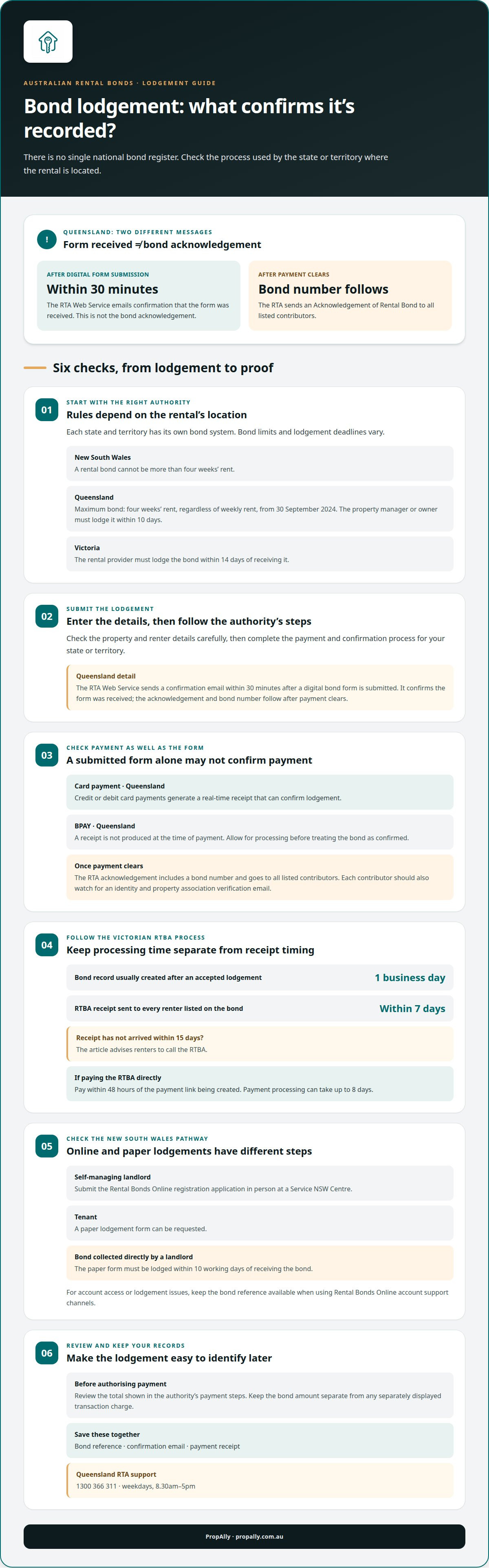
- Start with the authority for the rental’s state or territory. Australia has no single national rental bond portal, so each jurisdiction uses its own system and notification process. Bond limits and lodgement deadlines also vary. NSW Fair Trading says a rental bond in NSW cannot be more than four weeks’ rent. The Residential Tenancies Authority Queensland says the maximum rental bond is four weeks’ rent, regardless of the weekly rent amount, from 30 September 2024. In Queensland, the property manager or owner must lodge a bond within 10 days. In Victoria, a rental provider must lodge it within 14 days of receiving it.
- Use the portal or process for your state to create and finalise the lodgement. Enter the property and renter details carefully, then follow the authority’s steps for payment and confirmation. In Queensland, the RTA Web Service sends a confirmation email within 30 minutes after a digital bond form is submitted. That email confirms the form was received, while the bond acknowledgement and bond number follow after payment clears. Keep both messages for your records.
- Check the payment status as well as the form status. Queensland credit or debit card payments generate a real-time receipt that can confirm lodgement. BPAY doesn’t produce a receipt at the time of payment, so allow for processing before treating the bond as confirmed. After payment clears, the RTA sends an Acknowledgement of Rental Bond with a bond number to all listed contributors. Each contributor should also watch for an identity and property association verification email.
- For Victoria, look for an RTBA receipt sent to every renter listed on the bond. A bond record is usually created within one business day after an RTBA lodgement is accepted, but renters should receive the receipt within 7 days from lodgement. If it hasn’t arrived within 15 days, call the RTBA. A renter paying the RTBA directly must pay within 48 hours of the payment link being created. Payment processing can take up to 8 days, so distinguish processing time from confirmation.
- If you’re a self-managing landlord in NSW, submit your Rental Bonds Online registration application in person at a Service NSW Centre. NSW tenants can request a paper lodgement form if they prefer. Where a landlord collects bond money directly, the paper form must be lodged within 10 working days of receiving it. Use the Rental Bonds Online account support channels for access or lodgement issues, and keep the bond reference available when seeking help.
- Before authorising payment, review the total shown in the authority’s payment steps. Keep the bond amount separate from any separately displayed transaction charge, and retain the payment confirmation. For Queensland RTA support, call 1300 366 311 on weekdays between 8.30am and 5pm. For every jurisdiction, save the reference, confirmation email and receipt together so you can identify the lodgement if a notification is delayed.
Bond refunds and claims at the end of a tenancy
- Start with the bond authority holding the deposit, not the payment receipt alone. Find the bond record using its reference, property address or other details requested by the portal. Australia has separate state and territory systems, so use the authority for the rental’s location. For example, the RTBA handles Victorian bonds, while the RTA handles Queensland bonds.
- Confirm that the tenancy has ended and identify every tenant listed on the bond. Compare the authority’s record with the tenancy agreement, including the property address and renter names. If a tenant’s name changed during the tenancy, gather the relevant correspondence or updated agreement. Accurate records make clear which bond and tenancy the refund request concerns.
- Use the bond authority’s online refund or claim process, and select the outcome that matches the agreement between tenants and the managing party. A refund request asks for the bond to be returned; a claim identifies an amount someone says should be paid from it. Follow the portal’s prompts, enter the bond reference and provide the requested details.
- Before submitting, check that the requested refund shares match the tenants’ agreement. For example, if co-tenants have agreed how to divide the bond, make sure the request reflects that arrangement. Keep a copy of the submitted request and any confirmation or receipt. If the amounts or payees are wrong, the authority may need clarification before processing the request.
- If the managing party proposes a claim, review each reason and amount separately. Compare the details with the tenancy agreement, exit inspection records, condition reports and relevant communications. Organise evidence by issue, such as a dated photo relating to a property condition concern. Don’t treat a proposed claim as an agreed deduction unless the parties have accepted it.
- Complete any tenant sign-up or identity steps required by the relevant portal before responding. Use the email address associated with the bond record, then follow the authority’s instructions to access the transaction. Each tenant should review their own details and the proposed outcome. A managing party should use the account or lodgement process for its role.
- Track the request until the authority records an outcome. Save the bond reference, portal messages, submitted forms and receipts with the tenancy agreement. If tenants and the managing party agree, keep the agreement in writing. If they don’t, follow the relevant authority’s dispute process rather than assuming the bond will be released as requested.
Bond confirmation and notifications
To check a digital rental bond register in Australia, use the relevant authority’s status service or account. If you don’t have a bond number, ask the managing party for the reference or contact the authority with your rental details.
- Confirm which email address you supplied when the bond was lodged. Compare it with the address you regularly use and check for spelling errors, an old account or an inbox rule that moves messages automatically. If the managing party entered the details, ask them to confirm the exact address on record.
- Search your mailbox using the property address, the word “bond” and the authority’s name. Then check archived, deleted and junk folders. Search all mail, not just the inbox, as a notification may be filed under a label or moved by a filter.
- Read the message status carefully before taking another step. A submission notice, a request for more information and a completed lodgement describe different stages. If the wording is unclear, use the authority’s status service or ask the managing party to clarify what action remains.
- Open the relevant authority’s account directly instead of relying only on an email link. Review the bond’s displayed status and any outstanding tasks. If the account doesn’t load correctly, sign out and try again before submitting another form. This helps avoid confusion about which record you’re following.
- Check unexpected messages before clicking links or providing personal information. Review the sender details and whether the message accurately refers to your rental. If a payment request or attachment seems unrelated, access the authority’s service independently and check the record there.
- Save the complete notification, including its date, sender and attachments. Keep it with your tenancy documents so you can confirm what you received and when. A digital rental bond register in Australia is easier to manage when each message is filed against the correct property and tenancy.
- If the status remains unclear, contact the authority using contact details obtained independently. Explain that you’re checking a bond lodgement, then provide the property address, renter names and payment information requested. Ask whether the record is lodged, still processing or waiting for an action.
- Record the response and any next step in the same property file. Note the date, the status explained and any reference provided. This creates a clear follow-up trail if the notification is still missing or the account later displays a different status. Keep the record separate from those for other rentals.
Bond claims and disputes
If your landlord hasn’t lodged the bond, ask for written confirmation and contact the relevant state or territory authority. For a claim or disagreement, use the authority holding the bond and follow its dispute process.
-
Address an unlodged bond
Contact the landlord or managing party in writing and request the lodgement date and bond number. Keep the tenancy agreement, payment record and messages together. If they can’t provide a reference, contact the relevant rental bond authority with the property address and tenancy details. In NSW, a landlord who collects bond money directly must lodge the paper form within 10 working days of receiving it.
-
Manage bond claims and disputes
Read the claim carefully and separate each amount from its stated reason. Compare a claimed cleaning or repair cost with the condition report, exit inspection and dated communications. Tell the authority which items you dispute and provide relevant evidence through its process. Keep copies of submitted documents and notices. Don’t assume silence means you’ve accepted a claim or that a disputed amount will be released.
- Identify which authority holds the bond before lodging a response. Australia has state and territory systems, and the bond number helps distinguish your record from another tenancy. Include the property address, names listed on the bond and the managing party’s details when requested. If you don’t have the bond number, give the authority enough information to locate the correct record.
- Check whether the disagreement concerns the bond’s lodgement, a proposed deduction or the share due to each tenant. These are different issues. For example, a tenant disputing a cleaning deduction should identify the specific charge and attach relevant inspection records, rather than objecting only to the total. A tenant disputing an unlodged bond should explain when and how payment was made.
- Use the relevant authority’s formal dispute pathway if direct discussion doesn’t resolve the disagreement. Respond to requests for information and keep each submission, receipt and decision notice. The process depends on the jurisdiction and type of dispute, so follow the steps set out by the authority holding the bond. A landlord’s proposed claim isn’t an authority decision.
- Check the legal lodgement requirements if you’re a tenant in NSW or Queensland. Check the applicable bond collection requirements before paying, as they can vary by jurisdiction. In Queensland, a property manager or owner who takes a rental bond must lodge it with the RTA within 10 days. These requirements can help clarify whether your concern is about an unpaid bond or a disputed claim.
Transferring a bond to a new rental property
- Start by identifying the authority holding your current bond. Australia has no national rental bond portal, and each state and territory has its own authority and process. A move within Victoria and a move from Victoria to Queensland may involve different bond systems. Don’t assume the existing record automatically follows you to a new address.
- Check whether the current authority allows a bond transfer in your circumstances. Give it the existing bond number, current property address and new address. Ask which steps apply if the rental provider, tenants or jurisdiction changes. The authority’s process matters because a bond record relates to a particular rental, not simply to the tenant moving.
- Confirm who is named on the existing bond before starting a transfer request. Compare the record with the tenancy agreement and note every tenant and managing party. If a co-tenant is leaving or the new tenancy has different renters, explain the change in your request. An unchanged tenant group and a changed group may require different record updates.
- Keep the current bond separate from the new tenancy’s bond until the relevant authority confirms the process. A new rental may have a different rental provider, address and bond record. For example, don’t treat an acknowledgement for your former apartment as proof that a bond has been lodged for your new house.
- Gather the documents that identify both rentals. Keep the old and new tenancy agreements, bond reference, payment records and written messages together. If the managing party changes, include its details when requested by the authority. A clear document trail helps distinguish a transfer enquiry from a refund request or a new bond lodgement.
- For an interstate move, contact the authority holding the current bond and the authority responsible for the new property. State the move date and both addresses. Because there’s no single government register, one authority’s record doesn’t establish the status of a bond in another jurisdiction. Follow the steps each authority gives for its own record.
- Track the outcome of each action separately. Save the transfer confirmation, refund status or new lodgement receipt against the matching address. If the old bond is being refunded and a new one lodged, label the records clearly. This prevents a payment receipt for the former rental being mistaken for confirmation of the new bond.
- For property investors managing records across rentals, organise bond evidence by property alongside cash flow and compliance records. Keeping each bond reference with its rental address makes future moves and tenancy changes easier to track.
PropAlly
PropAlly helps Australian property investors organise rental records, including bond evidence for each property. Its dashboard brings together property cash flow, compliance information and supporting documents, making relevant records easier to find when a tenancy ends or you move between rentals.
Use PropAlly alongside the relevant state or territory authority. The platform doesn’t replace the official bond register or decide refund claims. Instead, it helps you maintain clear records of bond evidence and property information across rentals. State-specific compliance checklists and bond authority workflows support a more structured approach to managing those records.
PropAlly’s plans include the Starter Plan for investors managing smaller portfolios and the Business Plan for those tracking up to twenty properties. Choose the plan that fits how you organise your rental portfolio. Explore PropAlly’s plans to bring your property records together.
Make your next rental record easier to manage
Build a consistent record-keeping routine around each property, not just each tenancy. A clear digital rental bond register in Australia can form part of that system, alongside the agreements, statements and compliance documents you need to manage your portfolio. Treat the official bond authority’s records as the source for lodgement and refund decisions, and organise your supporting evidence in one place.
PropAlly helps Australian property investors bring rental records together across properties. Its dashboard supports cash-flow and compliance tracking, as well as organising bond evidence, so you can maintain a clearer view as your portfolio changes. The Pro Plan is one option for managing this work.
Set up a record structure that works for your properties now, and keep it consistent as you add or change rentals. For support with your property records, contact PropAlly. A more organised process starts with one well-kept record at a time.
Frequently Asked Questions
What Happens When the Tenancy Ends?
When a tenancy ends, the bond is dealt with through the authority holding its record. Tenants and the managing party can request the agreed refund or identify a claim through the relevant process. Before lodging a request, check that it includes the correct renters, property and payment details. For example, if co-tenants have agreed on different refund shares, make sure the request reflects their arrangement.
What Is a Rental Bond?
A rental bond is money paid in connection with a tenancy and held or lodged with the relevant state or territory authority. It isn’t ordinary rental income. The bond may be returned at the end of the tenancy, or a claim may be made against it. For instance, keep the bond record separate from rent receipts so the purpose of each payment remains clear.
Which Australian states and territories offer an online rental bond register?
Australia doesn’t have one national rental bond register; each state and territory has its own authority, processes and requirements. These jurisdictions are NSW, Queensland, Victoria, Western Australia, South Australia, Tasmania, the Northern Territory and the Australian Capital Territory. The Northern Territory’s rental security deposit arrangements differ from those in jurisdictions using a centralised bond authority, so don’t assume every place has the same type of register.
How do tenants lodge a rental bond online in each state or territory?
Use the process for the jurisdiction where the rental is located. In Queensland, tenants can lodge online through the RTA process; contributors need unique email addresses, and payment and property details are required. Victoria’s RTBA process requires listed renters to use unique email addresses. In NSW, tenants can use Rental Bonds Online or request a paper form. Processes differ elsewhere, so don’t apply one state’s steps nationwide.
How do landlords and property managers register a rental bond digitally?
Start with the landlord or managing-party process for the property’s jurisdiction. In NSW, self-managing landlords submit their Rental Bonds Online registration application in person at a Service NSW Centre. Queensland property managers and owners use the RTA’s Web Services process; online lodgement requires relevant tenancy and business details. Have the property and tenancy information ready, then follow the portal’s prompts to submit and finalise the lodgement.
How do tenants and landlords claim or dispute a bond refund online?
Use the relevant bond authority’s refund or dispute process, and identify the bond record before submitting anything. Tenants and landlords should distinguish agreed refund amounts from disputed claim items. For example, if tenants dispute a proposed cleaning deduction, they can identify the item and provide relevant condition or inspection records. Keep copies of submissions and authority messages, then follow the process for that jurisdiction and bond.
What documents and identity checks are needed for digital bond registration?
Requirements depend on the jurisdiction and who submits the lodgement. Queensland’s online process may require the property address, tenancy agreement, tenant names and unique email addresses, payment details, and managing-party contact information. Business lodgements also require an ABN and main office phone number, with an RTA ID if applicable. In Victoria, renters need a valid email address and mobile number for Service Victoria identity authentication.