
What if paying a bond is only one part of getting it lodged? In Victoria, the rental provider, property manager or agent lodges the bond with the RTBA, and renters must review and accept the electronic lodgement before it’s finalised. Residential bond authority workflow automation can help keep lodgements, transfers and claims organised around their next action.
When several people and notifications are involved, knowing who needs to act next makes a residential bond authority workflow easier to manage. Requirements vary across Australia, so the right process depends on the state or territory where the property is located.
This guide explains how to lodge, transfer or claim a residential bond, what information to prepare and what to expect from processing and notifications. It also outlines key stages in Victoria and Queensland, helping you follow the relevant workflow and keep the bond record clear from lodgement to the end of the tenancy.
Key Takeaways
- In Victoria, the rental provider, property manager or agent starts the bond lodgement. Renters need to review and accept the electronic transaction before it’s finalised.
- Prepare each renter’s unique email address and the details needed for identity authentication to help keep the lodgement moving.
- Allow for the processing stages: an accepted Victorian bond lodgement is usually finalised and its bond record created within one business day.
- Keep an eye on transaction links and email notifications, as a missed response can affect whether a bond transaction or claim proceeds.
- According to Residential Tenancies Authority Queensland, Queensland’s maximum rental bond is four weeks’ rent, regardless of weekly rent amount, from 30 September 2024.
Electronic bond lodgements, renter transfers and bond claims
Start by identifying the property’s state or territory, because bond authorities, portals and rules differ. The facts covered here name Victoria’s Residential Tenancies Bond Authority (RTBA) and Queensland’s RTA Web Services; they give a Queensland maximum of four weeks’ rent and Victorian lodgement timeframes of 10 business days and 14 days, depending on the stated party and circumstance.
Use the relevant authority portal for the transaction, then track its status, evidence and payment reconciliation in your property records. The steps below cover lodgements, renter responses, changes and end-of-tenancy claims.
-
Enter bond lodgement details
1. Register for RTBA Online and enter the Victorian rental and bond lodgement details through the electronic process. Record each renter’s own unique email address, as the RTBA uses separate contact details to send transaction links.
For Victorian lodgements, renters must pass Service Victoria identity authentication to review or accept an RTBA transaction. Authentication requires a valid email address and mobile number. The rental provider, property manager or agent starts the lodgement; renters cannot start it themselves. A renter’s payment alone does not mean the bond has been lodged.
In Queensland, each contributor needs a unique email address to access RTA Web Services. Link the transaction record to the correct property and contributors so payment reconciliation is not attached to another rental.
-
Notify renters about the lodgement
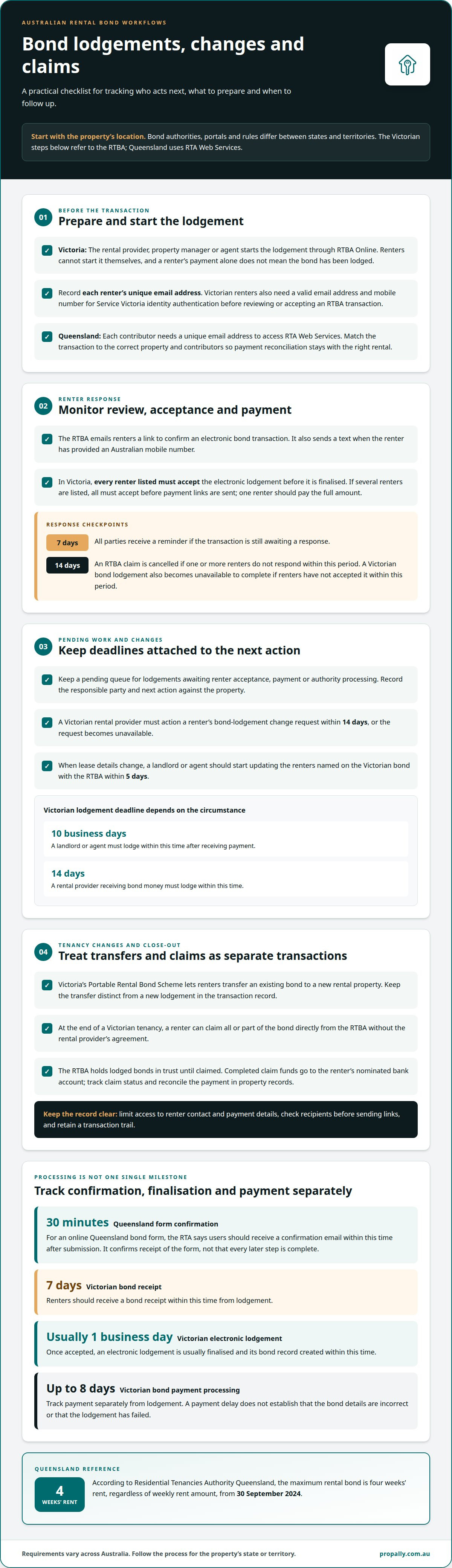
2. Send the lodgement for renter review, then monitor each response. In Victoria, the RTBA sends an email link to confirm an electronic bond transaction and sends a text when the renter has provided an Australian mobile number.
Each renter must accept a Victorian electronic lodgement before it is finalised. If several renters are listed, all must accept before payment links are sent, and one renter should pay the full amount. The payment link comes later in the workflow and does not replace renter acceptance.
Track unanswered links: all parties receive a reminder after seven days, and an RTBA claim is cancelled if one or more renters do not respond within 14 days. Use these checkpoints to identify stalled transactions rather than marking them complete prematurely.
-
Manage pending lodgements and change requests
3. Keep a pending queue for lodgements awaiting renter acceptance, payment or authority processing. In Victoria, renters must accept a bond lodgement within 14 days or it is no longer available to complete. A rental provider must action a renter’s bond-lodgement change request within 14 days, or that request also becomes unavailable.
When lease details change, start updating the renters named on the Victorian bond with the RTBA within 5 days. Record the request, responsible party and next action against the property. This creates an auditable sequence and helps prevent a change request from being mistaken for a completed transaction.
The Victorian lodgement timeframe depends on the described circumstance: a landlord or agent must lodge within 10 business days of receiving payment, while a rental provider receiving bond money must lodge within 14 days. Apply the wording relevant to the transaction.
-
Process bond increases, transfers and claims
4. Treat increases, renter changes, transfers and refunds as separate authority transactions. In Victoria, the Portable Rental Bond Scheme lets renters transfer an existing bond to a new rental property. A landlord or agent should start updating named renters with the RTBA within 5 days of a lease change.
At the end of a Victorian tenancy, a renter can claim all or part of a bond directly from the RTBA without the rental provider’s agreement. The RTBA holds lodged bonds in trust until they are claimed, and completed claim funds go to the renter’s nominated bank account. Automation can track claim status and reconcile the resulting payment, but the authority handles the transaction.
For software workflows, connect task tracking to the relevant authority process without assuming a particular property system integrates with RTBA Online or RTA Web Services. Limit access to renter contact and payment records, check recipients before sending links, and retain a clear transaction trail to reduce misdirected notifications and reconciliation errors.
Bond processing times
Allow for separate stages: submitting a form, receiving confirmation, finalising the bond record and processing payment. In Victoria, an accepted electronic lodgement is usually finalised within one business day, while bond payments can take up to 8 days.
- Record the submission time and the transaction type. For an online Queensland bond form, the RTA says users should receive a confirmation email within 30 minutes of submission. Keep that email with the rental agreement and bond record. It confirms receipt of the form, not necessarily that every later payment or administrative step has finished.
For a Victorian bond, distinguish the authority’s receipt from the finalised record. Renters should receive a bond receipt within 7 days from lodgement. An accepted electronic lodgement is usually finalised and its bond record created within one business day. These are separate milestones, so don’t treat the first notification as proof that all processing is complete.
- Track payment separately from lodgement. In Victoria, bond payments can take up to 8 days to process. A payment delay does not establish that the bond details are incorrect or that the lodgement has failed. Match the payment status to the property, renter and authority transaction before marking the record reconciled.
Manual workflows rely on staff to record submission times, compare emails and update records. An automated workflow can organise these checkpoints and flag an unmatched payment for review. Neither approach changes the authority’s processing sequence, and there is no general cost or speed advantage established between them.
- Check for the expected confirmation before following up. If a Queensland RTA online bond form has no confirmation email after the stated 30 minutes, review the submitted record and inbox details. For a Victorian bond, compare the lodgement date with the 7-day receipt period. Keep the agreement and transaction correspondence together to support a clear status history.
If a Victorian renter has not received a bond receipt within 15 days, they should call the RTBA on 1300 137 164. Use that specific follow-up point rather than treating the usual 7-day receipt timeframe as a guarantee of delivery.
- Close the workflow only after recording the relevant stage. In Victoria, record renter acceptance, finalisation, bond record creation and payment processing as separate events. In Queensland, keep the RTA submission confirmation with the rental record. A clear event history helps staff identify whether a delay is at submission, approval or payment.
Across several properties, use consistent status labels while linking each authority transaction to its own agreement. This gives staff a practical view of pending work without implying that software can speed up an authority’s processing.
Confirmation and notifications
Use each notification to identify the transaction stage, not simply to mark a bond complete. For a Victorian RTBA electronic transaction, finalisation triggers an email receipt to all parties. A residential bond authority workflow automation process can record each notification against the matching property and transaction.
- Match each notification to the correct tenancy record. The Residential Tenancies Bond Authority (RTBA) emails renters a link to confirm an electronic bond transaction. It also sends a text if a renter has provided an Australian mobile number. Check the property, renter and transaction details before recording the link as actioned.
Track email and text status separately. The RTBA sends a text only when an Australian mobile number has been provided. If the record has an email address but no mobile number, treat email as the expected contact channel, rather than assuming the lack of a text means the transaction failed.
- Record each renter’s response against the transaction. A Victorian renter must confirm an electronic bond transaction before the RTBA finalises the lodgement. If several renters are named, track their responses individually. One acceptance does not mean every listed renter has completed their part.
The RTBA sends all parties a reminder if one or more renters have not responded to a transaction link within seven days. An RTBA claim is cancelled if one or more renters have not responded within 14 days. Use those notification points to identify a pending action, not to assume the bond has been finalised.
- Separate authority confirmation from payment reconciliation. After a Victorian electronic transaction is finalised, all parties receive an email receipt. Save it with the bond record and update the transaction status. Then reconcile any related payment against the correct property and renter. An email link or payment entry is not authority confirmation.
For example, if a renter has accepted but the final receipt has not arrived, keep the record pending. This distinction creates a clear audit trail and prevents draft, accepted and completed transactions from appearing under the same status.
- Route notification issues to the next relevant action. If a renter has not responded, record the outstanding response and the link’s timeline. If the RTBA has finalised the transaction, retain the email receipt for all parties. For an online Queensland bond form, keep the government confirmation email with the submission record and agreement.
With residential bond authority workflow automation, consistent status labels can distinguish between awaiting renter response, finalised and payment reconciliation pending. These are internal tracking labels, not government decisions. Clear labels help staff separate authority notifications from internal updates and avoid duplicate prompts after a transaction has progressed.
Required information for tenants and managing parties
- Prepare one transaction file for the rental before opening the relevant government portal. Include the property address, tenancy agreement, bond amount, renter names and managing party’s details. Link the residential bond record to that property instead of leaving it in a general inbox without context.
Follow the portal prompts to determine which fields apply. An initial lodgement may require different information from a renter change, transfer or refund. Do not copy details from an earlier tenancy without checking that they belong to the current agreement.
- Record a separate, accurate email address for each renter on a Victorian bond transaction. Each renter named on a Victorian bond lodgement must have their own unique email address. A shared household inbox can make it harder to identify who received or acted on a transaction link.
For an RTBA transaction, Service Victoria identity authentication requires a valid email address and mobile number. Record each renter’s current contact details accurately and keep them with that tenancy’s records. An Australian mobile number allows the RTBA to send a text notification as well as its email link.
- Keep Queensland contributor details separate from Victorian renter details. Queensland bond contributors need unique email addresses to access RTA Web Services. Record each contributor against the correct rental transaction, and do not use one email address for multiple people.
Before submitting, compare the contributor list with the tenancy information being entered. This helps prevent notifications going to the wrong party or responses being associated with another residential tenancies record. Keep the submission confirmation with the agreement and property file.
- Identify each managing party’s role in the transaction record. Note whether they are the rental provider, property manager or real estate agent, and record the contact details used for the authority process. In Victoria, the rental provider, property manager or agent initiates a bond lodgement; renters review and accept it.
Keep owners’ property records separate from renter identity and payment information. Limit access to staff handling the transaction, and use the correct property record when updating contact details. This separation helps reduce accidental disclosure and makes it easier to trace who received a notification.
- Review the complete record before submitting a transaction. Match the property, agreement, bond amount, named parties and contact details to the tenancy being processed. If a renter’s email or mobile number has changed, update the relevant record before relying on it for an RTBA or RTA notification.
After submission, store the authority receipt, correspondence and payment record together. This creates a traceable transaction history for later updates, renter changes or a bond claim at the end of the tenancy.
Rental bond lodgment and refund processes by state
- Identify the state or territory where the rental property is located before preparing a bond transaction. Australian bond administration is jurisdiction-based, so the government authority and online process depend on whether the property is in New South Wales, Victoria, Queensland, South Australia, Western Australia, Tasmania, the Australian Capital Territory or the Northern Territory.
Keep the authority record linked to the property’s tenancy agreement. A portfolio may span several jurisdictions, but each bond lodgement and refund must follow the process for that rental. Do not assume one state’s portal, form or transaction sequence applies elsewhere.
- For a Queensland rental, use the Residential Tenancies Authority’s bond process and retain the submission confirmation with the tenancy record. According to Residential Tenancies Authority Queensland, the maximum rental bond is four weeks’ rent, regardless of the weekly rent amount, from 30 September 2024.
Keep the contributor details and payment record linked to the correct Queensland tenancy. This makes it easier to distinguish the initial lodgement from later updates or a refund request, especially when owners have rentals in more than one state.
- For a Victorian rental, route the transaction through the Residential Tenancies Bond Authority (RTBA). The Victorian Portable Rental Bond Scheme allows renters to transfer an existing bond to a new rental property. Record a transfer as a separate transaction linked to both the existing bond and the new tenancy.
At the end of a Victorian tenancy, the renter can make a direct bond claim without the rental provider’s agreement. Keep the claim status and authority correspondence with the bond record. The tenancy end date alone does not show that a refund has been completed.
- For New South Wales, South Australia, Western Australia, Tasmania, the Australian Capital Territory and the Northern Territory, identify the applicable government bond authority and its current transaction channel first. Keep the jurisdiction, property address, agreement, named parties and lodgement evidence together before moving from lodgement to a refund action.
Use a separate workflow record for each state or territory. For example, a property manager handling a Queensland lodgement and a Tasmanian refund should not use one transaction status as if both authorities followed the same steps. Record each authority’s response against the relevant rental.
- Close each process by reconciling the authority outcome with the property’s bond record. For a lodgement, retain confirmation; for a transfer, link the old and new rental records; for a refund, record the claim outcome and payment status. Keep disputed and pending transactions distinct from completed ones.
A jurisdiction-first approach helps owners and managing parties organise residential bond workflows without applying one state’s requirements across Australia. It also preserves a clear record when a renter moves between states or a portfolio spans different bond authorities.
PropAlly
PropAlly helps Australian property investors organise bond evidence and authority workflows alongside records for each rental property. Its dashboard brings cash flow, tax, compliance and bond information together. It can also automatically read statements from agents and inboxes, consolidating property data across multiple properties and states.
Use PropAlly when you need a clearer view of bond-related records across a portfolio, or want state-specific compliance checklists alongside property information. PropAlly organises your workflow but does not replace the relevant government bond authority’s lodgement, transfer or claim process. Choose a Starter Plan or Business Plan to suit your needs.
Contact PropAlly to discuss organising your Australian property records and bond workflows.
Make bond records easier to manage
Use your next tenancy change to make bond administration more consistent. A clear record structure keeps authority transactions connected to each property and helps you see which tasks remain open across your portfolio. Residential bond authority workflow automation supports this organisation, while the relevant government authority remains responsible for processing transactions.
PropAlly brings bond evidence together with property cash flow, tax and compliance records. Its Starter Plan, Pro Plan and Business Plan give property investors options for organising records and workflows. Start by deciding where bond information should sit alongside the rest of your property data.
Contact PropAlly about bond workflows to discuss keeping your Australian property records organised. A clearer process starts with one well-managed tenancy and can grow with your portfolio.
Frequently Asked Questions
What is a residential bond authority workflow in Australia?
A residential bond authority workflow is the sequence for recording a rental bond transaction with the relevant state or territory authority. It can include preparing tenancy details, lodging the bond, handling renter responses, tracking confirmation and reconciling payment or refund records. For example, a portfolio workflow can flag a bond record that still needs an authority receipt. Automation organises these administrative steps, but does not replace the government authority’s role in processing the transaction.
How do manual and automated rental bond workflows compare for speed, accuracy, and cost?
Automation can organise checkpoints, flag unmatched payments and maintain a clear transaction trail. Manual workflows rely on staff to record times, compare emails and update records. Neither approach changes authority processing times, and there is no general speed or cost advantage between them.