

A property dashboard is useful only when its records reflect what the managing agent has reported. To sync managing agent statements to an investor dashboard, bring statement details into a single record of rental income, management costs and property activity. This gives you a clearer view of holdings and transaction history across your Australian investment properties.
Tracking rent, fees and property updates across separate statements can make portfolio oversight harder than it needs to be. A consistent record shows what came in, what was paid and when transactions occurred, without relying on scattered documents.
This guide explains how syncing statements supports online holding records and transaction histories, which data fields matter, and how consolidated information can inform portfolio reporting. You’ll also learn how automated document processing fits into the workflow and what to review when a statement needs attention before its details enter your records.
Key Takeaways
- Bring managing agent statements into a consistent record of rent, fees and property activity to make holdings and transaction history easier to review.
- Useful statement data includes rent received, missed or late payments, property management costs, transaction dates and amounts.
- Integration options and sync timing depend on how statements are delivered and processed, so understand the workflow behind the dashboard records.
- Consolidated reporting can help you track cash flow and property information across multiple Australian investment properties.
- Automated document reading can reduce manual handling by bringing agent statements and inbox documents into one dashboard workflow.
Online holding and transaction history
An online holding record shows each rental property and its related activity in one place. A transaction history adds dated entries for rent received, fees paid and property expenses.
Statement Data Fields
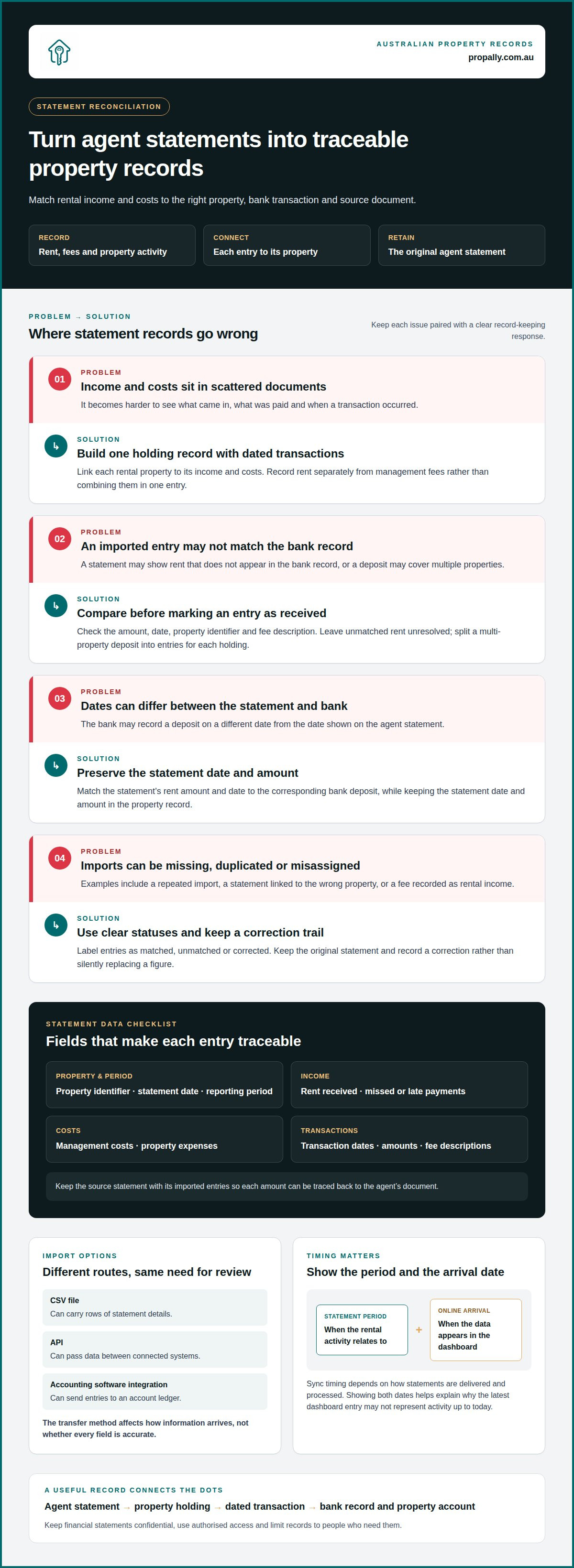
A managing agent statement sync transfers statement details into a property record. Include the property identifier, statement date, reporting period, rent received, missed or late payments, management costs, transaction dates and amounts. For example, record rent separately from a management fee instead of combining them in one entry. A holding is a property linked to its income and costs. A register is the organised record of those holdings and transactions.
Keep each source statement with its imported entries so you can trace every amount to the agent’s document. Australian property owners should retain records about their property, loan, property manager and other service providers. Record money received, fees paid, investments bought or sold, and transaction dates and amounts. These details help distinguish one property’s cash movements from another’s.
Statement Import Methods
Statement importing transfers agent document data into an investor record. CSV files, application programming interfaces (APIs) and accounting software integrations are possible methods, depending on the systems involved. A CSV can carry rows of statement details; an API can pass data between connected systems; an accounting integration can send entries to an account ledger. The transfer method affects how information arrives, not whether every field is accurate.
Match each statement to the correct property and reporting period, then retain its original document. Australian investors should use their provider’s latest available statements, reports and account information. If required information cannot be found, contact the provider. This helps distinguish an import problem from a statement that has not yet arrived.
Statement Data Reconciliation
Statement reconciliation checks the agent’s statement against the bank payout and your property records. Match the statement’s payment to the owner, or net disbursement, with the corresponding bank deposit. Gross rent received may be higher because the agent has deducted fees or paid expenses. Record rental income and expenses separately, and check any opening balance, retained funds and adjustments. If one payout covers several properties, keep the breakdown for each property.
Keep unexplained differences open for review rather than treating them as missing rent. Rent received by the agent on your behalf may not yet have been transferred to your bank account. Compare the receipt dates, charges, funds held and payout details, then ask your property manager about any difference you cannot explain. Keep their response with the statement. For the income distinction, see the ATO’s explanation of gross rental income received through an agent.
Sync Errors, Delays and Risks
Sync errors include missing, duplicated or incorrectly assigned entries. Examples include a statement linked to the wrong property, a repeated import, or a fee recorded as rental income. Reporting periods can remain incomplete until a statement arrives and is processed. Retaining the source document makes it easier to compare imported data with the agent’s record.
Treat agent statements as confidential financial documents. Share them through authorised access and secure transfer methods, and limit access to people who need the records. Keep dated entries for income, fees and transactions, identifying each property and service provider. If details differ, preserve the original statement and record the correction instead of silently replacing the figure. This supports clear, consistent accounting records.
Portfolio dashboard reporting
Portfolio dashboard reporting turns property records into a consolidated view of rental activity. It can help investors review cash flow, tax information, compliance tasks and bond evidence across Australian holdings.
Automated Statement Sync Tools
An automated statement sync tool transfers managing agent statement details into a property investor dashboard. Australian tools differ in the document formats and data fields they support, and in how they handle imported records. Compare whether a system captures rent and expenses, matches entries to the correct property, and retains the source document. These capabilities show how well the dashboard supports a usable reporting process.
No single tool comparison suits every portfolio. An investor with several properties across states may value consolidated reporting and state-specific compliance information. Someone tracking one rental may prioritise clear income and expense records. Compare the output and review process rather than treating the word “automated” as proof that every statement field will appear correctly.
Statement Sync Frequency
Sync frequency is how often new statement data appears in the dashboard. Timing depends on the statement’s delivery method and the platform’s import process. An agent statement emailed as a document enters the workflow after delivery and processing, while a connected data feed follows its own transfer cycle. The dashboard should make the statement’s reporting period clear.
For practical reporting, distinguish the statement period from the date its data appears online. For example, a monthly rental statement may cover one period but arrive after that period ends. Showing both dates explains why the dashboard’s latest entry may not represent activity up to today. Use the reporting period to compare like with like.
Connecting a Property Management System
Connecting a property management system means linking its statement information with an investor portal. Start by selecting the properties and records to include, then choose an available transfer method. Map each property to its dashboard holding, identify the income and expense fields, and import a sample statement. Review the resulting entries against the document before relying on the report.
Next, set a consistent process for handling new statements and corrections. For example, a revised agent statement should update the relevant property record, not create a second, competing entry. Keep the original document linked to the imported data. That link helps explain changes in cash flow and gives each dashboard figure a traceable source.
Once connected, use dashboard categories to answer specific portfolio questions. Cash flow reporting can show rental income alongside property costs. Tax reporting can organise relevant property information, while compliance views can surface state-specific checklist items. Bond evidence can also sit with the related rental property rather than among unrelated portfolio files. These views assist review, but a dashboard is not financial or tax advice.
A useful report documents the period covered, the property included and the source statement. For example, filter a portfolio view to one property and compare its income and expenses across reporting periods. Then review another holding separately. This helps identify where a change occurred without blending activity from different properties or states.
For a more organised view of Australian rental records, explore property portfolio dashboard reporting.
Which Australian property management platforms integrate with investor dashboards?
Integration transfers property-management information into an investor dashboard. For Australian investors, compatibility depends on the platform’s available data routes and the dashboard’s ability to process them. A property-management system may provide a direct connection, an export file or statements that can be read from documents. The route matters more than the platform’s label.
No specific Australian platform is universally compatible with every investor dashboard. Each connection depends on the systems involved, the statement format and the available fields. Compare the actual workflow: whether rent and costs transfer, whether each entry maps to the right property, and whether the source statement remains accessible. This gives a more useful answer than assuming two platforms integrate because both serve property investors.
Start with the property-management system already used for your rentals. Identify how it delivers statements, then match that route to the dashboard’s import options. For example, an emailed PDF may suit document-reading software, while structured transaction data may support a file export or system connection. If the agent supplies statements without a direct data feed, document processing can still help organise the information into property records.
Assess each candidate using the same steps:
- Identify the source: record the property-management platform and how it supplies statements.
- Map the fields: confirm that rent, fees, dates and property identifiers have corresponding dashboard fields.
- Test one statement: compare the imported result with the agent’s document before using portfolio reports.
- Review corrections: establish how revised statements and duplicate entries are handled.
These steps reveal whether an integration supports a complete reporting process or transfers only selected information. A rent figure without its property identifier, for instance, may be difficult to use across a multi-property portfolio. A connection that retains the statement alongside imported figures makes individual entries easier to trace.
For a portfolio spanning Australian states, also consider how the dashboard groups properties and presents state-specific compliance information. The property-management platform supplies the underlying records; the dashboard organises them for investor oversight. Keep those roles distinct. A reporting tool can improve visibility, but it does not replace the property manager’s statement or professional financial and tax advice.
The best fit is the platform-and-dashboard combination that transfers the fields you need, preserves their property context and supports a clear review process. Test the route with a real statement, then assess whether the resulting holding and transaction records meet your reporting needs.
Compatibility depends on the route: dashboards with a direct connection or structured-data import can receive records through those channels, while document-reading software can process emailed PDFs. Compare whether rent, costs and property identifiers transfer correctly, and whether the source statement remains accessible.
Compatibility depends on how each property-management platform supplies its records and whether the dashboard can process them. Check the workflow for rent, costs, property matching and statement access rather than assuming platforms integrate based on their labels.
What data fields should a managing agent statement sync include?
A statement sync field is a piece of information transferred from an agent’s statement into a property record. Useful fields connect each transaction to its property, reporting period, amount and source document. In Australia, start with rent received, missed or late payments, and property management costs. Then add enough context to make each entry clear in a portfolio view.
- Property identifier: This field identifies the rental property linked to the statement. Use a consistent label, such as a street address or internal property name, so a Sydney unit’s transactions don’t appear under another holding.
- Statement period: This field records the dates covered by the agent’s document. Keep it separate from the import date, so a statement covering one period remains clear when processed later.
- Rent received: This field records rental income reported by the managing agent. Keep each receipt distinct where the statement lists separate transactions, rather than combining entries into one unexplained total.
- Payment status: This field shows whether rent was received, missed or late. For example, an overdue amount should not appear as collected income merely because it is listed on the statement.
- Management costs: This field captures property management costs shown by the agent. Record each cost as an expense and retain its statement description, so it can be distinguished from rental income.
- Transaction date and amount: These fields show when an entry occurred and its value. Preserve the date and amount reported for each rent payment or cost, rather than relying only on a period total.
- Source document: This field links an imported entry to its managing agent statement. Keeping the document reference with the property record makes the original details easier to retrieve during review.
These fields work together. A rent entry without a property identifier can be difficult to assign across multiple holdings. A cost without a description may be hard to interpret later. For a portfolio with properties in different Australian states, consistent property labels also help keep each record in the right context.
Keep corrections visible. If an agent issues a revised statement, retain the document and associate the updated entry with the same property and period. Avoid leaving both versions as separate active transactions, which can distort a property’s income or expenses. A clear status, such as corrected or superseded, helps explain the record’s history.
Structure fields around the report they need to support. A cash flow view needs income and cost entries grouped by property and period. An online transaction history needs individual dates, amounts and descriptions. Keeping those details separate helps Australian investors move from a portfolio summary to the statement behind a specific entry.
How often can rental income and expense statements sync to an investor dashboard?
Sync frequency is the interval between a managing agent statement becoming available and its details appearing in an investor dashboard. There’s no single schedule for every Australian property portfolio. Timing depends on when the agent issues the statement, how it reaches the system and how the receiving platform processes it. The dashboard’s latest entry may therefore reflect the latest processed statement, not today’s activity.
Start by separating the statement period from the import time. A statement can cover rent and costs for a completed period but reach the dashboard later. For example, an agent may email a document after closing its reporting period, and the dashboard can process it only once received. Showing both dates helps explain the difference between reported activity and newly imported data.
The delivery route shapes the workflow. A connected data feed transfers information through its configured process, while an emailed statement must arrive before document processing can begin. A manually supplied file enters the workflow when it is uploaded and processed. Each method has a different starting point, so compare the dashboard timestamp with the statement date and reporting period.
For a clear operating rhythm, establish these checks:
- Confirm the source: identify whether the managing agent sends a document, provides an export or supplies a connected feed.
- Track arrival: note when the statement reaches the import process, not just the period it covers.
- Review processing: confirm the dashboard shows the expected property and statement period.
- Resolve gaps: if a statement is absent, identify whether it has not arrived, is still processing or needs attention.
Rental income and property expenses may appear together on an agent statement, but the dashboard should retain them as distinct entries. For example, a rent receipt and a management cost belong to the same property but represent different cash movements. Review both in the statement period they relate to, rather than treating the dashboard’s latest activity as a complete live bank balance.
Across Australian holdings, consistency matters more than assuming a universal schedule. Compare each property’s statement period with its latest processed document. This makes a delayed entry easier to distinguish from a quiet rental period. A clear record also helps explain why a portfolio summary changes when another statement arrives.
Choose a review routine that follows the agent’s statement delivery and the dashboard’s import method. Keep the original statement associated with its property record, then review newly processed entries before relying on a portfolio summary. To organise agent documents and rental records in one workflow, explore property dashboard tools.
PropAlly
PropAlly helps Australian property investors organise managing agent statements and rental records in one dashboard. Its platform automatically reads statements from agents and inboxes, bringing information together across properties and states. That’s useful when you want property-level visibility without sorting every document manually.
The dashboard brings together cash flow, tax information, compliance checklists and bond evidence. ATO-aligned tax calculations help organise records, but they aren’t financial or tax advice. For investors managing a growing portfolio, consolidated records can make it easier to review holdings and find supporting documents.
PropAlly offers the Starter Plan and Business Plan, as well as other plan options for different portfolio needs. If you want to organise agent statements and investor dashboard records, explore PropAlly’s plans and choose the option that fits your portfolio.
Make your next dashboard review count
Start by deciding what you want your property records to help you do. You may want a clearer view of portfolio performance, a more organised document trail, or a simpler way to prepare for a discussion with your accountant. That goal can guide which dashboard views you prioritise and how you review incoming information.
As you sync managing agent statements to your investor dashboard, keep the process aligned with the decisions you need to make. A useful system should make relevant property information easier to find and interpret, while leaving professional financial and tax advice to qualified advisers.
If you’re ready to put that workflow into practice, explore your dashboard options with PropAlly. Choose a clear next step for your portfolio, and build your records around it.
Frequently Asked Questions
How do Australian property managers sync managing agent statements to an investor dashboard?
Statements can be sent from an agent or inbox to a dashboard that reads documents and organises information by property. To sync managing agent statements to an investor dashboard, the workflow needs to identify each statement’s property and extract its relevant details. PropAlly reads agent statements and inbox documents, consolidating records across properties and states for investor review.
What are the costs of investor dashboards and property management integrations in Australia?
The cost depends on the dashboard plan, the number of properties tracked and the volume of documents processed. Property management fees and dashboard or document-processing costs are separate considerations, so assess them independently when planning your records workflow. Check each provider’s current published prices and any integration or setup charges. PropAlly lists its plans on its pricing page; a custom quote is not required to view them. Manual import allowances and paid email automation differ by plan. Consider which documents need processing and how your portfolio is organised before choosing a setup.