
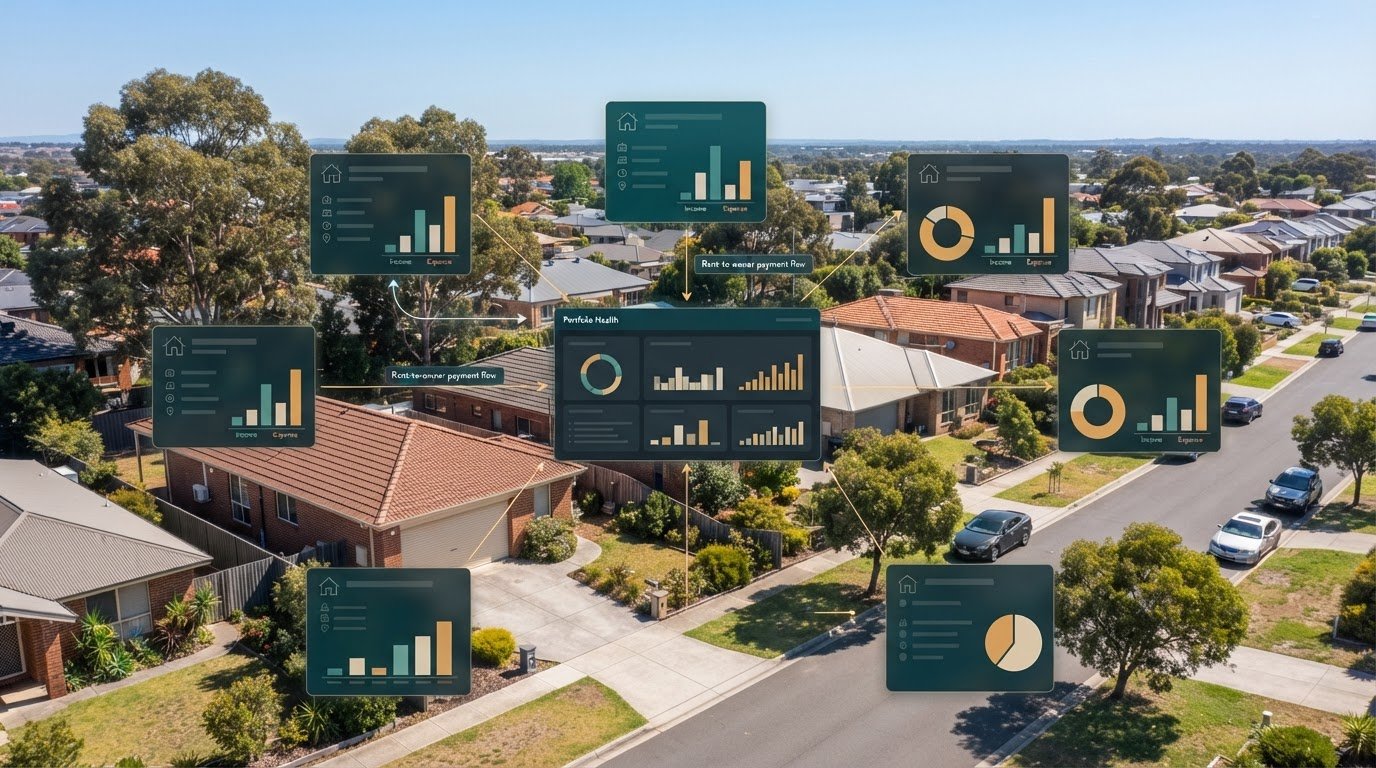
Cash flow can look healthy until rent, expenses and owner disbursements are brought together. Rental portfolio management software in Australia helps organise these moving parts by consolidating rental income, property costs, financial records and communication in one system. It supports oversight; it doesn’t replace the decisions behind managing a property.
The useful distinction is simple: property management software helps track and coordinate property information and workflows. For investors, that can mean seeing income and expenses across properties, keeping records organised and understanding how transactions affect rental cash flow. The tools vary between platforms, so match their features to the tasks you need to manage.
This guide covers rent tracking, owner disbursements, trust accounting, communication and portfolio cash flow in the Australian context. It also explains what to assess when comparing platforms, including how well they bring information together across properties and states. The goal is a clearer view of the numbers, with less reliance on scattered records.
Key Takeaways
- Assess whether a platform tracks your portfolio finances or manages an agency’s day-to-day property operations. The distinction helps you choose tools that fit your role.
- Map the rent-to-owner payment workflow so you can see how rent collection, deductions and disbursements are recorded.
- Consider trust accounting and state-specific compliance needs when comparing systems, especially if your properties are spread across states.
- Look for communication tools that keep property-related messages and records organised for owners and tenants.
- Review how income and expenses are grouped across properties to make cash flow easier to monitor and understand.
What is property management software?
Property management software organises rental tasks, records and communication in a shared system. In Australia, it can support agencies and investors managing leases, maintenance, payments and portfolio reporting.
Property management ecosystem
A property management system connects the people involved in a rental. A manager records tenancy activity, an owner reviews property information, a tenant submits a maintenance request and a tradie receives the job details. The software’s role is to keep each task and its related records together.
Compare who can access each function and what they can see. An owner may need financial reports, while a tradie needs the maintenance request and relevant access details. Clear permissions and a central record help prevent scattered emails, duplicated updates and uncertainty about who handles the next step.
Self-management and professional management
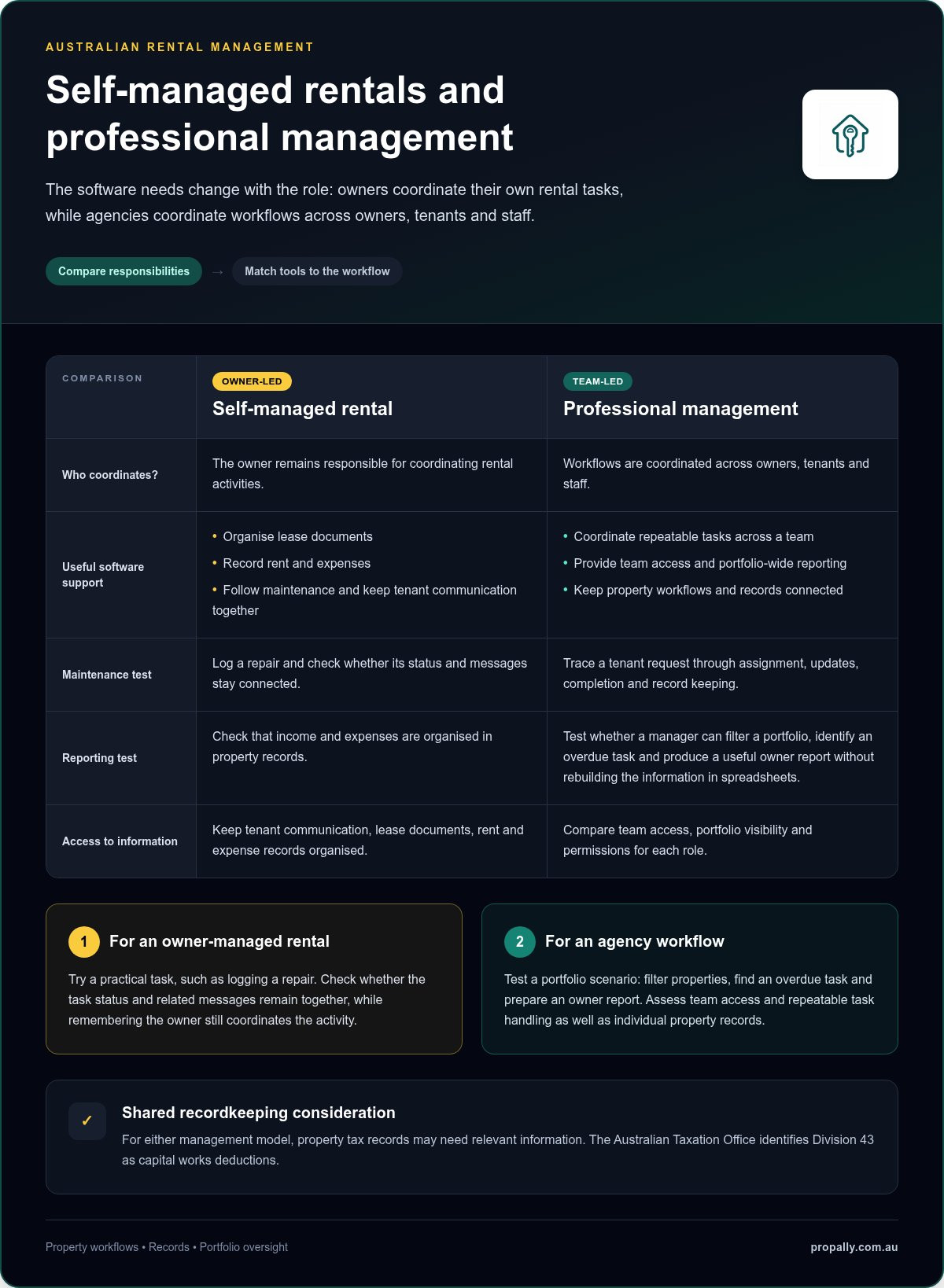
For a self-managed rental, software can help an owner organise lease documents, record rent and expenses, follow maintenance and keep tenant communication together. The owner remains responsible for coordinating these activities. Test a task, such as logging a repair, and check whether its status and messages stay connected.
Professional property management involves coordinating workflows across owners, tenants and staff. Agency software comparisons should therefore consider team access, portfolio-wide reporting and repeatable task handling, not just a single property’s records. For either model, tax records may need to capture relevant property information: the Australian Taxation Office identifies Division 43 as capital works deductions.
Lease, maintenance and commercial management
Lease tools organise tenancy documents, key dates, rent details and related correspondence. Maintenance functions can record an issue, assign it for action, retain updates and connect invoices or documents with the property record. When comparing systems, trace one example from tenant request through completion and record keeping.
Commercial property management may require workflows for business tenancies, lease obligations, premises maintenance and property-level reporting. These needs differ from residential rentals, so check whether the software’s records and reports fit the asset type. A useful test is whether staff can find the lease, open maintenance items and related costs in the same property file.
Reporting, comparisons and integrations
Portfolio reporting brings property records into views that help owners and managers review income, expenses, vacancies, lease activity and outstanding maintenance. Compare Australian agency software by testing a practical scenario: can a manager filter a portfolio, identify an overdue task and produce a useful owner report without rebuilding the information in spreadsheets?
Which platforms connect with Australian banks, accounting software and property portals? Integrations vary, so review each product’s published list for the specific bank, accounting software and portal your workflow uses. Check what information moves between systems, whether updates flow both ways and how duplicate records are handled. Connected tools can reduce re-entry, but useful reporting still depends on clear property-level categories and consistent records.
Automated rent payments and owner disbursements
Rent workflows connect tenant payments with receipting, arrears follow-up and owner disbursements. Check whether each transaction remains traceable from receipt through to the portfolio record.
Rent receipting and arrears automation
Rent receipting records a payment against the relevant tenancy and rent period. Depending on the software and its setup, the system may match incoming payments, update the tenant ledger and flag an outstanding amount. Review how it handles part-payments, missing references and payments received after an arrears reminder.
For example, a property manager can review a flagged ledger, compare the amount due with payments received, then record the follow-up. Automation supports the workflow, but staff still need to assess the account and communicate appropriately. Check whether the record shows the reminder, response and next action, not just an arrears status.
Tenant details, rent payments and communications should connect to the correct tenancy record. Keep contact details, payment references, lease documents and relevant messages organised, with access limited to people who need them. This makes payment queries easier to trace without searching unrelated property files.
To assess security, privacy and data-storage risks, review user permissions, authentication controls, backup practices, data retention and where information is stored. Restrict access to sensitive tenant and payment records, and remove access when a staff member no longer needs it.
Rent collection and payment allocation
To move a rental portfolio into software, first organise tenancy, rent, owner and property records. Then import or enter the information, check payment references and opening balances, set user access, and test a rent receipt and report before relying on the new workflow. Keep source documents available during the transition.
Payment allocation links money received to a tenant, property and rent account. A clear process distinguishes rent from other receipts and identifies transactions that need review. Reconciliation compares software records with bank transactions, helping staff find unmatched payments or incorrect allocations before preparing owner statements.
Owner disbursement workflows bring collected rent and recorded deductions together to calculate a payment and prepare a statement. Review the property ledger, confirm expenses and other authorised deductions, then check the resulting owner amount before payment. The statement should show each movement clearly, so owners can follow how rent received becomes a disbursement.
For a rent roll with multiple properties, portfolio views can help staff monitor receipts, arrears and upcoming owner payments across separate tenancy records. Inspections, documents and tenant communications should remain linked to the relevant property, not mixed into payment records. Trace one payment from collection through allocation and reconciliation to owner reporting when comparing systems.
Trust accounting and state-specific compliance
Trust accounting records money held or handled for another party, while an investor’s accounting tracks property income, expenses and ownership. Keep these purposes distinct when comparing systems for an Australian rental portfolio.
Separate agency trust records from investor accounting
In professional property management, a trust ledger can record rent received for an owner, property expenses and funds awaiting disbursement. An agency’s trust records serve a different purpose from an owner’s investment accounts. Software should make the account, property and transaction type clear, rather than combining balances into one portfolio total.
Landlords may hold properties through a company, family trust or self-managed super fund (SMSF). Entity-based accounting means recording income and expenses against the correct ownership entity. For example, assign a property expense to the entity that owns the property, then retain the invoice with its transaction record. Software can organise this information, but it doesn’t replace accounting or tax advice.
Trust accounting and disbursement workflows
A trust accounting workflow should show how a payment enters the ledger, what deductions are recorded and what amount remains payable to the owner. Review the audit trail: can a user trace a transaction to its source, see edits and match the disbursement with its statement? These checks make discrepancies easier to identify and investigate.
Automated payments can reduce manual entry, but they still need clear controls. Set up approved payment details, apply transactions to the right property and owner, then reconcile the ledger against bank activity. Keep mismatches visible for review rather than letting them disappear into a summary total. Connect invoices, receipts and payment records to the relevant transaction.
State-specific records and online accounting
Property management rules and trust-account processes vary across Australian states and territories. For a portfolio spanning New South Wales, Victoria and Queensland, organise records and workflows so each property can be reviewed in its relevant jurisdiction. Compare how software handles separate ledgers, record exports and compliance checklists, rather than assuming one generic workflow covers every location.
When using online accounting software, assess how property records connect with bookkeeping. Check whether rent, repairs and other expenses can be categorised by property and ownership entity, then exported or reconciled without losing transaction detail. Access permissions, secure sign-in, backups and a clear record of changes also matter when financial documents are stored online.
Before adopting a system, map one real transaction from receipt to final record. Confirm that the ledger, supporting document, entity allocation and owner statement match. This practical test shows whether accounting workflows are connected and understandable, while professional trust-account and tax obligations remain with the responsible parties.
Owner and tenant communication and portals
A management platform can organise property messages, documents and updates for landlords, tenants and agencies. Compare how each user finds information and follows an issue through to its next step.
Owner and tenant portals
An owner portal can give landlords a place to review property documents, statements and maintenance updates. A tenant portal can provide a channel for raising requests and viewing relevant tenancy information. Compare access by user role, then test a simple task: locate a document, submit a repair request or find an update. The next action should be clear.
Check how the platform handles property-level information. An owner with rentals in different Australian states should be able to identify which property an update concerns. Agencies can assess whether staff can see unresolved requests and recent messages without searching separate inboxes. These checks show whether portal access supports the rental workflow.
Tenant, owner and agency communications
Good communication records who sent a message, which property it concerns and what action followed. For a leaking tap, a tenant reports the issue, the agency records the details and the owner receives the relevant update. A connected thread helps keep repair instructions, approvals and progress notes from becoming scattered across emails and phone records.
Before choosing software, trace that example from report to resolution. Can the agency attach a photo, record a response, assign a follow-up and retain the final note? Check whether owners receive the information they need without being copied into every tenant conversation. Clear, role-based communication keeps records useful and reduces unnecessary back-and-forth.
Agencies should also assess routine messages, such as inspection scheduling or requests for tenancy documents. The workflow should show the message, its recipient and any response in the correct property record. This helps staff follow open tasks while landlords review relevant updates without relying on informal messages.
For Australian portfolios, compare how a system separates records across properties and states. A compliance reminder or inspection update should relate to the relevant tenancy, not be treated as a portfolio-wide instruction. Test search and reporting with real workflow examples to see whether users can find the right conversation, document and status when an owner asks for an update.
Finally, review how the platform manages access when agency staff change roles. Confirm that permissions match each person’s responsibilities and communication histories stay attached to the property record. A consistent process helps tenants, landlords and agencies understand who handles the next action.
Rental income, expenses and cash flow
Australian property investors need cash-flow reporting that can handle changing tax settings as well as rent and bills. From 1 July 2027, residential negative gearing rules will generally be limited to new builds. Properties held before 7:30 pm AEST on 12 May 2026 receive grandfathering under the described changes. That makes clear property records and scenario testing especially relevant when reviewing an investment’s expected performance.
A portfolio dashboard is useful when it shows more than rent collected. Investors need to compare income with property expenses, financing commitments and transaction timing. A property can appear profitable over a year while still facing a short-term cash gap. Tracking each transaction by property helps identify whether the pressure comes from lower rent, a large bill or delayed income.
For example, an illustrative dashboard may record annual property expenses of $18,000. The figure becomes more useful when transactions are categorised, such as insurance, repairs or other property costs. Investors can then distinguish recurring expenses from one-off items and compare actual outgoings with their records. A clear category structure also helps identify changes between reporting periods.
Rent changes affect the picture too. An example dashboard may show rent increasing by $40 per week. Track the change against its effective date and property record, then review how it affects projected income over the relevant period. A rent roll view can help compare income across properties, but investors should also account for vacancies, payment timing and expenses before judging cash flow.
A property recording a $12,000 loss during the financial year needs context, not just a red figure. Review its rent transactions, expenses and timing to find what drove the result. Was income interrupted, did a repair create a one-off cost, or did regular expenses exceed rent? Separating these causes helps investors plan follow-up actions and discuss records with their accountant.
Useful reporting lets investors move from portfolio totals to the transactions behind them. Start with net cash movement by property, then inspect the income and expense categories shaping the result. Compare actual records with expected rent and known bills. Scenario testing can show how changed assumptions affect projected cash flow, with each result tied to its underlying inputs.
For Australian real estate investors, a useful cash-flow view brings rent roll information, property expenses and transaction records together. Look for filters by property, ownership entity and reporting period, plus exports that retain transaction detail. Before relying on a report, trace a rent entry and expense back to their source documents. Review rental portfolio cash flow by bringing income, expenses and property records into one view.
PropAlly: Starter Plan
PropAlly’s Starter Plan gives Australian property investors a central view of rental cash flow, tax records, compliance and bond evidence. It can automatically read statements from agents and inboxes, bringing information together across properties and states.
Use it when rental records are spread across documents, agent statements and email. Property-level dashboards, state-specific compliance checklists and bond authority workflows help organise the information you need to oversee a portfolio. ATO-aligned tax calculations support record keeping, but PropAlly doesn’t provide financial or tax advice or replace an accountant.
For a broader portfolio, PropAlly also offers Pro Plan and Business Plan options. Choose a plan based on the oversight and organisation your properties require.
Visit PropAlly to explore the Starter Plan and its portfolio tools.
Make your next portfolio decision with clarity
Start by identifying where your current property records slow decisions down. Choose a recurring task, such as preparing an investment review, and note what information you need, where it lives and what takes time to reconcile. This gives you a practical basis for assessing rental portfolio management software in Australia, focused on features that support your priorities.
As your portfolio changes, revisit those priorities. A system that suits a straightforward investment setup may provide less oversight as ownership structures or record-keeping needs become more involved. Focus on whether the platform helps you understand your information and maintain a consistent process.
If you’re ready to explore a more organised view of your portfolio, contact PropAlly about your portfolio. Take the next step with a clearer picture of what you need.
Frequently Asked Questions
What is the best property portfolio app in Australia?
The right fit depends on whether you need agency operations or investor-side portfolio oversight. For an Australian landlord focused on investment records, PropAlly brings together tools for bond evidence, property tax records and cash-flow modelling. An investor preparing documents for an accountant, for example, may value the downloadable tax pack. Compare the tasks you need to manage, then choose a platform whose functions match them.
What rental portfolio management software is available in Australia?
Rental portfolio management software in Australia includes agency systems for managing tenancies and owner-side platforms for investors tracking their assets. PropAlly is investor-focused, with tools such as RentSmart for rent records and PropertyTax for categorised expense tracking. Identify whether you need to run agency workflows or organise information about properties already managed by an agent. That distinction shapes which features matter most.
How do the leading Australian rental portfolio management platforms compare?
Compare platforms by their intended user, supported workflows and reporting depth, not feature count alone. An agency system may focus on tenancy administration, while an investor platform may offer portfolio-level yield, equity and cash-flow views. Check whether a report can compare properties and test a rent or vacancy scenario. Also assess document handling, access controls, state-specific tools and how easily records can be exported.
What are the pricing plans and fees for Australian rental management software?
Plan costs can depend on property count, included tools and document-processing allowances. PropAlly has a free tier for one property, with paid plans for larger portfolios and optional email document add-ons. Those add-ons are volume-based, with allowances ranging from 500 to 2,000 documents per month. Compare the plan structure against your portfolio and expected document workload, including any add-ons needed for your regular process.
Which platforms suit landlords with one property versus large portfolios?
A landlord with one property may prioritise simple records and a low-friction way to organise expenses and tenancy documents. PropAlly’s Free Plan is for one property, while its paid tiers cover larger portfolios, including portfolios of up to 20 properties. As holdings grow, compare how a system separates properties, ownership entities and reporting. Check that the portfolio view remains useful without losing property-level transaction detail.
What features do Australian landlords need for rent collection, maintenance, and tenant communication?
Look for a rent ledger, arrears alerts, receipt capture and a clear maintenance workflow. PropAlly’s RentSmart includes a rent ledger with arrears alerts, receipt scanning, tax categorisation and a maintenance request board. Trace a repair from the tenant’s request to its status and related record. If an agent handles tenancy communication, focus on how your platform organises the statements and documents you receive.
Do Australian rental management platforms support state and territory tenancy laws and compliance?
Some platforms provide jurisdiction-specific compliance tools, so compare their coverage with the locations of your properties. PropAlly provides state-specific checklists for all eight Australian states and territories: Queensland, New South Wales, Victoria, South Australia, Western Australia, Tasmania, the Northern Territory and the Australian Capital Territory. ComplianceTracker monitors selected property obligations. Use these tools to organise records and deadlines, not as a substitute for understanding applicable requirements.
How do these platforms handle trust accounting, bonds, and rental tax records in Australia?
Features vary by platform. PropAlly organises bond evidence with timestamped entry and exit photos, GPS verification and PDF evidence packages. Its PropertyTax tool categorises expenses and supports Division 40 and Division 43 depreciation records, while allowing depreciation schedules to be imported. These functions help investors prepare organised records, but a portfolio platform is not a trust-accounting service or a source of financial or tax advice.