

What if multiple property invoices could move through one organised workflow instead of being handled one by one? Yes, teams can manage invoices together in a shared process, although a free invoice parser handles one invoice at a time. To parse property expense invoices automatically, an AI workflow needs to capture each document, extract its key fields and line items, then validate and categorise the costs.
For Australian property investors, the challenge is keeping expenses clear across properties, suppliers and states. A consistent process links each invoice to the right property and cost category, making it easier to spot unusual or incomplete records before using them in reporting.
This article explains how invoice extraction works, which fields and line items can be captured, and how validation and categorisation help keep records useful. It also covers practical considerations for an expense workflow, so you can decide where automation fits your property records.
Key Takeaways
- See how a provider moves property invoices from upload to structured records, with fewer manual hand-offs.
- Learn which invoice fields and line items AI can capture, and where human review can help resolve unclear details.
- Understand how validation checks and duplicate-payment controls help keep expense records consistent.
- Explore how coding costs to property and category can make expense reporting easier to interpret.
- Find out what to consider when introducing AI expense automation across an Australian property portfolio.
Can a provider process multiple property invoices at once?
Yes. A provider can process multiple property invoices through a batch workflow, rather than keying each document separately. The free invoice parser processes one invoice at a time, so batch processing depends on the provider’s software and workflow. In a property portfolio, invoices for cleaning, repairs and utilities can be captured together, then separated into records for the relevant properties.
Duplicate-payment controls start by matching each invoice against existing records. A provider can compare supplier details, invoice number, date and amount before marking a document for review. Automated cross-checks can reduce duplicate-payment risk to near zero. That matters because 39% of businesses report that duplicate payments and overpayments represent more than 1% of their payments. A repeated plumbing invoice, for example, should be flagged before it enters an approval queue.
Data-entry accuracy improves when software extracts invoice fields consistently and highlights uncertain values. A reviewer can focus on exceptions, such as a blurred invoice number or a total that differs from its line items. The provider can correct that record before exporting it. This is faster than rekeying every document, while preserving a clear trail from the original invoice to the structured data.
Recurring bills can follow a separate workflow from one-off expenses. Once a provider recognises a recurring supplier and billing pattern, the system can group each new invoice for review and approval. For example, regular utility bills can be linked to the same property and expense category. Automated payments require payment instructions and approval rules; invoice parsing alone captures and organises data, rather than moving funds.
Delayed invoices need clear status tracking. A provider can record when an invoice arrives, whether it is awaiting approval, and whether payment has been recorded. Automated overdue reminders can prompt the assigned approver or accounts team when an item remains outstanding. This makes it easier to distinguish an unpaid invoice from a document that has not yet been reviewed, reducing confusion across properties and suppliers.
Early-payment discounts depend on invoice terms and timely approval. AI-driven capture can increase early-payment discount capture by up to 75%. A workflow can surface a discount date alongside the due date, helping the team prioritise eligible invoices. The system still needs accurate extracted terms and a payment process that can act before the discount expires.
Handle invoices with privacy, access controls and sensible document retention. Limit access to people who need it, protect stored documents, and keep the original invoice linked to its extracted record. These practices help you organise supplier and property information while avoiding unnecessary access.
Before processing invoices, define property identifiers, supplier matching rules and what to do with exceptions. Then follow a consistent sequence: capture documents, check for duplicates, review uncertain details and approve records. The result should be searchable property expense information, not an unchecked collection of extracted figures.
How a provider processes property invoices from upload to structured data
A provider turns each uploaded invoice into searchable fields and line items. The workflow links the source document to structured records for review and export.
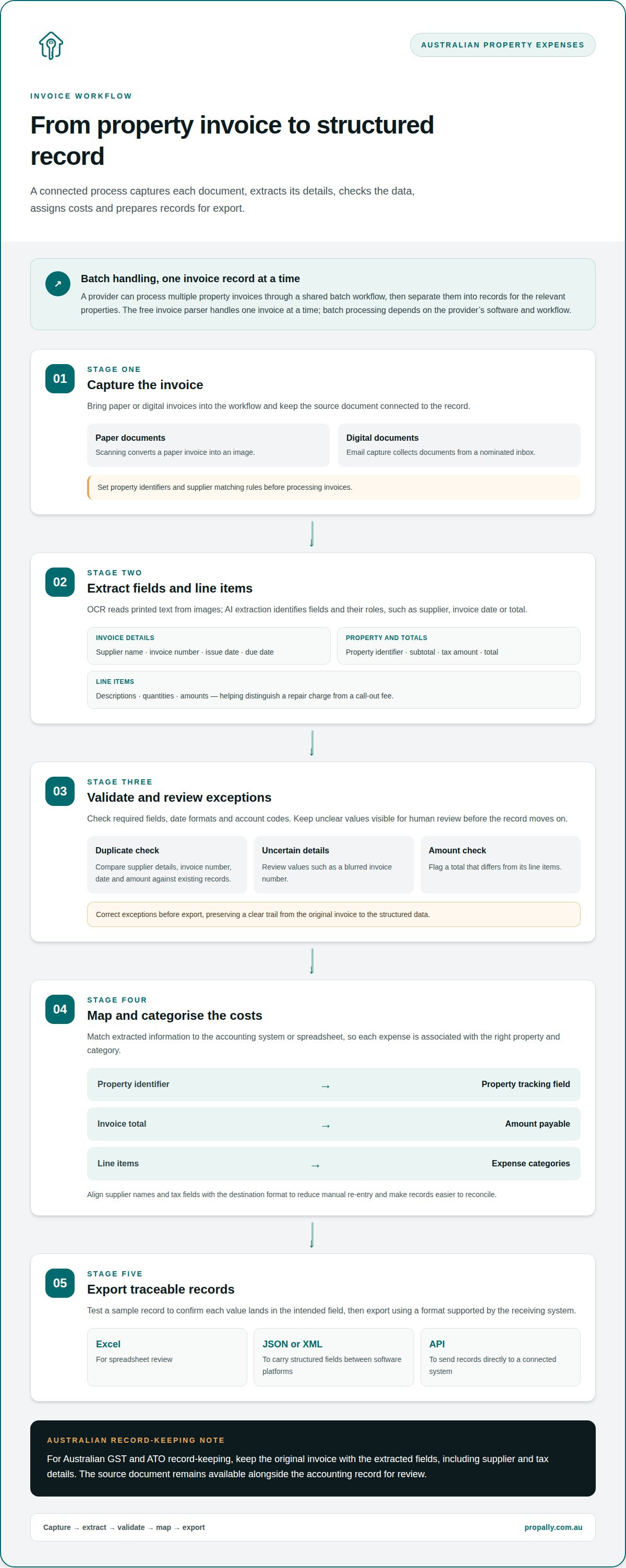
The sequence is capture, extraction, validation, mapping and export. At each step, the provider keeps the invoice connected to the data, so accounting staff can trace an entry back to its source.
How providers compare scanning, email capture, OCR and AI extraction for property expense processing
Scanning converts a paper invoice into an image, while email capture collects digital documents from a nominated inbox. OCR reads printed text from images; AI extraction identifies fields and their roles, such as supplier, invoice date or total. A provider can combine these methods, then review unclear values before recording them.
Invoice fields and tax details
Structured data can include the supplier name, invoice number, issue date, due date, property identifier, subtotal, tax amount and total. Line items add descriptions, quantities and amounts, helping distinguish a repair charge from a call-out fee. Consistent date formats also make records easier to sort and track.
For Australian GST and ATO record-keeping, keep the original invoice with the extracted fields, including supplier and tax details. The source document remains available alongside the accounting record for review.
Next, map extracted fields to the accounting system or spreadsheet you use. A property identifier can populate a tracking field, the invoice total can map to the amount payable, and line items can map to expense categories. Align supplier names and tax fields with the destination format to reduce manual re-entry and make records easier to reconcile.
Export options depend on the receiving system. Excel suits spreadsheet review, while JSON or XML can carry structured fields between software platforms. An API can send records directly to a connected system. Before export, the provider checks required fields, date formats and account codes, then tests a sample record to confirm that the accounting system places each value in the intended field.
When choosing an invoice workflow, consider how documents arrive, which fields you need, and how you will review and categorise expenses. For Australian property investors, PropAlly's RentSmart features include receipt scanning, tax categorisation and AI extraction of income, expense and tax data from PDF statements.
How a provider implements AI expense automation successfully
A useful workflow starts with the way your property records are handled, not with a software feature list. Map how invoices arrive, how expenses are reviewed and categorised, and where the information needs to go.
How to choose a provider for property management accounts payable automation
A property expense workflow should support invoice capture, property allocation and review. Match supplier invoices to property identifiers and expense categories, then check unclear or incomplete details before using them in your records. Consider how extracted information fits with your existing accounting process and how you will handle missing or inconsistent values.
Implementation time depends on workflow complexity. Standard AI expense automation configurations typically show initial results within 4-8 weeks, while complex implementations with custom workflows and multiple system connections take 2-3 months. A provider should define the process, integration points and success measures before configuration begins.
Centralised digital invoice management
A central dashboard can bring property records together, rather than leaving information scattered across email folders and spreadsheets. PropAlly consolidates property cash flow, tax, compliance and bond evidence, and can automatically read agent statements and inbox documents across properties and states. Its RentSmart features include receipt scanning, tax categorisation and AI extraction from PDF statements.
Automated extraction can help organise invoices and allocate costs to property categories. Keep the original invoice linked to its record, and review uncertain values before relying on the data. Automation can reduce repetitive entry, but it does not replace checks on the underlying document.
Bill-management features
A bill workflow can bring invoice capture, categorisation, review status and due-date tracking together. For example, a repair bill can be associated with the relevant property and reviewed as part of its expense records. These steps organise payable information; they do not mean the platform initiates payments.
Set up review steps around who manages each property record. An invoice with an unclear property reference should be held for review, while a correctly matched utility bill can be categorised for that property. Clear status labels make it easier to see which documents have been received, reviewed or processed.
Expense management
Expense management connects invoice records with property categories and budgets. Establish consistent categories for recurring costs, repairs and maintenance, then assign extracted invoice data to the relevant property. This gives you a clearer basis for reviewing spending across a portfolio.
Implementation should include a test batch before wider rollout. The provider checks whether supplier names, property identifiers and expense categories map correctly, then adjusts rules where records land in the wrong place. A 90-day implementation plan can prioritise automation opportunities, measure exceptions and expand the workflow in controlled stages.
AI extraction of invoice fields and line items
AI data extraction turns an Australian property invoice into structured fields that can be searched, reviewed and transferred. It handles both document-level details and individual line items, so a single supplier bill can retain its full breakdown. For standard documents, AI extraction accuracy is above 95%, compared with 85-90% for manual data entry. Review remains useful when a scan is faint or an invoice uses an unfamiliar layout.
At document level, extraction can capture the supplier name, invoice number, invoice date, due date, property reference, subtotal, tax amount and total. The provider maps each value to a defined field rather than leaving it in a block of text. Dates can use YYYY-MM-DD, while currency can be represented with ISO 4217 currency codes. Consistent formats help downstream systems sort and interpret records.
Line-item extraction preserves the detail behind an invoice total. A maintenance invoice, for example, may list a call-out charge, labour and replacement parts separately. Capturing each description and amount helps you identify the type of expense instead of recording only the total. Where tax appears against individual items, retain those amounts for review.
For structured JSON, a provider maps each extracted value to a field name and data type. A record might contain an invoice number as text, a date in YYYY-MM-DD format, a total as a numeric value, and line items as a list of descriptions and amounts. This structure makes the information easier to pass through an API or import into an accounting system without rekeying every field.
Enterprise invoice extraction often involves custom fields and varied document templates. A commercial property invoice may include a building code, tenancy reference or purchase-order number that standard extraction does not capture. The provider defines those fields, maps them to the destination workflow and tests sample documents. Missing references or unreadable figures can be marked for review instead of silently entered as complete data.
Extraction quality depends on the source document and the field definitions. Clear PDFs and consistent supplier formats give the system a stronger basis for identifying values; photographs, faint print and multi-page bills need closer exception handling. A useful workflow preserves the original invoice alongside the structured record, so a reviewer can compare an extracted line item with its source before approval.
For a property portfolio, capturing more fields is not automatically better. Focus on the information that supports your records and reporting. Test invoices from different suppliers and expense types to find gaps in field mapping before relying on the workflow.
Invoice coding, validation and categorisation
Coding assigns each invoice cost to a property, account and expense category. Validation checks that the extracted details support approval and reporting.
How a provider codes and validates invoices
A provider can match the invoice’s property reference to the relevant portfolio record, then apply an account code. For a plumber’s bill, separate labour and materials may need different descriptions or categories. Validation can compare the invoice total with its line items, check that a due date is present, and flag missing supplier or property details before approval.
Define what happens when details are unclear. If an invoice names a building but not a unit, hold it for allocation instead of assigning it to the wrong property. If the line items do not add up to the total, compare them with the source invoice. Keep the original document linked to the record while resolving these exceptions.
Keep a clear connection between a reimbursement claim and its supporting expense. Associate a staff reimbursement with the relevant property or work order, and retain the receipt with the record. If a contractor invoice and an employee claim relate to the same repair, keep their references distinct so the expenses are not confused during review.
Standardised expense categories
Standard categories give teams a consistent way to record costs across properties. A provider can map recurring expenses, such as utilities, cleaning, repairs and maintenance, to agreed categories. Standardised expense categories can improve reporting accuracy, help identify overspending and support compliance with auditing requirements.
Consistency matters when managers compare budgets with actual expenses. If one property’s plumbing work is coded as “repairs” and another’s as “maintenance”, the same type of cost may appear in separate reports. A provider can align category names and account codes, then apply the mapping to invoices before export. Teams can review unusual or uncategorised entries without changing the original invoice.
Approval rules can use the resulting codes to direct documents to the right person. For example, a maintenance expense can follow the property’s assigned approval path, while an uncategorised charge stays in an exception queue. The due date remains visible alongside approval status, helping staff prioritise invoices without losing the audit trail or source document.
For a consistent view of rental expenses, organise property expense records alongside property-level cash flow and tax tracking.
PropAlly
PropAlly gives Australian property investors a dashboard for tracking cash flow, tax, compliance and bond evidence across rental properties. It can automatically read agent statements and inbox documents, consolidating information across properties and states. This helps investors organise property records alongside their expense information. PropAlly is a tracking platform, not a property management service or a source of financial or tax advice.
It can be a useful next step when you need property-level records organised in one place, particularly across a multi-property portfolio. PropAlly offers the Starter Plan and Business Plan, alongside other plan options, to support different needs.
Contact PropAlly to discuss organising your property records.
Make invoice automation part of your next workflow decision
Start by defining what you need from your invoice records. Decide which documents and fields matter, how expenses should be categorised, and where a person needs to review exceptions. PropAlly's RentSmart features can extract income, expense and tax data from PDF statements, helping you keep property information organised.
PropAlly brings property cash flow, tax, compliance and bond evidence into a dashboard for Australian investors. If you want to organise property records alongside invoice and statement information, explore the Starter Plan and its RentSmart features. Choose a workflow that keeps each expense connected to the right property and source document.
Take the next step when you’re ready to discuss your requirements. Contact PropAlly about invoice automation and start shaping a clearer process for your property records.
Frequently Asked Questions
How does AI-driven data extraction work?
AI-driven data extraction identifies information in an invoice and organises it into labelled fields. It can distinguish a supplier name from an invoice number, then capture amounts and descriptions from the document. For a standard invoice, extraction accuracy can exceed 95%, compared with 85-90% for manual data entry. Results depend on document clarity and layout, so a review step helps catch faint text or unusual formats.
Does a provider need to create a separate invoice from scratch?
No. Parsing processes an existing supplier invoice rather than creating a replacement. The original document remains the source, while its details can be turned into a structured record for your expense tracking. For example, a landscaper’s PDF can provide the supplier, date and charge details. Any separate accounting entry represents the source invoice, not a replacement for it.
How does a provider parse property expense invoices automatically?
To parse property expense invoices automatically, capture documents from a consistent channel, extract the relevant information, and review and organise the results. A supplier PDF might be matched to a rental property using its address or another reference. Hold records with missing details for review, and keep the original document accessible alongside the extracted data.
What is automated property expense invoice parsing and how does it work?
Automated property expense invoice parsing turns invoice documents into organised, searchable information. It identifies details such as supplier and total, creating a record for property expense tracking. For example, a strata maintenance invoice can be associated with the relevant property and kept with its source document. Automation helps capture and organise data; approval and payment are separate decisions.
Which software or provider can automatically extract data from Australian property expense invoices?
PropAlly is an Australian property-investor dashboard that can read agent statements and inbox documents, consolidating information across rental properties and states. Its RentSmart features include receipt scanning, tax categorisation and AI extraction of income, expense and tax data from PDF statements. It helps investors organise property records alongside portfolio information, but it is not a property management service or a source of financial or tax advice.
What invoice fields should property managers capture, such as supplier, GST, amount, property and expense category?
Useful fields include supplier name, invoice number, issue and due dates, property reference, line descriptions, total and any GST amount shown. Add a category such as repairs, utilities or cleaning to make portfolio records easier to review. Recording both the property and repair category, for example, helps distinguish maintenance costs between rentals. Keep extracted values linked to the original document.
How accurate is invoice OCR and AI extraction for Australian invoices, and how do providers check for errors?
AI extraction can exceed 95% accuracy for standard documents, compared with 85-90% for manual data entry. OCR reads text from scanned documents, while AI helps identify what each value represents. A provider can check extracted totals against line items, flag missing invoice numbers and send unclear fields for review. Supplier layouts, print quality and document completeness affect how much checking a record needs.
How does a provider set up an automated invoice capture and approval workflow for property expenses?
Start by deciding where invoices will come from, which details identify each property, and how you will categorise expenses. Set up supplier matching and a process for reviewing missing or unclear information, then test the workflow with representative documents. An invoice without a property reference should be held for allocation rather than treated as complete. Keep each document’s status and source visible.