

A tidy inbox can still leave rental property information scattered. To extract data from property management emails in Australia, turn agent statements and messages into organised records for cash flow, tax, compliance and bond evidence. Choose an output such as JSON, CSV, Excel or XML, then decide whether you need a one-off extraction or an ongoing workflow.
A folder full of messages is not enough if key details are difficult to find and use across your properties. Start by listing the fields you need, then choose a format that fits your records and the task you want to complete.
This guide explains what property information you can capture from emails and other text, how extraction and output formats work, and what to consider when choosing a single data pull or ongoing processing. Use these steps to turn property correspondence into consistent records, rather than treating every email as a separate admin task.
Key Takeaways
- Choose the property fields you need before extracting data, so emails and other text become organised records rather than a pile of disconnected details.
- Match the output format to how you’ll use the data: structured exports can support different workflows and systems.
- Use a one-off extract for a defined task, or schedule recurring extraction when property information needs ongoing updates.
- Set clear rules for dates, amounts, property identifiers and other fields to keep records consistent across messages.
- Pick an extraction method based on the source material, the structure of the messages and how the resulting data will be used.
Available dataset fields and output formats
Property email extraction turns messages and statements into searchable fields in a structured format. The right dataset depends on your goal, whether you are tracking investment activity, organising records or transferring information into another system.
Available property data fields
For Australian rental properties, useful fields include property identifiers, agent details, rent and statement amounts, tax-related entries, compliance items and bond evidence. Match the fields to the task: cash-flow tracking needs transaction details, while bond records need evidence linked to the relevant property. A contact list can also include agent email addresses when they appear in the source.
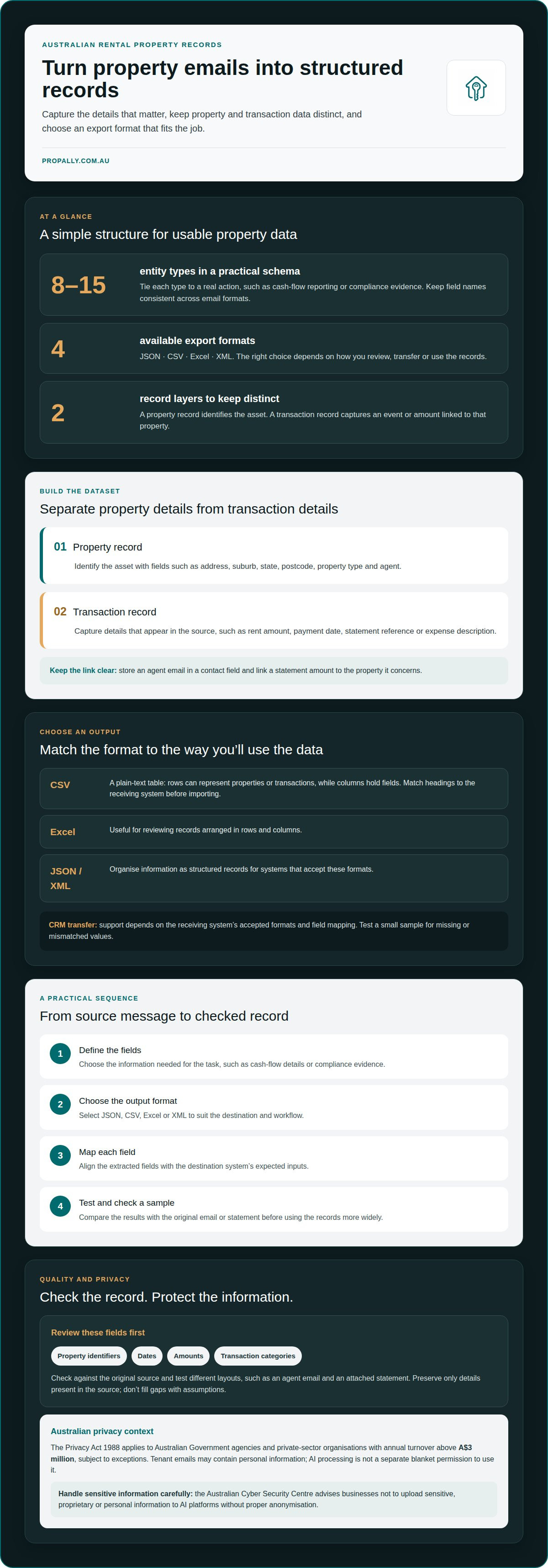
Keep property-level and transaction-level information separate. A property record identifies the asset; a transaction record captures an event or amount linked to it. This helps prevent agent contact details from being mixed up with rent entries or compliance documents. For example, store an agent email in a contact field and link a statement amount to the property it concerns.
Export formats and CRM integration
Property datasets can be exported as JSON, CSV, Excel or XML. CSV is a plain-text table format: each row can represent a property or transaction, and columns can hold fields such as a property identifier, agent email or statement date. Before importing a CSV into a CRM, match its column headings to the CRM’s expected fields and decide how to handle repeated records.
Excel is useful for reviewing rows and columns; JSON and XML organise data for systems that accept structured records. CRM integration depends on the receiving system’s supported formats and field mapping. A practical sequence is to define the fields, choose an export format, map each field to its destination, then test a small sample for missing or mismatched values.
The Privacy Act 1988 applies to Australian Government agencies and private-sector organisations with annual turnover above A$3 million, subject to exceptions. It is relevant when property emails contain personal information; state and territory tenancy requirements may also affect how records are handled.
The Privacy Act does not provide a separate blanket permission to use AI on tenant emails. Treat AI processing as handling personal information, and account for applicable privacy and tenancy obligations in the relevant jurisdiction.
Extracted details may include personal, financial or tenancy information, and incorrect field matching can link a tenant’s details to the wrong property. The Australian Cyber Security Centre advises businesses not to upload sensitive, proprietary or personal information to AI platforms without proper anonymisation.
Formal information-gathering powers are separate from ordinary commercial extraction. The ATO obtains property management data under section 353-10 of Schedule 1 to the Taxation Administration Act 1953, and collects it annually following each financial year. That statutory collection does not itself define what a private email-extraction workflow may collect.
Extracting structured fields from emails and other free text
Agent emails, inspection notes and statement descriptions often combine several details in one message. A clear extraction schema separates each detail into a field, so records can support a specific action, report or monitoring task.
For Australian residential property, source text may come from an email, an attached statement or a listing description. Extraction identifies relevant details, links them to the right property and organises them for later use.
Structured property and transaction fields
Property fields can identify an address, suburb, state, postcode, property type and agent. Transaction fields can capture a rent amount, payment date, statement reference or expense description when that detail appears in the source. Keep property and transaction records separate, so one property can link to multiple events without merging unrelated information.
Start with a schema of 8 to 15 entity types tied to real actions. For example, a cash-flow report may need property identity, transaction date, amount and category. A compliance workflow may need an evidence type and relevant property. Keep the field names consistent across email formats.
Extraction accuracy and result checks
Extraction accuracy depends on the source text, field definitions and how clearly each message identifies a property. An email saying “rent received” may not include a date or amount. Preserve only details present in the source, rather than filling gaps with assumptions.
Check extracted records against the original email or statement. Review property identifiers, dates, amounts and transaction categories first, then test messages with different layouts, such as an agent email and an attached statement. Correct field mappings if the same information appears in different columns.
Australian listing text can include fields such as listing date, location, land size and coordinates. A sample listing records 28 June 2026, postcode 4520, latitude -27.37121 degrees and longitude 152.86761 degrees. These examples show why the schema should distinguish dates, postcodes and geographic values instead of treating them as one text block.
Email parsing and AI tools can work with Australian property management software when their extracted fields match the receiving system’s accepted inputs. Test a sample record to see whether it transfers to the correct property and transaction fields. A CSV export can reveal mismatched headings before you use the records in a report.
Check each provider’s current pricing, document allowances and setup requirements before choosing a service. PropAlly publishes its plans and email options on the pricing page; a custom quotation is not required to view those plans. Check extracted figures against the source message before relying on them.
To keep extraction useful, define the action each field supports, such as categorising a transaction or monitoring a compliance item. Then review sample outputs and refine the schema when agent wording changes. For ongoing rental-property records, property email data tracking can help bring extracted information into a central view.
One-off and periodic data extracts
A one-off extract captures a defined set of property records for a specific task. Periodic extraction processes new emails or documents as they arrive, keeping structured records up to date. Choose between a snapshot and ongoing coverage based on how you plan to use the information.
Use a one-off run to bring existing records together or prepare a single report. For example, an investor could process saved agent statements to assemble rent and expense entries for selected properties. First define the source inbox or files, properties, date range and required fields. A clear scope keeps the dataset focused on the task.
Periodic extraction suits workflows where new correspondence updates records over time. For example, an investor may receive statements for properties in different suburbs, with each message covering a particular property. A recurring process can capture new messages, apply the same field structure and add information to the relevant property record. Set clear rules for identifying new messages and avoiding duplicates.
- One-off: choose a defined source and date range for a historical review or portfolio import.
- Periodic: process incoming correspondence to maintain records as new information arrives.
- Combined: run an initial backfile extract, then process later emails on a recurring basis.
Combining a one-off extract with ongoing processing creates a useful starting point while bringing later records into the same workflow. Process saved statements first, then direct future agent emails into the same platform. Use consistent property identifiers, such as an address or internal reference, to link each new statement to the right property record.
Before setting a schedule, define what counts as a new item. An agent’s revised statement may replace an earlier version, while a separate email may report a new transaction. Rules for dates, document names and property identifiers help distinguish updates from additional records. Without them, the output may contain duplicate or conflicting entries.
Set processing frequency to match the decision the data supports. A one-off portfolio review can use a fixed cut-off, while ongoing rental monitoring needs a repeatable process. For properties across different suburbs, group records by property first, then organise extracted transactions by their source date. This gives each update a clear place in your workflow.
Record the scope and outcome of each run. Note which inbox or files were included, which properties were processed and which messages could not be matched. An email without a clear address, for example, should go to a review queue rather than being assigned based on a guessed location. These controls make repeat extracts easier to compare and maintain.
One-off and scheduled property data extracts
A one-off extract answers a defined question using a specific set of records. A scheduled extract repeats the process as new source material arrives. For an Australian property portfolio, choose based on whether you need a snapshot, ongoing monitoring or both.
A custom extract can focus on one property, suburb, agency or document type. For example, an investor preparing a portfolio review might gather existing agent statements for selected properties. A recurring workflow can then capture later correspondence from the same approved inbox. Defining the source and purpose keeps the extract aligned with the decision it supports.
Set a schedule around when information arrives and how you will use it. A monthly review may suit a reporting cycle, while a workflow monitoring incoming correspondence can run as new messages arrive. The useful interval depends on the source and the action required, not an arbitrary timetable. Record the schedule, source and expected output together.
- Define scope: identify the inbox, property group, suburb or document source.
- Choose the trigger: use a one-off request or a recurring process tied to incoming material.
- Set handling rules: distinguish new records from corrected or repeated documents.
- Review exceptions: route unclear property references for separate handling.
Public listing data needs a different approach from private agent emails. Scraping a real estate domain can collect changing listing details, but each source has its own access conditions. When collecting public web data from Domain.com.au, follow its terms of service and privacy rules. Keep the source and purpose clear.
Account for source changes in scheduled collection. A listing may be edited or removed, and an agent email may contain a revised statement. Preserve the source reference and extraction date so later reports can distinguish a new observation from a changed record. This supports traceable property information without treating each update as a separate asset.
Some Australian property datasets publish their own update cycles. Western Australian cadastral data is updated daily and sourced from the Spatial Cadastral Database. This illustrates why a workflow should follow each dataset’s actual update pattern. Email extraction, listing scraping and government data feeds are distinct sources and should not be treated as interchangeable.
For a practical rollout, start with a defined source and a limited group of properties. Compare the resulting records with their source material, then refine the extraction rules before expanding coverage. A schedule is useful only when it produces records that support an action, such as preparing a report or monitoring property changes.
Choosing extraction methods
Choosing how to extract data from property management emails in Australia starts with matching the source material to the task. For agent emails with consistent subject lines, defined parsing rules may capture predictable details. For varied messages about repairs or rent adjustments, extraction needs to interpret the text and link each detail to the right property.
Start with the workflow’s destination. A spreadsheet for portfolio analysis may need consistent categories and tidy rows. A property management system may expect fields such as a property reference, transaction date and amount. Map each output field to its destination before choosing a tool. This shows whether a simple export or a connected workflow is needed.
To set up an email workflow, define the source inbox, identify relevant messages, specify the fields, then map and export the results. For example, separate messages containing agent statements from inspection correspondence, then route each to the appropriate property records. Keep the original message associated with each extracted record for traceability.
- Template-based parsing: suits recurring emails where labels and layouts remain consistent.
- AI-assisted extraction: can interpret less predictable wording, such as a repair update written in free text.
- Manual review: helps resolve messages with unclear property references or conflicting details.
Let the message guide the extraction method. An email stating “the hot water system was replaced” describes an event, but may not identify the property or transaction amount. Capture the stated event, flag missing information and avoid assigning it to a property based on a guess.
Match accuracy checks to the risk of each field. A misspelt suburb can disrupt property matching, while a transposed amount can distort cash-flow analysis. Compare sample records with their source emails, focusing on property identity, dates, amounts and event categories. Refine the rules when the same wording produces inconsistent results.
Public listings require separate consideration from private correspondence. Scraping listing pages may suit analysis of advertised property details, but it does not replace email extraction for agent statements or tenant correspondence. Domain.com.au’s terms of service and privacy rules apply when collecting its public web data. Keep each source distinct in your dataset.
For a controlled rollout, begin with one source type and a clear reporting purpose. Test a small batch, review field accuracy, then expand to other message types or listings. This approach helps organise how you extract data from property management emails in Australia before automation handles a wider range of records. Set up property email data workflows for organised rental-property records.
Template-based parsing suits recurring emails with consistent labels and layouts, while AI-assisted extraction can interpret less predictable free-text messages. Map extracted fields to the property management system’s required fields, and review unclear property references or conflicting details manually.
PropAlly
PropAlly helps Australian property investors bring agent statements and inbox information into one organised view. Its dashboard consolidates records across multiple properties and states, supporting oversight of cash flow, tax, compliance and bond evidence. This can help when manual tracking makes it difficult to see which property a statement or document relates to.
For investors who want to connect extracted property information with broader portfolio tracking, PropAlly offers Starter Plan and Business Plan options. The platform organises property records alongside investment information, but it does not provide property management services or financial and tax advice. Choose PropAlly when you want a central place to track rental property information.
Contact PropAlly to discuss how it can support your property data workflow.
Make property email data part of your routine
A useful extraction workflow makes investment records easier to rely on. Set a clear purpose for the data, then process it consistently as part of managing rental property information. This turns scattered correspondence into records that are easier to organise and use across your portfolio.
If you want to extract data from property management emails in Australia and bring rental information into one view, PropAlly can organise records across properties. Choose from the Starter Plan, Pro Plan and Business Plan to suit how you manage your portfolio and the records you want to keep together.
Contact PropAlly about property data extraction and take the next step towards more organised property records.
Frequently Asked Questions
How do I extract tenant, property, rent, maintenance and lease data from emails?
Create separate fields for tenant, property, rent, maintenance and lease details, then map each email or attachment to those fields. For example, a message about a leaking tap can become a maintenance record linked to its property, while a rent statement supplies payment details. Keep the original email with the extracted record, and flag missing or ambiguous details instead of making assumptions.
How do I connect email extraction tools to Australian property management platforms?
Use a platform’s supported import route, such as a compatible file export, and map each extracted field to its destination. PropAlly’s AI Email Automation reads Gmail or Outlook through a read-only OAuth token and scans PDF or image attachments. It can categorise information by property using details such as address, ABN or rent amount. This does not mean it connects directly to every property management platform.
How do email parsing, OCR and generative AI compare for property data extraction?
Email parsing applies rules to predictable labels and message patterns, making it suitable for consistent agent emails. OCR reads text from scanned PDFs or images, such as a photographed rent statement, but unclear scans can affect recognition. Generative AI can interpret varied wording, including free-text maintenance descriptions. A mixed workflow can use the right method for each source, then check extracted records against the originals.
What email parsing and AI tools work with Australian property management software?
Email parsing and AI tools can work with Australian property management software when extracted fields match the receiving system’s accepted inputs. Test a sample record to confirm that it transfers to the correct property and transaction fields.