

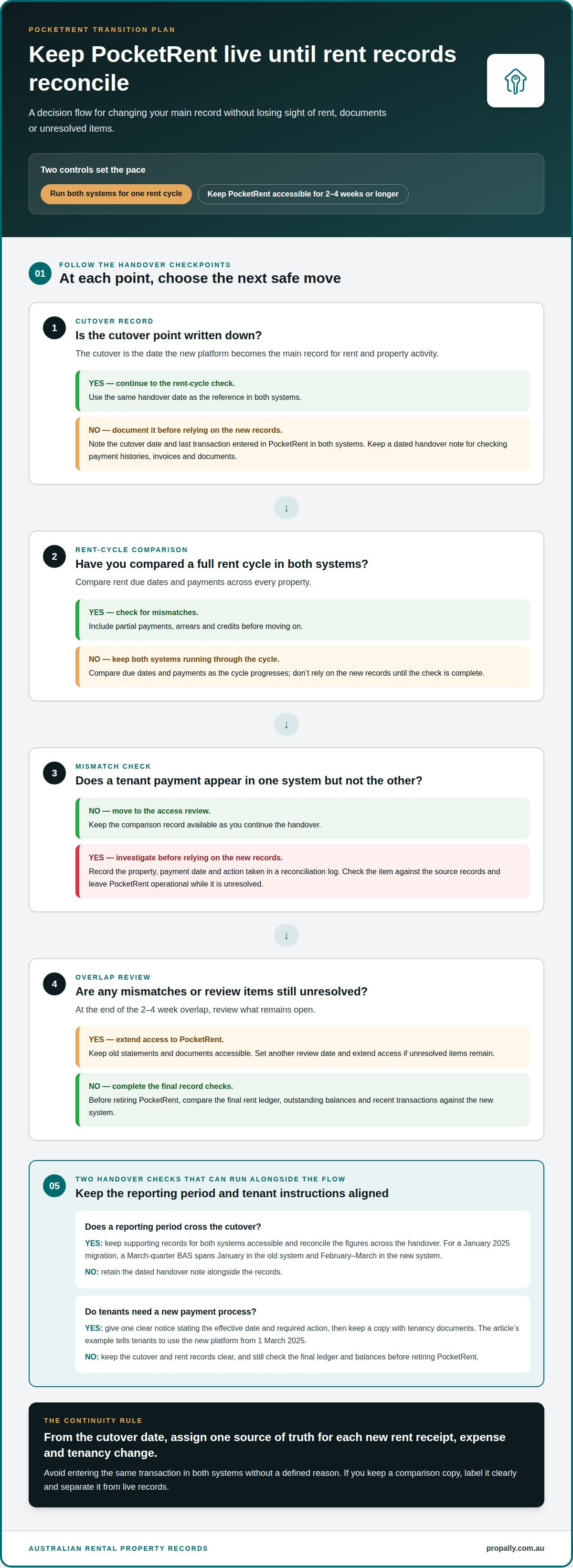
A smooth move from PocketRent starts with choosing landlord software that fits your property business, then transferring records in a controlled sequence. To migrate from PocketRent to dedicated landlord software, keep both systems running for at least one rent cycle and maintain access to the old system for 2-4 weeks or longer. This gives you time to compare rent records and resolve gaps before relying on the new setup.
Focus on continuity: rent tracking, property and tenant details, expenses and supporting documents all need to remain accessible during the change. Choose software that suits how you manage your portfolio now and can support the records and oversight you need as it grows.
This guide explains how to assess software against your portfolio’s size and priorities, plan a low-disruption transition, organise existing information and test the new system. It also covers migration support and what to review before making a new platform your main workspace. A clear plan helps you move your records and keep the information you rely on to oversee Australian rental properties.
Key Takeaways
- Choose a platform around your portfolio’s size and the records you need to manage, rather than selecting on features alone.
- Plan the change in stages so rent tracking and access to historical information stay organised during the transition.
- Prepare a separate data backup and sort records before moving them to reduce avoidable clean-up work.
- Check which information and file formats you can export from PocketRent, then test the transferred records before relying on them.
- For Australian property oversight, consider whether cash flow, tax records, compliance tasks and bond evidence need a central dashboard.
Keeping the previous system running during transition
- Set a clear cutover point. Choose the date the new platform becomes your main record for rent and property activity. Note it in both systems alongside the last transaction entered in PocketRent. A dated handover note gives you a reference when reviewing payment histories, invoices or documents, and helps distinguish transactions recorded before the move from those entered afterwards.
- Run both systems for one rent cycle. During that cycle, compare rent due dates and payments in each platform. Check every property, including partial payments, arrears and credits. Investigate any tenant payment that appears in one system but not the other before relying on the new records. Keep a reconciliation log showing the property, payment date and action taken.
- Keep PocketRent operational for 2-4 weeks or longer. That overlap gives you time to review records after the new system starts handling current activity. Preserve access to old statements and documents, and avoid closing the account while you still need to resolve a mismatch. Set a review date at the end of the overlap, then extend access if unresolved items remain.
- Assign one source of truth for each transaction. Tell everyone involved which system records new rent receipts, expenses and tenancy changes from the cutover date. Avoid entering the same transaction in both systems without a defined reason. Duplicate entries can distort income totals and complicate reconciliation. If you need a comparison copy, label it clearly and keep it separate from live records.
- Map the change against Australian reporting periods. For a migration in January 2025, a March-quarter BAS spans January in the old system and February-March in the new system. Keep the supporting records for both periods accessible, then reconcile the figures across the handover. This example shows why a cutover date should be documented alongside the reporting period, rather than treated as an isolated software task.
- Coordinate tenant instructions with the cutover. If tenants need to use a new payment process, state the effective date and the action required in one clear notice. In the example, tenants are told to use the new platform from 1 March 2025. Align the notice with the recorded handover date, and retain a copy with tenancy documents. Before retiring PocketRent, compare the final rent ledger, outstanding balances and recent transactions against the new system.
Choosing landlord software to fit the size and needs of a property business
Australian tenancy requirements vary by state and territory, so choose software that organises state-specific compliance tasks, bond workflows, lease records and notices. PropAlly provides compliance checklists for all eight Australian jurisdictions, alongside bond evidence and tax tools. Before choosing any platform, assess how it fits your existing banking and accounting processes.
- Map your portfolio and workload. List each property, its state or territory, tenancy status and key management tasks. With a smaller portfolio, clear rent and expense records may be the priority. A growing portfolio may call for consolidated reporting and repeatable workflows. This inventory shows what a replacement must handle from day one when you migrate from PocketRent to dedicated landlord software.
- Check state-specific organisation. If your rentals span states, assess whether you can group tasks and records by jurisdiction. Keep bond evidence, lease documents and compliance reminders linked to the relevant property. PropAlly offers state-specific checklists across all eight Australian jurisdictions, helping you organise obligations without applying one generic checklist to every tenancy.
- Match daily workflows to the platform. Write down how you record rent, expenses, repairs and tenancy changes. Then test a realistic task, such as recording a rent receipt and attaching its supporting document. The system should make routine work straightforward and help you find property records without unnecessary steps.
- Assess bank and accounting connections. Australian landlord software can connect to local banks, payment systems and accounting tools when the platform supports those integrations. Compare compatibility with your bank and existing tools. Consider how transactions enter the records, how you identify unmatched items and whether the workflow keeps property income and expenses easy to review.
- Prioritise reporting you will use. Identify what you need to review across properties, such as rental income, expenses and supporting documents. Check whether reports can be organised by property and period. If you own properties in different states, a clear view of compliance tasks alongside financial records can also help with oversight.
- Consider who needs access. Decide whether you manage records alone or share tasks with a partner, bookkeeper or accountant. Assess how the software separates property information and supports your working arrangement. Use a sample property record to see whether another authorised user can find rent details and documents easily.
- Test a representative scenario before committing. Use one property to try rent tracking, expense entry, document storage and a state-specific task. Note any manual steps or missing information. Before migrating from PocketRent, confirm that the platform fits your actual workflow and supports your banking and accounting processes, rather than judging it by its feature count alone.
Getting migration expert support
- Define what support must cover. Before the PocketRent transfer begins, write down the help you need with export planning, data mapping, document handling, testing or go-live troubleshooting. If tenant details and rent histories need different treatment, record both requirements. A scoped request clarifies responsibilities, what you need to prepare and which tasks need to be completed before the move.
- Ask for a staged migration plan. A property management software migration project may typically take 7-13 weeks. The planning and selection phase can take 2-4 weeks, while go-live and post-migration work typically lasts 2-4 weeks. Ask the migration lead to set out the stages, dependencies and decision points. Use the plan to coordinate staff time and avoid scheduling the move around an unexamined assumption.
- Confirm who owns each data task. Assign responsibility for preparing PocketRent records, mapping fields and reviewing the new system. Clarify who handles tenant records, rent histories, property details and documents. For each category, agree how missing or duplicated information will be logged instead of silently changed during the transfer.
- Bring examples to planning sessions. Select representative records, such as a current tenancy, a property with a rent adjustment and an expense with an attached document. Use these examples to explain how your records are organised and what must appear after migration. Weekly or bi-weekly workshops give the team a regular forum to discuss usability and resolve questions before they affect daily work.
- Request a test transfer and review. Before the final move, run a sample import with the agreed property and tenant information. Compare record counts, key fields and document links against PocketRent. Log each mismatch by record type and required correction. This turns general concerns into specific actions and gives you a clear basis for resolving issues before go-live.
- Agree on go-live support and escalation. Identify who handles access issues, import errors and questions from staff after launch. Write down the route for reporting each issue and how updates will be tracked. During the 2-4 week go-live and post-migration phase, review unresolved items regularly. Keep the agreed migration plan and issue log together so the team can see decisions, owners and outstanding work in one place.
Migrating existing property-management information
Australian platforms vary in how they handle PocketRent imports, so check whether the migration accepts PocketRent exports and which fields it maps. Move records in stages, then verify financial information and supporting documents before relying on the new system.
-
Export PocketRent data and formats
Start by exporting the property, tenancy, rent and expense records available in PocketRent. Record each file’s format and date range, and keep the original export unchanged. Some legacy platforms export only the most recent 12 months by default, so older records may need to be requested separately. Include documents in your inventory, and note that mail merge templates may need rebuilding because tags differ and are fewer in number.
-
Choose a platform that supports PocketRent imports
Ask each Australian landlord platform whether it can import PocketRent data directly or process exported files, then confirm which fields and documents transfer. A platform’s import route should match the files you have, not just promise a general migration. Compare its field mapping with your export inventory, including property identifiers, tenancy dates, rent histories and expense categories, before transferring the full dataset.
-
Check migrated data for accuracy
Compare the new records with PocketRent using property-by-property checks. Match tenant names, lease dates, rent amounts, payment histories and document links, then reconcile opening balances against bank and loan statements as at the migration date. Review totals for a partial period too. A 40 per cent jump in rental income without an added property or rent rise may indicate that data was imported twice.
-
Keep compliant records during the transition
Keep a separate backup of all data before migration, and retain the source files alongside the new records. The Australian Taxation Office requires records to substantiate deductions with invoices, receipts or bank statements. For a migration during a financial year, include complete records from 1 July of that tax year and archived totals for earlier years.
- Finish with a controlled transfer and document review. Data preparation and cleansing typically requires 2-3 weeks, while transfer and testing can take 1-2 weeks. Migration may take several hours for most users, with manual records potentially adding time. If the merchant ID changes, re-authorise tenant direct debit mandates. Check that imported documents open correctly, and update mail merge templates before using them.
Set the separate backup aside before beginning the transfer, so the migration starts with a preserved copy of the data being moved. Use that copy as a reference when checking that the records included in the new system match the intended scope. For a property software migration during a financial year, include complete records from 1 July 2024 of that tax year and archived totals for earlier years. Keep the current-year records and earlier-year totals identifiable as distinct parts of the migration, and check that neither is omitted when reviewing what has been transferred. This gives the transition a clear record boundary: the backup preserves the pre-migration data, while the new system can be checked against the full required period and the archived totals.
What data can be exported from PocketRent, and in which formats?
- Open PocketRent’s export options and make an inventory. List each available category, such as property details, tenancy records, rent transactions, expenses and attached documents. Record the format and date range for every export. Don’t assume all categories use the same file type or that one export includes every record you need.
- Check the export range for each category. Some legacy property platforms export only the most recent 12 months by default, so inspect the dates before relying on a file. Compare the available period with the property’s management history. If earlier records are needed, identify them separately so the migration plan accounts for older transactions and documents.
- Save exports in clearly labelled folders. Use a consistent structure, such as one folder per property with separate folders for financial records and tenancy documents. Keep the original filenames, adding a clear date or category where useful. This makes it easier to trace a rent transaction to its export instead of mixing files from different properties.
- Separate data files from supporting documents. Keep invoices, receipts, bank statements and tenancy paperwork linked to the relevant property or transaction. Documents may transfer, but mail merge templates need updating because the destination system uses different tags, and may offer fewer of them. Don’t assume a template will work unchanged after import.
- Match each export to the destination platform’s import process. Before transferring files, compare PocketRent’s export formats with those the new platform accepts. Map fields such as property identifiers, tenant details, payment dates and expense descriptions. If a file needs restructuring, preserve the original and note the changes made to the working copy.
- Test a small set before preparing every property. Use one property’s records to see how its data and documents appear after import. Check that dates, labels and attachments remain understandable, then apply the same preparation method to other properties. Once records are organised, a central property dashboard can help bring cash flow, tax, compliance and bond evidence together.
Experts recommend completing and exporting the current year’s data from the legacy software before migrating, then starting the new tax year in the new software. This gives the export and the new system a clear point of transition. Before beginning migration, create a separate backup of all data. Keep that backup apart from the files being prepared for import, so the original records remain available if the migration process needs to be reviewed or repeated. Corrections after June 30 require formal amendment disclosures on the tax return, so check the exported records carefully before relying on them for the new system.
Allow enough time to prepare and transfer the records: migrating data into new property-management software may take several hours for most users, with manual records potentially increasing the time. The work can include checking export ranges, organising documents, mapping fields and testing a small set of records, so avoid treating the export as a single file transfer. Keep a note of any records that are manual or require extra preparation, and confirm that the backup remains intact before proceeding. After the transfer, review the imported records against the exports and retain the originals for reference.
PropAlly: Starter Plan
PropAlly brings Australian rental property oversight into one dashboard, helping you manage records once they’re organised. Track cash flow, tax, compliance and bond evidence for each property, including properties across multiple states.
PropAlly’s Starter Plan is for landlords who want to centralise key property information. The Business Plan is available for portfolios of up to twenty properties. PropAlly can read agent statements and inbox documents, while state-specific compliance checklists, bond workflows and ATO-aligned tax calculations help keep records organised. The platform supports administration, not property management or financial and tax advice.
If you’re ready to organise your Australian rental records in one place, visit propally.com.au.
Make the new system part of your operating routine
After you migrate from PocketRent to dedicated landlord software, treat the change as the start of a clearer routine, not simply a completed data transfer. Decide who maintains property records, how updates are recorded and where supporting documents belong. A consistent approach keeps information useful as your Australian portfolio changes, whether you add a property, renew a tenancy or review cash flow.
Set aside time to learn the new workspace using your own property records. Focus on the tasks you’ll use regularly, and keep your process simple enough to follow during busy periods. This practical foundation makes future reviews easier and helps you spot missing information before it becomes difficult to trace.
If you’re considering how PropAlly could fit your property-record workflow during the transition, contact PropAlly to discuss your setup. Take the next step with a process that keeps your information organised and your property business moving forward.
Frequently Asked Questions
What are the best dedicated landlord software options in Australia, and how do their features compare?
The best fit depends on whether you prioritise rent administration, investor oversight or both. Compare how platforms organise property records, rental income, compliance tasks, bond evidence and tax information. PropAlly focuses on an Australian investor dashboard, with cash-flow tracking, state-specific compliance checklists, bond workflows and ATO-aligned tax calculations. Investors with properties across states can use it to bring records together while keeping jurisdiction-specific tasks in view.
How should landlords migrate rent schedules, arrears, bonds, and payment histories without disrupting rent collection?
Set up each tenancy’s payment schedule using the next invoice due date, then compare its first expected charge with the existing arrangement. Carry forward arrears as a distinct opening balance, not a new rent charge, and link bond evidence to the correct property and tenancy. If the merchant ID changes, re-authorise tenant direct debit mandates. Keep a transaction-level record of opening balances and later receipts so you can trace how each figure was carried over.