
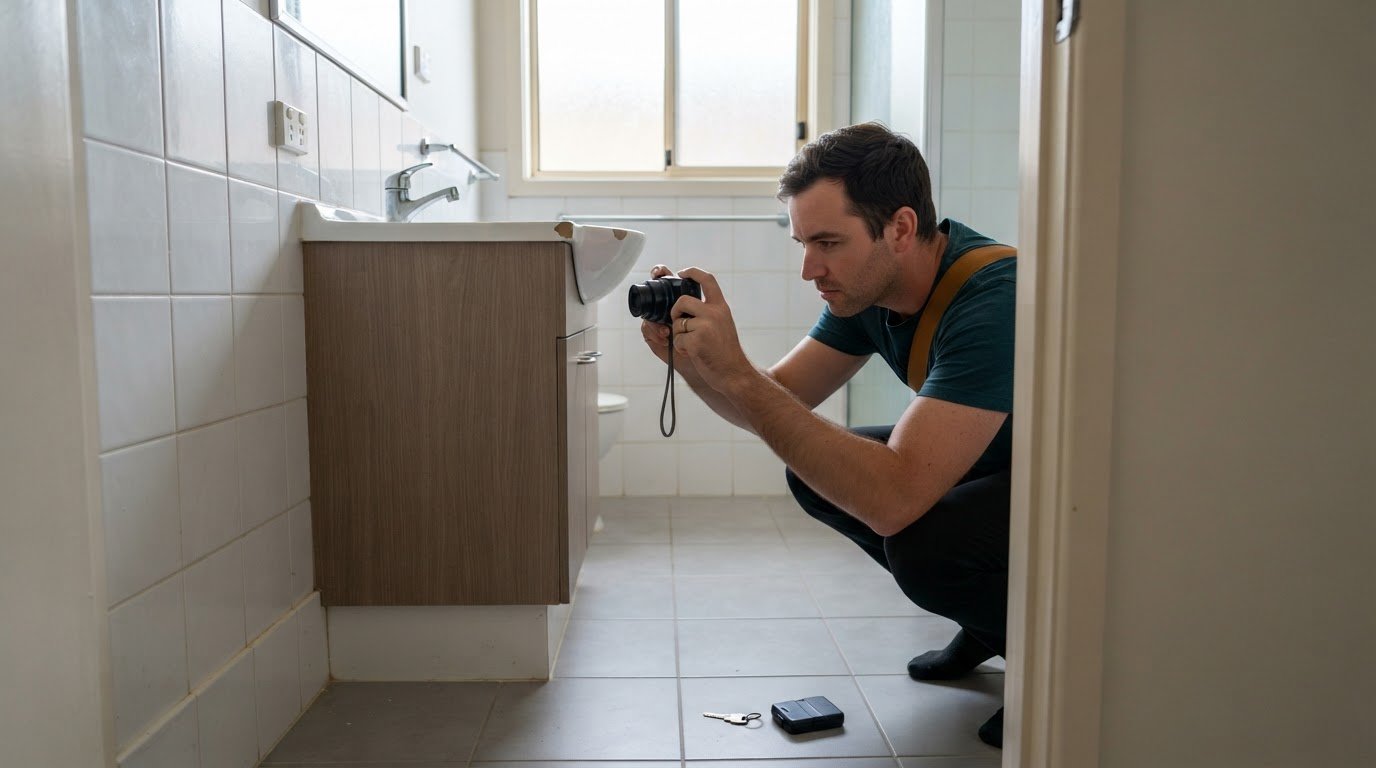
A rental condition dispute can turn on what the records show, not what anyone remembers. Digital document capture for residential landlords helps keep timestamped photos, condition reports and related correspondence organised by property. Clear records at lease signing, move-in, routine inspections, repairs and move-out make it easier to trace a property's condition throughout the tenancy.
It’s understandable to focus on inspection photos when a bond refund is contested. But evidence is only part of the process: documents also need to be easy to find, share and retain for lease renewals and tax records. A consistent filing system keeps these tasks connected instead of scattering records across inboxes and devices.
This article explains how to capture and organise rental records, share documents with tenants or owners, and build practical workflows for condition disputes, tax, renewals and bond refunds. Clear naming, secure storage and searchable files make records more useful when you need to make a decision.
Key Takeaways
- Use a consistent, date-first file-naming pattern to make rental records easier to sort and retrieve.
- OCR can make scanned PDFs searchable, helping you locate key details without opening files one by one.
- Build condition evidence around tenancy milestones and keep reports, photos and correspondence together by property.
- Set clear rules for who captures records, when they’re filed, how long they’re retained and when they’re securely disposed of.
- PropAlly brings property-level cash flow, tax, compliance and bond evidence tracking into one dashboard for Australian property investors.
Can I upload all types of documents?
Most rental records can be digitised and grouped, from lease agreements to inspection photos. A reliable filing structure makes records for each property easier to find across a portfolio.
Uploading and grouping rental documents
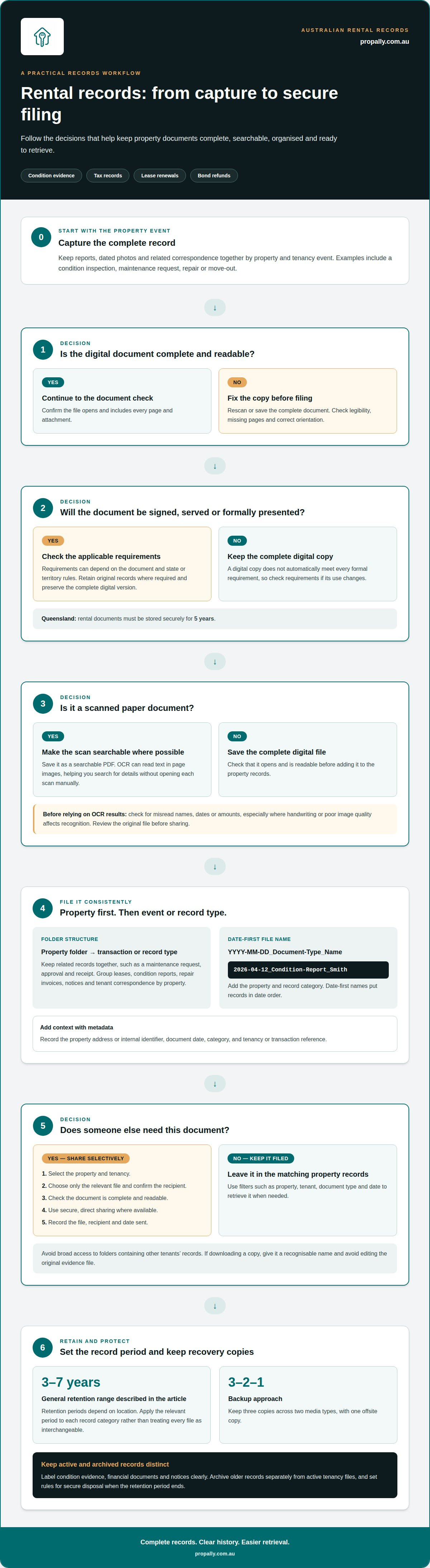
Group files by property first, then by transaction or record type. A property folder, for example, can contain lease agreements, condition reports, repair invoices, notices and tenant correspondence. Keep records about the same event together, such as a maintenance request, approval and receipt. Before uploading, check that each file opens and includes every page and attachment.
Acceptable digital copies
Digital copies of leases, inspection reports, receipts and notices can be kept as rental records. However, a copy doesn’t automatically meet every formal requirement for signing, serving or presenting a document. The requirement can depend on the document and the applicable state or territory rules, so retain original records where required and preserve the complete digital version. In Queensland, rental documents must be stored securely for 5 years.
Scanning and naming rental documents
Scan paper records as searchable PDFs where possible, and check each scan for legibility, missing pages and correct orientation. Name files with the date first in YYYY-MM-DD format, followed by the document type and tenant or vendor name. For example, use “2026-04-12_Condition-Report_Smith”. This puts records in date order and makes a specific inspection or receipt easier to find.
Retention periods for property records generally range from three to seven years, depending on location. Apply the relevant period to each record category, rather than treating every file as interchangeable. Keep condition evidence, financial documents and notices in clearly labelled folders, then archive older records separately from active tenancy files. This helps staff distinguish current documents from records retained for reference.
Metadata adds context that a file name alone may not provide. Record the property address or internal identifier, document date, category, and tenancy or transaction reference. For a repair, link the request, invoice and completion evidence to the same property and event. Consistent labels make shared folders more useful when a team member needs to trace a decision or find supporting records.
For efficient retrieval, use a repeatable upload routine:
- Scan or save the complete document as a readable PDF.
- Apply the date-first name and add the property and record category.
- File it in the matching property folder and transaction subfolder.
- Confirm it opens, then keep backups across three copies, two media types and one offsite copy.
That 3-2-1 backup approach separates working files from recovery copies. A consistent property folder, date-based name and searchable document together make retrieval faster during an inspection review, tax preparation or bond dispute.
Can I send documents to tenants or landlords directly from the platform?
Yes, when the platform supports controlled document sharing. Check that you can select specific files, manage access and keep a record of what was sent. These controls matter when sharing an agreement, repair receipt or inspection report with the relevant tenant or owner.
Share the right file with the right person
Follow a clear process for every document you send. Select the property and tenancy, choose only the relevant file, then confirm the recipient. A tenant may need a copy of their lease, while an owner may need an invoice and repair update. Keep unrelated paperwork out of the shared package.
Before sending, check that the document is complete and readable. Use a secure, direct sharing method where available, and avoid giving broad access to a folder containing other tenants’ records. Record the file, recipient and date sent so staff can track correspondence and answer later questions.
Search and filter documents
Document management systems should make retrieval faster than searching email attachments or desktop folders manually. Useful filters include property, tenant, document type and date. For example, filtering a property's records to show inspection reports can narrow the search before you review a particular tenancy event.
Download a file when a meeting, email or offline review requires a separate copy. Give it a recognisable name and avoid editing the original evidence file. This helps identify the current record and prevents an altered copy from being mistaken for the source document.
Make scanned paperwork searchable
A scanned PDF may contain page images rather than searchable text. Optical character recognition, or OCR, reads text within those images and makes it searchable. Property managers can then search for a phrase in an agreement or contract instead of opening and reading every scan manually.
OCR works best with a clear scan. Review the results for misread names, dates or amounts, especially if handwriting or poor image quality affects recognition. Search results can help locate a document, but review the original file before sharing it.
For property-level tracking, a central property records dashboard can help bring rental documents and related records together.
How can property managers prove rental property condition in a bond dispute?
Build a clear record linking the property’s condition to specific tenancy events. Dated photos, inspection reports and repair records can help show what changed and when.
App and software costs in Australia vary according to features, storage, document volume and the number of users. Compare what you need before choosing between scanning, property management and dedicated document management tools.
Property software or document management
Property management software connects records with tenancy tasks such as inspections, rent administration and maintenance. Dedicated document management focuses on storing, classifying, searching and controlling access to files. For a bond dispute, assess whether the system links condition evidence to the correct property and tenancy, and whether staff can retrieve it without searching unrelated records.
Some landlords use both types of software. The key is whether the workflow links an inspection or repair to its supporting documents, rather than leaving reports in a separate filing system.
Integrated workflows and automation
An integrated workflow can connect a tenant’s maintenance request with the work order, contractor correspondence, invoice and completion record. That sequence helps explain how a property's condition changed and what action followed. Inspection and renewal reminders can also prompt the responsible person to capture or review records at the right time.
Automation organises a process, but it doesn’t replace evidence review. For example, a closed maintenance task should still include a clear record of the reported issue and completed work.
Types of property documents managed
Relevant files include lease agreements, entry and exit condition reports, inspection checklists, dated photos, maintenance requests, contractor invoices, notices and tenant correspondence. A move-in inspection checklist may be two to four pages long. Keep each report with its related images so the document and visual evidence can be considered together.
For a dispute, retrieve the tenant’s entry condition record, later inspection evidence and documents about relevant repairs. A continuous sequence is more useful than an isolated image without property or tenancy context.
App and software options
Australian landlords can use a phone’s scanning function, cloud storage, property management software or a dedicated document management system. A scanning app can turn paperwork into PDFs; document systems can add search, categorisation and access controls. Choose based on whether your priority is capturing documents, managing tenancy tasks or organising records across a portfolio.
Secure access matters when tenants, property managers and owners need different files. Set permissions according to each person’s role, then share only the relevant condition report or repair record. Keep the original file intact so a downloaded or shared copy doesn’t replace the source evidence.
Time-stamped condition records at tenancy milestones
A useful condition history follows the tenancy from lease signing to move-out. Capture dated photos and reports at lease signing, move-in, routine inspections, repairs and move-out. Together, these records show the property's condition at different points, rather than relying on a single inspection or someone’s later recollection.
At each milestone, connect images to the relevant report and property. For a kitchen inspection, photograph the benchtop, appliances and any existing marks, then keep those images with the inspection report. During a repair, retain the original condition image, the vendor’s invoice and evidence of completed work. At move-out, record the same areas where practical, making changes easier to identify.
Missing records often result from an incomplete handover, files saved to personal devices, unclear responsibility for the next task, or correspondence left in an inbox. A routine inspection may happen, for example, but its report and photos never reach the property folder. Assign responsibility for recording each milestone, and use an inspection or repair task to prompt filing before the event is marked complete.
Protect sensitive tenant information when sharing condition evidence. Inspection photos may include personal belongings, while tenancy paperwork can contain identity or financial details. Store sensitive files in password-protected or encrypted cloud storage that restricts unauthorised access. Limit access to people who need the specific record, such as the tenant, property manager or owner.
When sending a report to a tenant or owner, select the relevant document rather than sharing an entire folder. A tenant may need a move-in condition report, while an owner may need that report alongside a repair update. Check the recipient and attachments before sending. Record what was shared and when, so later correspondence can be matched to the right tenancy event.
Preserve original files where possible. Converting a PDF to an image and back can remove metadata, including timestamps. If a document needs editing or annotation, save a separate working copy and retain the original. This helps staff identify the source record when reviewing a dispute or comparing inspection reports.
A simple milestone workflow keeps the evidence connected:
- Capture photos and complete the report at the relevant inspection or repair.
- Save the original files with the property and milestone identified.
- Attach vendor invoices or related certificates to the matching repair record.
- Share only the relevant report with the tenant, owner or property manager.
- Confirm the record is filed before closing the task.
Following the same steps at move-in, routine inspections, repairs and move-out creates a traceable sequence. Each report, photo and vendor document then supports a specific point in the tenancy timeline.
Rental document workflows for tax, lease renewal and bond refunds
Across Australia, property record retention periods generally range from three to seven years, depending on location. In Queensland, documents must be stored securely for 5 years.
A useful workflow connects each record to a task, such as tax preparation, a signed lease renewal or a bond refund. Set a written standard that specifies the records required, who captures them, when they are filed and how they are named. This gives staff a consistent process across rental properties and reduces gaps between an event and its paperwork.
For tax records, group income and expense documents by property and financial period. Keep rental statements, invoices and receipts with notes explaining the expense. For example, file a plumbing invoice alongside the related maintenance request and payment record. This makes it easier to trace a transaction without treating the file as financial or tax advice.
Lease renewal records need their own sequence. Store the current signed agreement, renewal correspondence, approvals and the replacement lease together. Record the relevant dates and status, such as draft, awaiting approval or signed. A reminder can prompt the responsible person to follow up; automation can support the workflow, but staff still need to confirm that the final signed document is filed.
For a bond refund, assemble tenancy documents related to the property’s condition and finalisation. These may include entry and exit condition reports, relevant inspection records, repair invoices and correspondence about outstanding items. Keep records in date order to make the sequence clear. An organised file makes it easier to find supporting documents when a refund is processed or disputed.
Retention needs a defined end point as well as a filing rule. A written policy should state how long each record type is kept, how it is archived and when it is securely disposed of. Apply the period by record category and location, rather than automatically deleting every file after the same interval. A property document management system can automate retention schedules and categorise documents according to regulatory standards.
- Capture records when the related rental event occurs.
- File each document against its property, task and record type.
- Track approvals and signed agreements as distinct workflow stages.
- Archive records according to the applicable retention policy.
For a multi-property portfolio, review the workflow regularly. If a lease renewal lacks an approval or a tax receipt sits outside its property file, assign the missing action and update the record. Clear ownership, consistent filing and scheduled retention keep tax, renewal and bond paperwork connected without relying on individual inboxes.
Retention periods generally range from three to seven years, depending on location. In Queensland, rental documents must be stored securely for five years.
PropAlly
PropAlly helps Australian property investors organise property-level cash flow, tax, compliance and bond evidence in one dashboard. It can automatically read statements from agents and inboxes, bringing records together across properties and states. For rental document workflows, this gives investors a central view of records that support tax preparation, compliance tracking and bond matters. State-specific compliance checklists and bond authority workflows help keep related tasks organised, while ATO-aligned tax calculations support record review. PropAlly offers Starter Plan and Business Plan options. It’s a practical next step when property records and financial details are spread across multiple files or properties. PropAlly provides tracking and organisation tools, not property management services or financial and tax advice. Contact PropAlly to discuss your needs.
Make your records work as your portfolio grows
A dependable record system should keep pace with changing tenancies, new properties and staff handovers. Set a routine that fits your portfolio, then revisit it when responsibilities or record needs change. Clear ownership of each step keeps important information accessible beyond the person who first captured it.
Digital document capture for residential landlords is most useful when it becomes part of everyday property administration, rather than a catch-up task before tax time or a tenancy dispute. Start with one consistent process, apply it across your records and refine it as your needs change. PropAlly brings property-level cash flow, tax, compliance and bond evidence tracking together in one dashboard for Australian property investors.
Choose a more organised way to oversee rental property records. Explore how PropAlly can support your property records, and take the next step with confidence.
Frequently Asked Questions
How do I organise documents for easy access?
Use a consistent structure that reflects how you search for records. Start with a property folder, then group files by purpose, such as tenancy, maintenance, tax or correspondence. Add a recognisable date and document type to each file name. For example, searching “invoice” with a property identifier should narrow results to repair paperwork, rather than unrelated documents across your portfolio.
Is the document storage secure?
Security depends on the storage system and how you manage access. Use a service with encryption, strong account authentication and access permissions, then remove access when a staff member or contractor no longer needs it. Avoid placing tenant identity or financial documents in broadly accessible shared folders. PropAlly states that its platform uses bank-level encryption and is Privacy Act compliant. Those measures do not replace careful account management.
What is the best way to organise rental documentation across a portfolio?
Use a property-first structure, then separate records by tenancy and function. If you own properties in different states, label records by jurisdiction to distinguish state-specific compliance items. Give each property a consistent identifier across accounting records, inspection files and correspondence. For staff handovers, include a short index of active matters, such as pending repairs or unsigned lease paperwork, rather than relying on one person’s inbox.
What is digital document capture for residential landlords in Australia?
Digital document capture for residential landlords means converting or collecting rental paperwork and images as digital records, then storing them for later use. It can include scanning a paper receipt, saving an emailed lease or taking inspection photos on a phone. The important distinction is between keeping a digital copy and managing it with context, such as its property, tenancy, date and purpose.
Which documents should Australian landlords digitise and store?
Prioritise records that explain a tenancy, property expense, condition change or compliance task. Examples include signed leases, condition reports, inspection photos, rent statements, invoices, receipts, notices and repair correspondence. Keep supporting items together: a maintenance request, approval and contractor invoice tell a clearer story as a set. Store documents relevant to the property or task, and avoid collecting extra personal information without an operational need.
What privacy and cybersecurity rules apply to storing tenants’ personal documents digitally in Australia?
Privacy and cybersecurity obligations depend on the landlord’s or property manager’s circumstances and the information they handle. As a practical baseline, restrict access to people who need the records, protect accounts with strong authentication and avoid retaining unnecessary identity or financial documents. Set a process for changing access, secure disposal and responding to suspected unauthorised access. These steps support responsible handling, but do not establish which legal requirements apply to every landlord.
What are the risks of digital document capture, and how can landlords avoid lost or unusable records?
Common risks include incomplete scans, unreadable photos, accidental deletion, file corruption and records saved to an inaccessible account. Open each new scan to confirm every page is legible, and keep an independent backup rather than relying on a single device. Preserve original files when editing or annotating copies. Periodically test retrieval by opening an older inspection report and its attachments to identify gaps before a dispute or handover.
How do DIY scanning apps compare with property management software for Australian landlords?
A DIY scanning app is useful for turning paper receipts or notices into digital files, particularly when you have a small number of occasional documents. Property management software is better suited to linking records with tenancy activity, such as rent, inspections or maintenance. A dedicated document system can offer more classification and search options. Compare tools by the work they support, their access controls and how easily you can export or retrieve files later.