
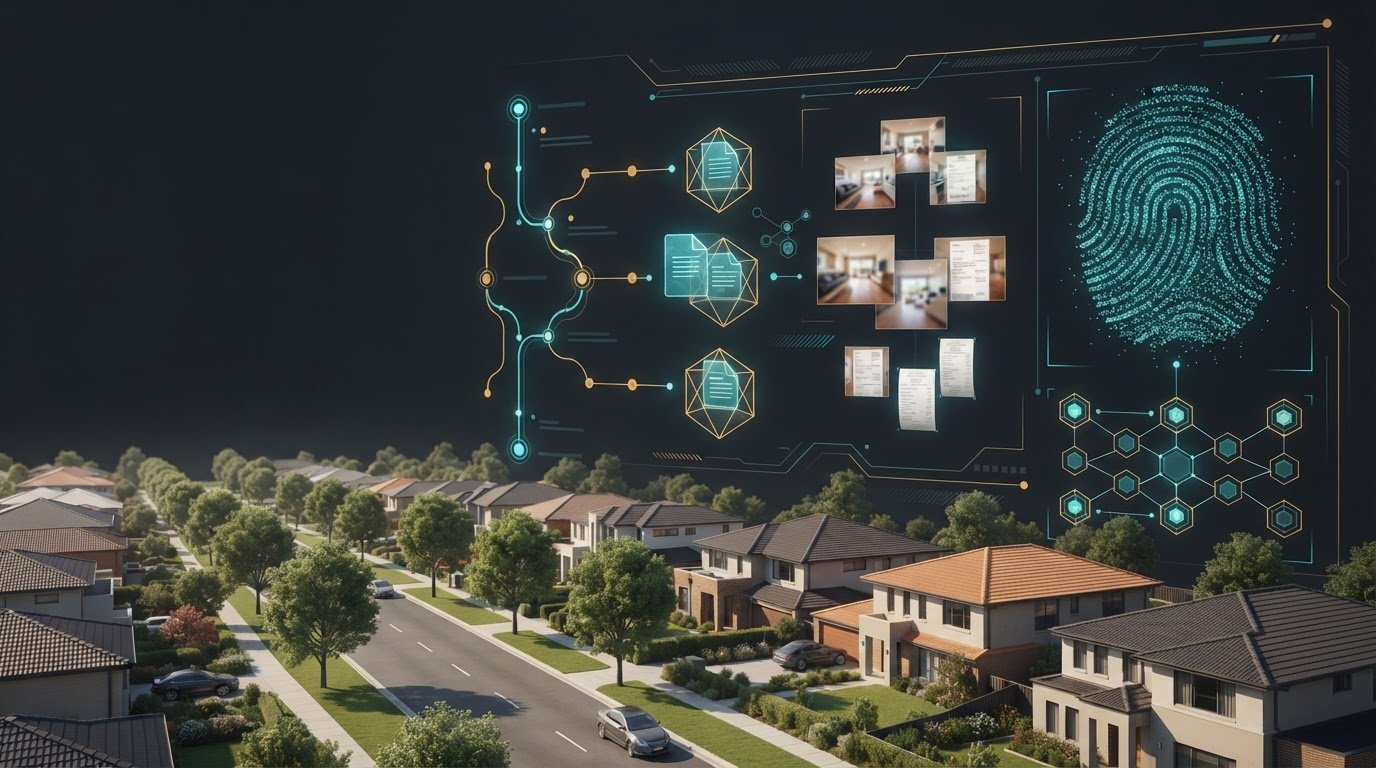
A digital bond record can be difficult to rely on if its handling is unclear. For digital bond evidence storage in Australia, preserve the original files, log who accessed or transferred them, and keep verifiable copies in durable, encrypted storage. A hash can help show whether a file has changed since it was recorded.
Saving a bond document is only the first step. If a tenancy dispute reaches a tribunal, a clear record of where the evidence came from and how it was handled can help explain its integrity. No storage method, however, guarantees that evidence will be accepted.
This guide explains how custody logs, file formats, encryption, storage capacity and hash verification work together for Australian rental bond evidence. You’ll learn what each measure does, why digital files need careful handling, and how organised records can be easier to retrieve and explain if a dispute arises.
Key Takeaways
- Keep a clear custody record showing where bond evidence came from, who handled it and when it moved or was accessed.
- Choose file formats that are practical to preserve and retrieve, and plan for format migration before files become difficult to open.
- Encryption helps protect sensitive records, but access controls and a secure process for handling decryption are also important.
- Estimate storage needs from the evidence you hold, and avoid relying on a single device as the only copy.
- Use hash verification to compare a file’s digital fingerprint over time; the article explains how MD5 and SHA-256 fit into that process.
Chain-of-custody challenges in court
A bond dispute may turn on whether a record shows the property’s condition at a particular time. A clear handling history helps connect each photo, message or inspection document to its source.
Electronic records and signatures
Electronic records and signatures can show what parties recorded or agreed. Australian jurisdictions have their own evidence laws, so the rules depend on where the tenancy dispute is heard. Keep the complete signed document with its surrounding email or message and any later versions. For example, an emailed condition report is more informative when kept with its attachments and reply.
Organise photos, videos and messages so a tribunal can understand their context. Record the room or item shown, who created the file and when it was captured. A photo of a wall may show damage, but a room label and matching entry report help explain its relevance. Keep related messages in sequence, with dates and sender details, rather than presenting isolated screenshots. These steps make the evidence easier to follow and compare.
At the start and end of a tenancy, document each room and relevant fixture consistently. Take wide shots to show the room, then close-ups of marks, appliances or fittings. Label each image with the room and feature, and record observations in the condition report. At the end, repeat the same views where possible. A side-by-side comparison of the kitchen bench, for example, can clarify what changed during the tenancy.
Preserving original files and metadata
Original files retain information such as timestamps and metadata that may help show when and how a record was created. Preserve the camera or phone file before editing, cropping or adding annotations. Keep a separate working copy for labels or highlights, and leave the original unchanged. A screenshot may omit embedded details, so retain the source image and the message or document that accompanied it.
Create a simple custody log whenever evidence is copied, transferred or accessed. Include the file name, person handling it, date, action and storage location. If a property manager emails a report, retain both the received attachment and the original email. Electronic records can be altered or deleted automatically, deliberately or accidentally, so preserve them promptly. Keep backups separate from working files, and record each transfer to make later handling traceable.
Digital material can be mixed with records belonging to other people. If law enforcement seizes co-mingled data, it should remain in safe custody while competing claims about the legality of the seizure are resolved. Investigators should stay within a search warrant’s scope and seek an extension or fresh warrant where appropriate. Established data-preservation and recovery procedures reduce disputes about how evidence was handled. For rental records, a dated log and untouched original provide a practical account of custody.
Durable and open file formats
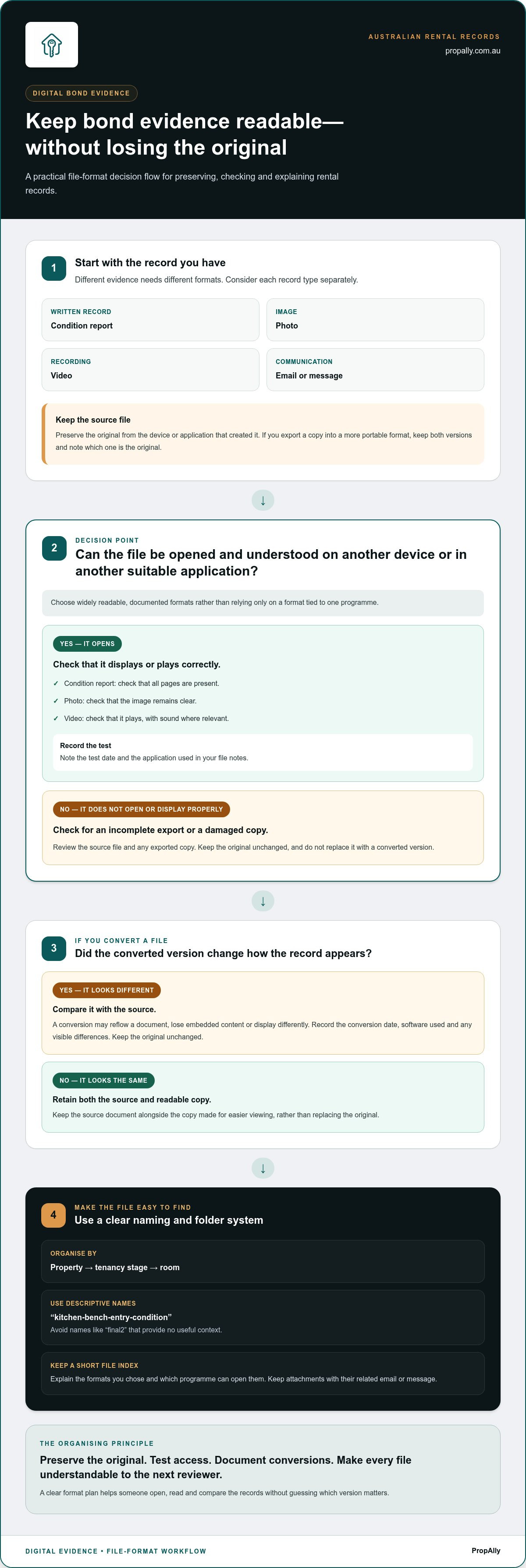
A file is useful as bond evidence only if it can still be opened and understood later. Choose widely readable, documented formats rather than relying solely on a proprietary format tied to one program. Bond University recommends deciding on research data file formats before collecting data, because migrating to a more durable and accessible format can be difficult, expensive or impossible. The same planning principle helps rental records remain usable throughout a tenancy and any later dispute.
Consider each type of rental evidence separately. A condition report, photo, video and email are different records, so one format will not suit them all. Keep the original file from the device or application that created it. If you also export a copy into a more portable format, retain both versions and note which is the original. This gives you a readable working copy without discarding the source material.
Use a consistent naming and folder structure that makes the file’s purpose clear. For example, organise documents by property, tenancy stage and room, then give each file a descriptive name such as “kitchen-bench-entry-condition”. Avoid names like “final2” that provide no useful context. Keep a short file index explaining the chosen formats and which program can open them. That simple record can guide a future reviewer using a different computer or operating system.
Before relying on a file, test that it opens and displays correctly on another device or in another suitable application. Check that all pages of a condition report are present, a photo remains clear, and a video plays with sound where relevant. A successful test today cannot guarantee future access, but it can catch an incomplete export or damaged copy early. Record the test date and application in your file notes.
Control format conversions. A converted document may reflow, lose embedded content or display differently from the original. Compare the converted version with its source, then record the conversion date, software and any visible differences. Keep the original unchanged. If you convert a report for easier viewing, for example, retain the source document alongside the readable copy rather than replacing it.
Review access as tenancy records accumulate. Remove duplicate working copies only after identifying the authoritative version, and preserve attachments with their related email or message. A clear format plan supports later review: the person checking the records can open, read and compare them without guessing which version matters. For Australian rental evidence, durable storage starts with deliberate format choices, not a last-minute conversion after a dispute begins.
Encryption and decryption challenges
Encryption turns readable electronic records into data that requires an authorised key or method to access. For a rental bond dispute, this may affect a phone backup, cloud folder or password-protected inspection report. Encryption protects private tenancy information, but it can also block access if a passphrase is lost or the person who set it up cannot be reached. Plan access before you need the evidence.
Keep the encryption key separate from the encrypted evidence. For example, store a property’s inspection photos in an encrypted archive and its recovery details in a controlled, separate location. Limit access to people with a genuine role, such as the landlord or an authorised representative. Record who can access each location and update that record when a property manager or staff member leaves.
A forgotten password can make an intact file unusable. Keep recovery information current and test that an authorised person can open a sample file. Record the test date and software used. If a cloud account protects bond documents, maintain access to its recovery method too. Signing in successfully on one computer does not prove that another authorised user can retrieve the files.
Some Australian jurisdictions empower law enforcement officials to require people to assist with data access. This may matter if an investigation involves rental records or a device containing both personal and tenancy information. Keep the scope clear by identifying which accounts, devices and files relate to the property. Avoid deleting, resetting or changing a device after an incident, as those actions may affect data relevant to forensic analysis.
Where possible, preserve the original encrypted item during decryption. Make a working copy, record the method and software used, and note who performed the operation. If a tool extracts messages from a phone, keep the output and a log explaining the process. Investigators should follow established procedures when software preserves or recovers data, reducing the risk that handling methods are challenged.
Access controls need to suit everyday property administration. Rental records may contain identity details, bank information or messages unrelated to a bond issue. Use separate folders or permissions so someone reviewing a condition report does not automatically receive every document in the tenancy archive. Review permissions when roles change, and record each approved transfer of encrypted files.
For disputed evidence, involve people with relevant digital expertise early. They can assess whether a locked device, encrypted backup or software-generated export needs specialist handling. The practical aim is to protect sensitive records while preserving a clear account of how authorised access occurred. That balance makes encryption a managed part of evidence handling, rather than a barrier discovered during a bond dispute.
Digital evidence volume and storage
Storage needs depend on evidence type, file size and the number of properties you manage. A consistent protocol keeps records accessible without letting duplicates overwhelm the archive.
Choosing a storage option
A storage option is the place and system used to keep rental evidence, from an email inbox to a dedicated digital records service. Email is convenient for a few attachments, while cloud drives and tenancy apps can group files by property. A dedicated service may offer more structured handling, but compare access controls, search, backup and export features with your actual needs.
For example, a landlord with one condition report might organise it in a labelled cloud folder. An investor managing several properties may need a repeatable structure for leases, reports and correspondence. Free options can work for basic filing, but storage capacity, account access and retrieval methods determine their practical limits.
Keeping bond dispute evidence
Keep records that explain the bond, the tenancy and any claimed change to the property. A useful file set includes the lease, bond lodgement details, entry and exit condition reports, dated photos or videos, rent records, repair invoices and relevant messages. Link each item to its property and tenancy so the sequence is clear.
State and territory tribunals apply their own procedures and evidence laws. Digital condition reports, photos and videos are assessed in context, including their relevance, source and connection to the dispute. No single Australia-wide rule guarantees acceptance.
Evidence storage periods
Keep rental evidence through the bond claim and any related tribunal process, review or enforcement. The appropriate retention period depends on the dispute’s progress and applicable recordkeeping obligations, not one fixed period for every Australian tenancy.
For example, don’t delete an exit report while a bond claim remains unresolved. Once proceedings conclude, consider whether related repair, insurance or accounting records still need to be kept. Documenting the disposal decision helps prevent accidental deletion during an active matter.
Secure cloud storage and costs
Secure cloud storage may be a general cloud drive, a tenancy app or a dedicated records service. Compare user permissions, account recovery, backup arrangements, search and file export. Keep an independent copy of essential records, as a single account or device can become inaccessible.
Costs vary with storage capacity, document volume, retention and included functions. For a small archive, an existing email or cloud account may meet basic needs; larger portfolios may require more organised processing. PropAlly’s Email Basic Add-on and Email Unlimited Add-on are priced by document volume, ranging from 500 to 2,000 documents per month.
Large evidence volumes can make retrieval and storage planning more demanding. Digital evidence analysis across investigative agencies can take months depending on the volume of data and device complexity. ASIC anticipated that increasing data volumes, encryption, cloud computing, virtualisation and new devices and types of evidence would drive change over a multi-year period, and projected it would receive 425 TB of data per annum by 2020. ASIC also received over two million audio files as part of an investigation. Bond University advises researchers not to treat USB drives, external hard drives or individual desktop and laptop computers as the primary storage location for research data, because they pose data-loss risks if not backed up.
Hash verification with MD5 and SHA-256
A hash is a value generated from a file’s contents using a chosen algorithm. Comparing hashes can help show whether a stored copy matches the file recorded earlier. For bond evidence, this provides a practical integrity check for inspection photos, reports or exported messages. It does not establish who created a file, when it was created or whether its contents were accurate from the outset.
MD5 and SHA-256 are different hash algorithms. The same unchanged file processed with the same algorithm should produce the same hash value. If a file’s contents change, its resulting value will usually differ. Record the algorithm beside each value: an MD5 value cannot be compared directly with a SHA-256 value. Consistent recording makes later checks meaningful.
For a rental evidence file, use a repeatable verification sequence:
- Identify the original file and its saved location.
- Use hash software to generate a value, and record the algorithm.
- Store the value with the file’s name, date and custody notes.
- Recalculate the hash after transfer, then compare the result.
For example, generate a value for an entry-condition photo before copying it to another storage location. A matching result after transfer supports the conclusion that the file’s contents remained unchanged during that transfer.
MD5 has known weaknesses for security-sensitive uses, so SHA-256 is generally the stronger choice for checking file integrity. If an older record only has an MD5 value, retain it as part of the historical record, but don’t silently replace its algorithm label. Generate a new SHA-256 value for the current file and record when and how it was created. Keep both values clearly distinguished.
A matching hash has limits. It can help detect changes between checks, but cannot prove that a photo shows the claimed property, that its timestamp is genuine or that the original file was never edited. Pair the hash record with context, such as the property address, room, capture details and related condition report. Together, these details help a reviewer interpret the file and its integrity record.
Use trusted software and keep a record of the tool and method used. If a file is edited, compressed or converted, treat the result as a new file and calculate its hash separately. Keep the original and note how the versions relate. This distinction matters during a bond dispute and can also assist law enforcement if records become relevant to an investigation. A clear hash log makes each verification easier to explain.
For a more organised property evidence workflow, organise rental property records alongside your verification notes.
PropAlly: Starter Plan
PropAlly gives Australian property investors a dashboard to track bond evidence, compliance, cash flow and tax across rental properties. If you want to bring bond records into a more organised property workflow, the Starter Plan is a practical next step. The platform can automatically read statements from agents and inboxes, consolidate information across properties and states, and provide state-specific compliance checklists and bond authority workflows.
As your portfolio grows, the Business Plan is another option. PropAlly also provides ATO-aligned tax calculations to support record organisation, but these are not financial or tax advice. The platform helps centralise oversight; it does not replace preserving original evidence or keeping a clear record of how files were handled.
Explore PropAlly’s plans to find a fit for your rental property recordkeeping.
Make evidence readiness part of your property routine
Set a regular point in your property workflow to review how rental records are created, stored and retrieved. After an inspection, for example, file the completed report with its related evidence and update the record of where it is held. A repeatable routine makes evidence management part of everyday property administration, rather than a task prompted only by a disagreement.
A considered approach to digital bond evidence storage in Australia supports clearer oversight across a portfolio. It also helps you spot gaps early, such as an inaccessible file or missing document, while there’s still time to organise your records. Keep your process practical and consistent with how you manage each tenancy.
If you’re ready to bring property records into a more organised workflow, contact PropAlly about evidence storage. A clearer system starts with a manageable next step, and you can build from there with confidence.
Frequently Asked Questions
What is digital bond evidence storage in Australia?
Digital bond evidence storage in Australia means keeping tenancy records electronically in an organised way so they can be found and understood if a bond disagreement arises. A practical archive can group documents by property and tenancy, then arrange them by event, such as bond payment, inspection, repair request and refund discussion. This timeline connects each record to the decision or issue it relates to, instead of leaving files scattered across inboxes and devices.
What privacy and data-security risks apply when storing rental property photos and documents online?
Online rental records can expose personal details if an account is compromised, a file is shared with the wrong person or access remains after someone’s role ends. Photos may also reveal possessions, security features or when a property is vacant. Reduce exposure by limiting folder permissions, using unique passwords and multi-factor authentication, and reviewing shared access when tenancy arrangements change. Avoid uploading unrelated identity or financial documents to a property evidence folder.