

A growing rental portfolio shouldn’t turn a clear property view into a maze of spreadsheets. Upgrading to a business property dashboard in Australia can bring cash flow, tax, compliance and bond records into one place, organised around each property.
A dashboard should keep pace as your properties and records grow. The right setup makes it easier to move between portfolio-level summaries and property details. An upgrade that doesn’t solve a real reporting or workflow gap, however, can add complexity without adding value.
This guide explains how dashboards support day-to-day oversight, what to assess before changing plans and when a downgrade may make sense. It also covers how to keep property records organised as your portfolio grows, without losing sight of important details.
Key Takeaways
- Use office, portfolio and property-level views to move between an overview of your holdings and the detail for an individual rental property.
- Choose dashboard capacity to match your current rent roll and expected growth, rather than upgrading for features you don’t need.
- An upgrade may be worthwhile when scattered records or limited reporting make it harder to oversee cash flow, compliance or property documents.
- Look for Australian-focused tools that bring together agent statements, tax information, compliance checklists and bond evidence.
- Review your account as your needs change; a lower plan may suit you if you no longer need the additional capacity.
Office, portfolio and property-level drill-down
A useful dashboard connects office-wide oversight with portfolio summaries and individual property records. The right view depends on which decisions you need to make and how quickly you need to trace a transaction to its source.
Portfolio and property views
At office level, managers need a clear picture of activity across the business. A portfolio view groups properties so an investor can review holdings together, then narrow the view by estate, location or ownership structure. At property level, the record should bring relevant income, expenses, documents and compliance tasks into context.
For example, a portfolio summary may flag a property that needs attention. Its detail view should help you identify whether the issue relates to a rent receipt, an agent statement or another document. Consistent categories make it easier to move from a high-level report to the underlying transaction.
Dashboard fit for property users
Australian commercial property owners, investors and managers need different levels of detail. An owner may prioritise cash flow and property documents; an investor may need comparisons across holdings; a manager may need clear task and record visibility. Suitability comes down to whether the dashboard makes those views accessible without forcing users through unrelated information.
Consider how staff move between office, portfolio and property records. A practical test is to follow one transaction from a portfolio summary into its property entry, then identify its supporting record. If each step is clear, the dashboard supports oversight as well as individual follow-up.
Which dashboard is best for Australian commercial property owners, investors, or managers? The best fit is the dashboard that provides the views each role needs, with a clear path from portfolio reporting to property-level records. For an Australian property business, assess how it organises holdings, documents and transactions rather than choosing on a feature list alone.
What Australian tax, privacy and data security rules apply to property dashboards? Using a dashboard doesn’t replace your Australian tax and privacy obligations. Review how it handles access, records, exports and data security, and keep source documents available for your reporting needs.
Do Australian property dashboards integrate with accounting, CRM, or property management software? Integration depends on the dashboard and the systems involved. Some workflows may use a direct connection, while others rely on importing statements or transferring records, so map how each transaction reaches your reporting system before choosing a setup.
Can I migrate property, tenant and financial data when upgrading a dashboard? Migration may involve property records, tenant details, financial entries and documents. Organise your source records, map fields to the new system, transfer the data, then reconcile key entries and retain supporting documents.
- Separate essential records from duplicates before moving data.
- Keep property identifiers consistent across systems.
- Reconcile balances and transaction dates after transfer.
For a business managing several Australian properties, these checks help maintain continuity between office reporting and each property’s record.
Software scalability as rent rolls grow
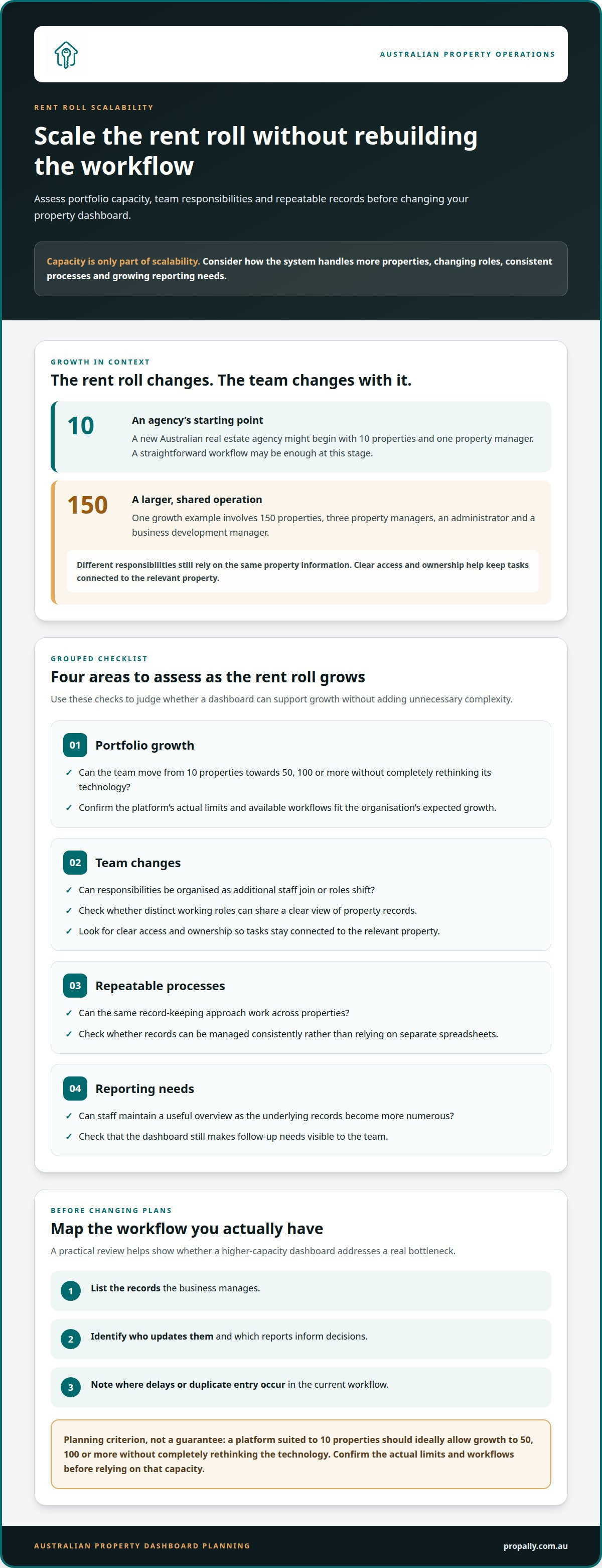
A dashboard that works for a small rent roll can become harder to manage as records, users and workflows expand. Plan for that change early: assess whether the software can support a larger portfolio without forcing the business to rebuild its processes or replace its technology.
A new Australian real estate agency might begin with 10 properties and one property manager. At that stage, a straightforward workflow may be enough. As the rent roll expands, staff need clearer ways to assign work, keep property records consistent and see where follow-up is required. The system should support that shift without making routine tasks unnecessarily complicated.
One growth example involves 150 properties, three property managers, an administrator and a business development manager. That team has different responsibilities, even when everyone relies on the same property information. Consider whether a dashboard can support distinct working roles and preserve a shared view of records. Clear access and ownership help prevent tasks from becoming detached from the relevant property.
Capacity matters, but scalability is about more than the number of properties a system can hold. Review how the platform handles:
- Portfolio growth: Can a team move from 10 properties towards 50, 100 or more without completely rethinking its technology?
- Team changes: Can responsibilities be organised as additional staff join or roles shift?
- Repeatable processes: Can the same record-keeping approach work across properties, rather than relying on separate spreadsheets?
- Reporting needs: Can staff maintain a useful overview while the underlying records become more numerous?
Before upgrading, map your current workflow and expected growth. List the records you manage, who updates them and which reports inform decisions. Note where delays or duplicate entry occur. This gives you a practical way to judge whether a higher-capacity dashboard will address a real bottleneck.
A property management platform suited to 10 properties should ideally allow an agency to grow to 50, 100 or more properties without completely rethinking its technology. Treat that as a planning criterion, not a guarantee of unlimited capacity. Confirm that the platform’s actual limits and available workflows fit the organisation’s expected growth.
If your portfolio spans Australian states, consistent organisation matters. Use shared property identifiers and document categories, while keeping each property’s records distinct. This helps keep reporting coherent as your portfolio grows.
If you’re reviewing how your property records can scale, explore Australian property record management as part of your dashboard assessment.
When an upgrade may be worthwhile
An upgrade makes sense when your current dashboard creates a specific workflow problem. Before upgrading to a business property dashboard in Australia, identify the task you want to improve, such as preparing a report from records held in separate places.
Reasons to consider an upgrade
Consider an upgrade when your current setup makes routine work harder. You may need to combine separate files for a portfolio view or search across folders to find a property document. Identify the recurring task first, then assess whether the higher plan addresses that exact gap.
Look for an operational reason, not simply a longer feature list. You may need clearer oversight across holdings or an easier way to organise records. Match the proposed change to the people, reports and records involved before upgrading your business property dashboard in Australia.
Use this assessment to connect the change to a practical need:
- Record the task: Note where staff repeat data entry or switch between systems.
- Identify the impact: Describe how the current setup affects reporting, document retrieval or follow-up.
- Define the needed change: Specify the capability that would remove the bottleneck.
- Review actual use: Compare the requirement with the features available in the proposed plan.
Upgrade risks and limitations
The main risks are paying for unused capacity, disrupting established workflows and moving incomplete records. A new feature won’t fix inconsistent property names or missing transaction details on its own. Identify those issues before the change and include them in your migration plan.
What are the risks or limitations of upgrading a business property dashboard? A plan change may add complexity, require staff to adjust or leave data gaps if migration isn’t planned. It also won’t solve problems caused by unclear processes rather than software limits.
Before switching, trace one property record through your current system, including a document, a transaction and the report that uses it. Repeat the process in the proposed setup. This can reveal missing fields, changed workflows or manual work that may remain after upgrading.
Separate the plan decision from the migration decision. First identify which capabilities address your need. Then map how records will transfer, how staff will use the new workflow and how you’ll reconcile key entries.
Review the change against a real business task, such as your next reporting run. Compare the result with the original bottleneck and note whether staff use the new capability. If the gap remains, review the process and setup before making further changes.
What does a business property dashboard in Australia include?
An Australian property dashboard can bring cash flow, tax calculations, compliance records and bond evidence together, organised around each rental property. Its value lies in linking statements and documents to the property they relate to, rather than leaving them as separate files.
For cash flow oversight, a dashboard can organise rental income and property expenses. Agent statements can be matched to the relevant property, helping you review transactions alongside their supporting records and see information across your portfolio.
Tax tools can organise property figures for Australian reporting. ATO-aligned calculations can apply Australian tax settings to property information and keep records tied to the relevant rental. A dashboard supports preparation and review, but it isn’t financial or tax advice. Keep source documents available so your accountant or tax professional can interpret the figures for your circumstances.
Compliance tools should reflect the state or territory where a property sits. State-specific checklists can make relevant records and tasks easier to manage across a portfolio that spans jurisdictions. For example, a property in one state can have a different compliance checklist from a property in another. The dashboard’s organisation should make that distinction visible, not flatten every property into one generic list.
Bond records are another useful component. Bond authority workflows can organise evidence and related steps alongside the relevant property record, keeping bond information distinct from rent receipts and other transactions. Make sure the record shows which property the evidence concerns and keeps supporting documents accessible.
Document handling can reduce manual sorting. A system that reads statements from agents and inboxes can extract information for consolidation across multiple properties and states. For example, an investor with separate agent statements can bring those records into a shared view, then trace an entry back to its property and document.
When assessing an Australian dashboard, review how these components connect:
- Property records: Each rental has a distinct place for its financial, compliance and bond information.
- Portfolio reporting: Records from multiple properties can be viewed together without losing property-level detail.
- Australian workflows: Tax calculations, state-specific checklists and bond processes reflect Australian property administration.
- Document capture: Agent statements and inbox documents can feed into organised property records.
Test one property from statement capture through to its cash flow and compliance records. This practical walkthrough shows whether the dashboard connects the information your Australian portfolio needs.
How do I upgrade an existing business property dashboard account?
Start by identifying your current plan, the change you need and who controls billing. Then review the plans available in your account settings. Since menu labels vary between platforms, use the account’s own subscription controls rather than assuming every Australian dashboard has the same steps.
Before changing plans, match the capability you need to a specific task. Note whether you need more document processing, clearer reporting or an easier way to manage property records. This keeps the decision focused on a defined operational need.
Use this sequence to organise the change:
- Review the current account: Record the plan, account owner and existing users.
- Define the requirement: Name the workflow or record-management gap the upgrade should address.
- Compare plan details: Check the available features, limits and billing terms shown in the account.
- Authorise the change: Ask the account owner to apply the selected plan through the platform’s upgrade process.
- Test the result: Confirm the relevant feature works with a real property record and the intended users.
Keep the change controlled. Before authorising an upgrade, identify whether it affects access, billing or existing workflows. If others use the account, tell them which tasks or screens will change. Assign someone to oversee the transition and note any settings that need updating.
After changing plans, test a representative workflow from start to finish. Choose a property and a common task, such as finding its financial record or preparing a portfolio report. Confirm that the information remains accessible, the right people can use the required features and the result addresses the original need.
If your account holds records across Australian states, include a property from each relevant state in your review. Check that records remain distinct by property and jurisdiction. Update staff instructions if information has moved or a workflow has changed.
Keep a short change log with the date, plan selected, approving account owner and tests completed. This gives the business a clear record if staff later need to understand why the account changed. It also makes a future review easier: compare the original requirement with actual use, then decide whether the current setup still fits.
Ready to organise your property dashboard account around your portfolio needs? Review your business dashboard options and select the setup that fits your next stage.
PropAlly: Business Plan
PropAlly’s Business Plan is for Australian property investors who manage records across rental properties. Its dashboard brings together cash flow, tax calculations, state-specific compliance checklists and bond evidence, organised by property.
PropAlly can read agent statements and inbox documents, then consolidate information across multiple properties and states. Its dashboard helps investors manage property records without acting as a property manager or tax adviser. For a smaller portfolio, PropAlly also offers the Starter Plan.
Explore PropAlly’s Business Plan to see how its dashboard can bring your Australian property records together.
Make your next dashboard decision deliberate
Before upgrading to a business property dashboard in Australia, define what a better day-to-day workflow would look like. Choose one recurring task that currently takes extra effort and decide what improvement would make a difference. A clear measure keeps the decision grounded in your business needs, not just the features on a plan page.
Keep your review practical. Consider who uses the account, which property records matter most and how your needs may change as your portfolio evolves. Revisit the setup when your priorities shift. A measured approach helps keep administrative decisions connected to your property goals.
If you’re ready to consider the next step, discuss an upgrade with PropAlly. A clearer plan starts with knowing what your portfolio needs now, and what it may need next.
Frequently Asked Questions
What features are included in each dashboard subscription tier?
PropAlly’s tiers differ by property capacity and monthly usage limits. Free covers one property, with three PDF imports monthly and five expense extractions. Starter supports one to four properties, with 20 PDF imports and 50 expense extractions monthly. Pro supports up to 10 properties, with 100 of each and 500 email documents included monthly. Business supports up to 20 properties, with unlimited PDF imports and expense extractions, plus 2,000 email documents monthly. All tiers include property dashboard tools.