

Use a bank property tracker for a quick view of account balances and transactions. Choose a dedicated investor dashboard when you need to organise cash flow, property values, loans and equity by investment property. The choice between bank property tracker tools and a dedicated investor dashboard comes down to whether you’re monitoring money in accounts or managing the wider picture of your Australian property portfolio.
Bank tools can feel like the easiest place to start, especially when your finances are centred on one institution. But a bank view may not bring rental income, expenses, loan balances and estimated values together in the way you need to assess each property.
This comparison explains how the options differ across cash flow, automation, property values, loans and equity, so you can choose a setup that fits the way you invest. It also covers where spreadsheets and general accounting platforms fit, when manual tracking becomes more demanding, and what to prioritise as your portfolio grows. Clear records help you understand each property’s position and spot gaps before they become harder to resolve.
Key Takeaways
- Use a bank tracker for a simple view of transactions and balances; choose a dedicated property dashboard when you need to see each investment’s finances together.
- Set up income and expense records by property so you can review cash flow and keep deductible items organised.
- Spreadsheets can suit a single property, but tracking monthly statements across three or more properties can become time-consuming.
- Look for tools that reduce repetitive entry by reading property-related statements and bringing information into one place.
- Compare tools by how clearly they track cash flow, property values, loans and equity, then choose the setup that fits your portfolio.
Why use a purpose-built solution for property investors?
Bank trackers show activity in connected accounts; investor dashboards organise information around properties and portfolio decisions. For multi-property tracking, a dashboard can group rental income, expenses, loans and records into property-specific views. A bank tracker centres on transactions, not investment assets.
Australian bank apps and online banking tools commonly show account balances, transaction histories and spending summaries. Features vary by institution. These tools focus on banking activity, so a rental payment may appear without being linked to the property it relates to. Investors with properties and loans across different institutions may need to bring several account views together.
Privacy matters when you link financial accounts to a dashboard. Connected access can expose sensitive transaction details if login credentials or shared data are compromised. Before linking an account, review the access permissions and privacy information. Use read-only access where available, protect accounts with multi-factor authentication, and disconnect access you no longer need.
A portfolio dashboard is most useful when it separates assets, rather than simply combining balances. For example, an investor with rentals in different states may need distinct records for each property’s rent, loan costs, maintenance and documents. Property-by-property views make those differences easier to see. If you also track other investments, check whether the dashboard supports those asset types.
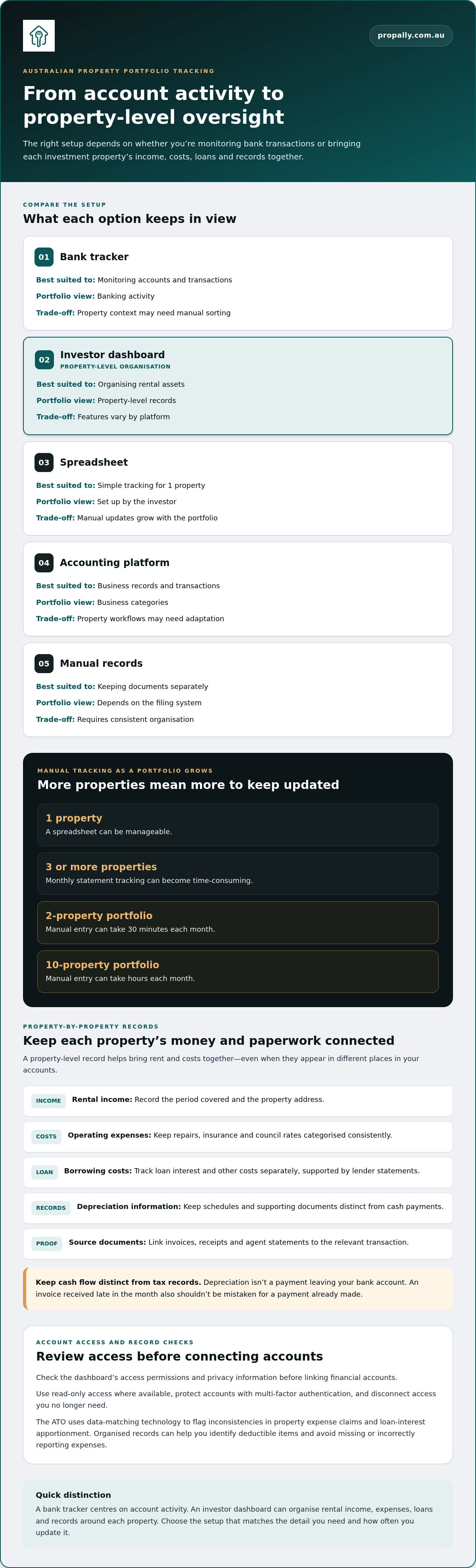
Spreadsheets can be manageable for 1 property. With monthly statements, 3 or more properties can make manual tracking feel like a second job. Entering figures for a 2-property portfolio can take 30 minutes each month; manual entry for a 10-property portfolio can take hours each month. Choose a setup based on the detail you need and how often you update it.
The ATO uses data-matching technology to flag inconsistencies in property expense claims and loan-interest apportionment. Organised records can help you identify deductible items and avoid missing or incorrectly reporting expenses. General small-business accounting platforms focus on invoicing, payroll and business expenses, so property-specific tracking may require additional categorisation.
| Option | Best suited to | Portfolio view | Key trade-off |
|---|---|---|---|
| Bank tracker | Monitoring accounts and transactions | Banking activity | Property context may need manual sorting |
| Investor dashboard | Organising rental assets | Property-level records | Features vary by platform |
| Spreadsheet | Simple tracking for 1 property | Set up by the investor | Manual updates grow with the portfolio |
| Accounting platform | Business records and transactions | Business categories | Property workflows may need adaptation |
| Manual records | Keeping documents separately | Depends on the filing system | Requires consistent organisation |
Choose a bank tracker for account activity, or an investor dashboard when property-by-property oversight is your priority.
Per-property income, expenses and cash flow
A rental property’s cash flow is clearer when income and costs are grouped by property. A weekly rent deposit may look healthy in your bank account, while insurance, repairs, council rates and loan repayments appear elsewhere. A property-level record brings those movements together, showing which costs relate to each investment and when they occurred.
Start with a separate record for each property. For example, label rent from one property separately from rent received for another. Record the payment date, amount, source and property. Then categorise expenses consistently, so recurring bills and one-off repairs don’t disappear among everyday transactions.
For each property, keep an organised record of:
- Rental income, including the period covered and the property address.
- Operating expenses, such as repairs, insurance and council rates.
- Loan interest and other borrowing-related costs, supported by lender statements.
- Depreciation information and supporting documents, kept distinct from cash payments.
- Invoices, receipts and agent statements linked to the relevant transaction.
This structure helps you distinguish cash movement from tax records. Depreciation isn’t a payment leaving your bank account, so mixing it with repairs or loan repayments can distort your cash-flow view. Keep depreciation schedules and related documents with the property record. Track borrowing costs separately from interest, using lender paperwork to identify each item clearly.
Use a simple monthly routine. First, match rent entries against the managing agent’s statement or bank transaction. Next, assign each expense to its property and category. Finally, compare the period’s income with costs paid, and note unpaid invoices separately. For example, an invoice received late in the month shouldn’t be mistaken for a payment already made.
A platform is only useful if it preserves that property-level context accurately. If a transaction is imported without an address or category, review and assign it before relying on the totals. Keep source documents attached or filed consistently. This makes it easier to trace a figure back to an agent statement, invoice or lender record.
Deductible expenses need careful records. Tracking eligible property costs can help you avoid missing or incorrectly reporting expenses. Retain evidence and categorise items accurately, but don’t treat an app label as proof of tax treatment. An accountant can apply the relevant rules to your circumstances. Clean records make that review more straightforward.
Review each property individually, then compare properties across your portfolio. This can show whether rental income is being offset by recurring costs, a large repair or changing loan expenses. A consistent monthly process turns scattered entries into a usable cash-flow picture without confusing accounting records with cash actually available.
Manual data entry versus automation
Manual entry gives you control over every category, but each transaction needs attention. Automation can import transactions or read statements, then organise information for your review. The practical difference is where you spend your time: entering routine details or checking exceptions and correcting classifications.
Investor dashboards can connect to Australian bank accounts, loans and property data when the relevant feeds or import options are supported. Bank transactions may flow through an account connection, while loan details and agent statements may need separate feeds, uploads or manual updates. Coverage varies by platform and data source.
A useful workflow starts with the source document. An agent statement, for example, records rent received and expenses paid for a rental. An automated system may extract those entries, but you still need to confirm the property, date, category and amount. Treat imported figures as a starting point, not a substitute for checking the statement.
Use a regular review process:
- Match imported bank transactions against the relevant account statement.
- Assign each rent receipt or expense to the correct property.
- Review uncategorised entries, duplicate imports and unusual amounts.
- Compare the resulting reports with agent, bank and lender documents.
- Keep original statements and invoices with the records they support.
These checks can catch common errors. A plumbing invoice might be imported twice if an upload overlaps with an account feed. A transfer between your own accounts might appear as income unless labelled correctly. A property dashboard can help surface these entries, but you remain responsible for resolving mismatches before relying on the totals.
Automation also depends on data quality. An agent statement with a clear property address and transaction description is easier to classify than a generic bank narration. Text recognition may capture a document’s contents, but unclear scans or unusual layouts can require correction. Keep statements readable and compare extracted details with the source.
Manual tracking remains workable when your records are simple and updated consistently. A spreadsheet can preserve your chosen categories, but you’ll need to enter each transaction and maintain the formulas. Automation suits investors who want to reduce repetitive entry across bank activity and property documents. Neither approach removes the need to retain source records or check reports.
Choose based on the work you want to manage. If you prefer direct control and have straightforward records, manual entry may suit you. If statements arrive through several channels, prioritise a platform that can consolidate those sources and flag entries for review. Keep a consistent approval step before using totals for decisions or tax records.
Property values, loans and equity tracking
A bank tracker can show a loan balance, but that figure alone doesn’t show an investment property’s overall position. Pair the outstanding loan with an estimated property value to calculate estimated equity. A dedicated dashboard can display both figures alongside the property, making their relationship easier to review without combining details from separate accounts.
For a simple estimate, subtract the loan balance from the property’s estimated value. If a rental property’s recorded value is higher than its current loan balance, the difference is its estimated equity. This is a monitoring figure, not a statement of how much you can borrow or access.
Keep each input traceable. Record where a value came from and when it was entered. An agent’s appraisal, a valuation document and an online estimate may produce different figures because they use different methods and information. Store the source and date with the value, rather than presenting an undated estimate as a current market valuation.
Loan balances also need context. A lender statement can show the outstanding amount, while an account view may display other loan activity. Record the relevant loan against the correct property and distinguish the loan balance from available redraw or offset funds. These figures describe different things and shouldn’t be combined into one equity number.
A useful property record brings together:
- The property address and ownership details used in your records.
- The estimated value, its source and the date recorded.
- The lender and loan account associated with the property.
- The outstanding balance and the statement date.
- Any notes explaining a changed estimate or loan arrangement.
If a property’s estimated value changes in your records, update the estimate and retain its previous date and source. Then compare it with the latest loan statement. This creates a visible history instead of silently replacing an old figure, helping you understand whether a change comes from the estimate or the debt balance.
A dashboard’s value depends on how clearly it presents those inputs. Look for separate property records, visible update dates and a way to correct an estimate or loan figure. If a bank tracker only shows accounts held with that institution, loans elsewhere may need to be entered separately. A consolidated view can help, but only if figures are current and labelled correctly.
Use estimated equity as a monitoring measure, not as a borrowing decision. Property values can change, and the displayed amount depends on the estimate and recorded debt. Keep source documents with the figures, update them when new information arrives, and compare each property individually before reviewing the portfolio total.
Property investment software comparisons in Australia
Australian investors can compare bank trackers, dedicated dashboards, spreadsheets, accounting platforms and document systems. Dedicated dashboards can bring property cash flow, records and portfolio information into one view, while options vary in setup, automation and property-specific detail.
Property investment software options
A bank tracker focuses on transactions within its banking environment. A spreadsheet lets you create custom property categories, but you maintain its entries and formulas. General accounting software is structured around business transactions such as invoices and expenses. A document folder stores source records but doesn’t calculate a portfolio view. Each option balances setup effort and property context differently.
| Option | Primary view | Property detail | Trade-off |
|---|---|---|---|
| Bank tracker | Account activity | May need manual property labels | Centres on banking |
| Dedicated dashboard | Investment portfolio | Can organise records by property | Capabilities vary by platform |
| Spreadsheet | Custom data fields | Set by the investor | Requires ongoing maintenance |
| Accounting software | Business transactions | Categories may need adapting | Not necessarily property-led |
| Document folder | Stored files | Depends on file naming | Limited automatic analysis |
Dedicated dashboard features
Dedicated property dashboards are designed to organise information around investment assets. Depending on the platform, features may include property-level cash flow, expense records, loan details, document storage, compliance tasks and portfolio reports. The defining difference from a bank tracker is a property-centred structure, rather than an account-centred transaction list.
Check the workflow, not just the feature list. If you own rentals in different states, a useful system should keep each property’s records distinct and show relevant compliance tasks by state. If it can read agent statements, check that you can review extracted entries and assign them to the correct property before they appear in reports.
Compare tools with the same practical test. Choose a rental property and follow a rent payment, an expense invoice and a loan statement through each option. Note whether you can find the supporting document, identify the property and understand the resulting cash-flow record without rebuilding it elsewhere.
Also assess the outputs you need. If you’re preparing records for an accountant, you may prioritise exportable transaction details and supporting documents. For portfolio reviews, consolidated reports alongside property-level views may matter more. A tool that tracks compliance or bond evidence can suit investors managing properties across Australian states, while a simple account tracker may be enough for banking activity.
The deciding factor is the job you need the software to do. Choose a dedicated dashboard for property-centred oversight, a bank tracker for account monitoring, or a spreadsheet when custom control matters more than automation. Compare data capture, review steps, records and reports against your actual investment workflow.
PropAlly: Starter Plan
PropAlly’s Starter Plan gives Australian property investors a place to organise rental records and monitor property finances. Its dashboard tracks cash flow, tax, compliance and bond evidence for each rental, bringing separate records into a clearer view.
Turn to PropAlly when bank transactions alone don’t provide enough property-level detail, or when managing statements across properties and states creates extra administration. PropAlly can automatically read statements from agents and inboxes, consolidate information, and provide state-specific compliance checklists, bond authority workflows and ATO-aligned tax calculations. These tools support record-keeping; they aren’t property management or financial and tax advice.
To organise your Australian rental portfolio, visit PropAlly online and explore the Starter Plan.
Make your next tracking decision with confidence
Choosing between bank property tracker tools and a dedicated investor dashboard is an opportunity to set a clear standard for managing property information. Decide which records you want at your fingertips, how often you’ll update them, and which tasks you’d prefer to automate. Use those priorities to guide your next step, rather than adding another tool without a defined role.
For an Australian portfolio, PropAlly offers the Starter Plan, Pro Plan and Business Plan. Choose the plan that suits your property record-keeping needs, then build a consistent process around it. The aim is practical: know where your information sits and make your next review easier to complete.
To discuss your options and take the next step, contact PropAlly. A more organised approach can start with one deliberate choice.
Frequently Asked Questions
Which Tracker Should You Choose?
Choose a bank tracker if you mainly need to monitor transactions within one banking environment. Choose an investor dashboard if you want property information organised separately from everyday banking. An investor with loans at different lenders, for example, may prefer a consolidated view, while someone reviewing a single account may find their bank’s tools sufficient. Match the tool to the decisions you need to make, not simply the number of features it advertises.
Which Australian investor dashboards track rental income, expenses, loans and equity?
Australian property investor dashboards can combine rental records with loan and equity tracking, but features vary between platforms. PropAlly’s Cashflow tools provide property and portfolio views, including equity and loan-to-value ratio (LVR) monitoring. Its Investor calculators also include an Equity Tracker. Compare whether a dashboard keeps each property’s figures distinct and lets you review the inputs behind an estimate, rather than relying on a portfolio total alone.
What are the prices of Australian property investor dashboard tools?
Australian dashboard pricing depends on the platform’s plan structure, property limits and included automation. Optional document processing can also affect the total. Compare the billing period, included features and any usage-based extras, then calculate the cost against the workflow you’ll actually use. For PropAlly, pricing depends on the selected plan and add-ons, and is provided after a quote request. Don’t compare a basic account tracker with a property dashboard as if they offer identical functions.
How do bank trackers and investor dashboards handle tax reports and rental property expenses?
Bank trackers record account transactions, while a property dashboard can categorise rental expenses and organise tax-related records by property. PropAlly’s PropertyTax tools categorise expenses and track Division 40 and Division 43 depreciation, with a downloadable tax pack for an accountant. For example, keep an invoice’s source document alongside its category. Software can organise records, but it doesn’t replace an accountant’s advice about how an item applies to your tax return.
How to choose between a bank property tracker and a dedicated investor dashboard?
Test both against a real task before committing. Take a recent rental statement and ask: can you identify the property, find its supporting document and see the figure you need without rebuilding the record elsewhere? Then check account connections, export options, privacy controls and how you’ll correct errors. The choice between bank property tracker tools and a dedicated investor dashboard becomes clearer when you compare the work each removes from your regular routine.