

Recurring invoices are easier to manage when a parser matches supplier details, property references, dates and line items, then flags changes for review. An automated invoice parser for property investors in Australia can organise repeat documents instead of leaving you to compare each one manually. The important distinction is between a familiar pattern and an exception, such as a changed amount or a charge assigned to the wrong property.
This matters when invoices arrive with rental statements, agent correspondence and batches of files. A document can be captured correctly but categorised incorrectly, or entered twice. Good processing combines structured data extraction with a clear review process for anything that does not match.
This guide explains how recurring invoices, property statements and bulk uploads are captured, categorised and checked. You’ll learn what a parser can extract, how it handles repeat charges and where human review remains important. Use these checks to assess whether invoice parsing can make your Australian property records easier to oversee.
Key Takeaways
- Recurring invoices can be matched using supplier details, property references and line items, with changes flagged for review.
- Check extracted statement lines against the original document before relying on their categories or totals.
- Separate rental and settlement statements from standalone bills to reduce the risk of recording the same charge twice.
- Organise bulk uploads by property and document type so duplicates and misclassified files are easier to spot.
- Use PropAlly’s Starter Plan to bring property records together when you want a clearer view of statements and rental data.
Automated extraction and categorisation of property statement lines
An automated parser reads invoice fields and property statement lines, then organises them for review. For Australian investors, check that each extracted amount remains traceable to its source document and the correct property.
Australian property investors can use invoice parsers within accounting platforms, dedicated document-capture tools or property-focused record systems. An automated invoice parser for property investors in Australia should handle recurring supplier documents and statement lines, while letting you review the captured data before it reaches accounting records.
Invoice detail extraction
Automated extraction reads details such as supplier name, invoice date, reference and amounts from a digital document. AI-powered extraction can interpret different layouts, but scanned invoices and unclear descriptions may still need manual review. Test a representative file, such as a recurring plumbing invoice, and check that you can compare the extracted record with the original.
GST, ABN and line-item capture
Check whether the parser separates the supplier’s ABN, GST amount, invoice date and individual line items into distinct fields. For a property management statement, rent received should remain separate from the management fee, not merge into one figure. Compare the fields with the source document. Accurate extraction helps with review, but does not determine whether a GST credit applies.
Which tools capture these fields accurately? Test the same Australian invoice in each tool and compare the ABN, GST, supplier, date and line-item descriptions with the original. Accuracy depends on document quality, layout and field separation, so review exceptions rather than relying on a single extracted total.
Which parser is best, and how do features and pricing compare? The best fit depends on whether you need statement-line categorisation, recurring supplier matching, accounting exports or property-level records. Pricing models vary by provider. PropAlly publishes its plans on its pricing page; compare document-volume limits, included processing features and any email-automation add-on.
What GST and ATO record-keeping requirements apply? Use the parser to organise invoices and supporting records, but retain the source documents and review GST treatment against the transaction. Document extraction does not establish whether an expense is deductible or how GST applies. Check the underlying transaction and seek advice from a registered tax agent where needed.
What security and privacy risks should investors consider? Invoices can contain names, addresses, bank details and property identifiers. Before uploading, check who can access the documents, where they are stored, how long they are retained and how to remove them. Avoid sending sensitive records to a public AI tool unless you understand how it handles data.
For a practical accuracy check, upload an invoice and a property statement. Confirm the property assignment, supplier, date, GST field and line items, then compare the saved record with each source before using it in accounting.
AI hallucination and data accuracy risks
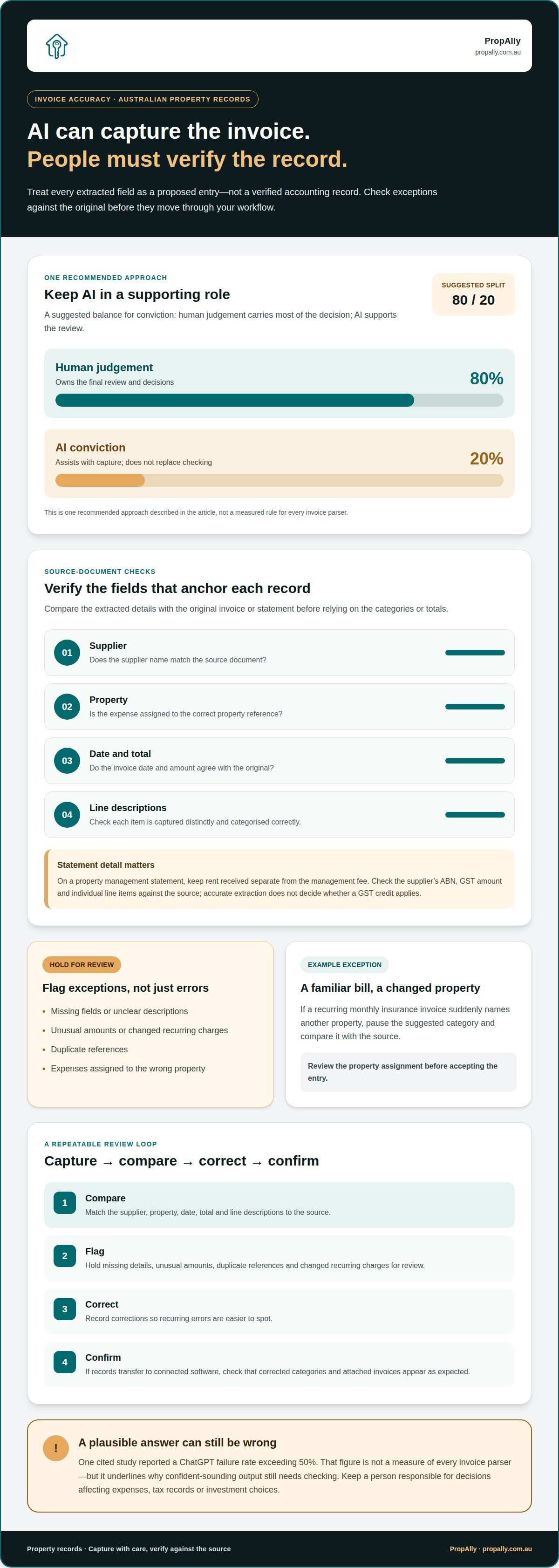
AI can misread an invoice, infer a missing detail or assign an expense to the wrong property. Even if the supplier name is right, the invoice date, GST amount or account category may be wrong. Treat each extracted field as a proposed entry, not a verified accounting record. Compare exceptions with the original before they move through your workflow.
Hallucinations can look plausible. A model might complete an obscured reference number or label a repair as a capital improvement without enough context. Confident-sounding output still needs checking against the source document. Keep a person responsible for decisions that affect expenses, tax records or investment choices.
Use a repeatable review process. Compare the supplier, property, date, total and line descriptions with the source. Flag missing fields, unusual amounts, duplicate references and changes to recurring charges. For example, if a monthly insurance invoice suddenly names another property, hold it for review rather than accepting the suggested category. Record corrections so recurring errors are easier to spot.
Can invoice parsers integrate with Xero, MYOB, QuickBooks or property management software? Some parsers connect with accounting platforms such as Xero, MYOB and QuickBooks, or transfer data to property management software. Connection methods and available fields vary. Test whether property references, tax details and corrected categories carry across with each record.
Portfolio migration needs the same care. Before moving historical invoices, organise source files by property, supplier and financial period. Import a small sample, then compare the resulting records with the originals. Check that opening balances, expense categories, document links and property labels remain consistent. Keep source files intact until you have reconciled the new records.
Real-time syncing can reduce delays between document capture and accounting, but it does not remove the need for review. Check when the software last synced, whether failed transfers are visible and how edits in one system appear in another. Test the process by correcting a sample expense, then confirming the revised category and attached invoice appear in the connected account.
For investment decisions, keep AI’s role proportionate. Use extracted figures as inputs for review, not as a substitute for checking the underlying property, cash flow and supporting records. A parser organises data; it doesn’t establish whether an expense is appropriate for your investment.
To keep those records together across properties, explore property portfolio tracking as part of your review workflow.
Automated capture of settlement statements and rental statements
Settlement and rental statements bring property income and costs into one document, but their layouts differ. A parser can capture dates, descriptions, amounts and property references, then organise the fields for review. For example, keep rent received separate from agent fees before transferring figures to accounting records. Connecting each entry to its source makes later checks more straightforward.
A settlement statement can include proceeds, adjustments and transaction costs. Capture each line separately rather than treating the final balance as a single income or expense figure. Match the document to the property and settlement date, then compare extracted amounts with the source. This helps distinguish a sale-related record from an ongoing rental expense.
Rental statements often combine rent, management charges and other adjustments. Keeping these lines separate shows how the statement reconciles to cash received and gives you a clear starting point for checking the tenant’s rental record against the property’s account activity.
A spreadsheet can provide a simple rental property tracking workflow. Create a row for each transaction, with columns for property, date, supplier or agent, description, amount and category. Add the filename or a link to the supporting statement. Record an inspection invoice separately from the inspection note. This structure makes it easier to filter expenses by property and compare monthly activity.
For cash-flow analysis, group rental income and property expenses by period and property. A spreadsheet can calculate the difference between income received and recorded outgoings. A rental yield calculation compares rental income with the property’s purchase price. Keep assumptions visible, including whether income is gross or net of agent charges. Clear inputs support useful comparisons without confusing cash flow with investment return.
How can invoice parsing help with rental property deductions and tax reporting? It can capture invoice details, organise expenses by property and retain a trail to supporting documents. These records can help prepare tax information, but an extracted category alone does not establish that a cost is deductible. Review the transaction and its context before reporting it.
Use the same review sequence for each statement: confirm the property, compare every amount, check the category, then reconcile the total against the account record. Keep corrections with the original document. This helps catch a missing fee or misread rent line before it affects cash-flow summaries or tax preparation. Record tenant rent, agent fees and inspection invoices separately.
Distinguishing statements from bills to prevent double-counting
A property statement may report a bill that also arrives as a separate document. If both are recorded as expenses, portfolio costs are overstated. The parser should help distinguish a transaction notice, supporting bill and summary statement, while preserving the relationship between them. Review the source documents before accepting the expense record.
For each document, compare the supplier, property, description, amount, date and reference. A council rates notice is a bill; an agent’s statement may simply show that rates were paid or charged. Treating both as separate expenses risks recording the same obligation twice. Attach the underlying bill to the statement entry, or mark it as supporting evidence rather than a new charge.
The same distinction applies to water bills, insurance premiums and strata levies. A water account may show a direct charge, while a rental statement may record an amount the agent paid on the owner’s behalf. An insurance schedule describes cover but is not necessarily an invoice. A levy notice lists amounts for a property, while a payment record shows the transaction. Classify documents by purpose, not keywords alone.
Review whether a statement line represents a payment, reimbursement or new payable amount. The document date and supplier reference can help distinguish repeat charges from the same bill appearing twice.
Owners and landlords need visibility beyond the expense total. Look for property-level views of rent received, bills and maintenance costs, with links to supporting documents. This lets you trace a maintenance charge from invoice to agent statement instead of searching through unlabelled files. Clear property records also make it faster to review statements that cover multiple properties.
Use a consistent workflow for each uploaded statement:
- Identify whether the document is a bill, payment record or summary.
- Match the property, supplier, amount and reference against existing records.
- Link supporting bills to statement lines instead of creating duplicate expenses.
- Review unmatched charges and confirm their meaning before categorising them.
Keep separate records where the statement shows a payment and the bill shows the original charge. They serve different purposes, but should connect to the same expense. A clear audit trail helps owners see what was charged, what was paid and which document supports each entry. The same approach works for council rates, water, insurance, strata levies and maintenance invoices across an Australian rental portfolio.
Bulk invoice uploads
Bulk uploads let investors submit several property invoices together rather than processing files one at a time. For portfolios with multiple properties or entities, the workflow should assign each document to the correct record before creating reports.
Batch invoice uploads
A batch upload may include supplier invoices, maintenance receipts and agency documents. The parser reads each file, separates documents and prepares captured details for review. Look for a processing queue that clearly shows which files succeeded, need attention or could not be read. An upside-down scan, for example, should be easy to identify and replace without holding up the other files.
Prepare the batch before uploading. Use a consistent file structure, such as folders by property or financial period, and descriptive filenames. Separate combined PDFs if they contain unrelated invoices. After processing, compare the number of documents with the upload queue, then open exceptions and confirm key fields. This helps catch missing files and incomplete processing.
Agencies may send documents by email, through a portal or in downloadable statement bundles. Record the source and upload date for each batch. This context helps distinguish a new invoice from an older copy received through another channel. Review duplicate alerts before approving records, especially when the supplier sends an invoice directly and includes it in an agency package.
Invoices across properties and entities
Invoice automation can organise documents across properties and ownership entities using property identifiers, supplier details and assigned account records. Check that you can review and correct assignments before posting. A shared maintenance supplier, for example, may invoice two properties, so each line needs the correct property and entity.
Use consistent matching rules for incoming files. Keep property names, entity labels and account categories consistent across the portfolio. If an invoice lacks a clear property reference, send it to a review queue rather than assigning it automatically. This keeps reports useful when you need to separate property expenses from entity-level costs.
Before adopting a bulk workflow, test it with a mixed batch: an agency statement, a maintenance invoice and a utility bill. Confirm that each document appears once, has the intended property and entity, and retains its source file. Then compare the resulting reports with the uploaded documents. A controlled test reveals workflow gaps before larger batches become routine.
- Keep a record of each upload batch and its source.
- Review unmatched documents before assigning them.
- Compare processed files with the original upload set.
- Check reports for property and entity allocation errors.
For a more organised view across Australian rental properties, explore property portfolio tracking and keep incoming records connected to the right property.
PropAlly: Starter Plan
PropAlly’s Starter Plan gives Australian property investors a place to organise property records and oversee their portfolio. Its statement tools help organise uploaded documents. Email automation is a separate add-on for Free and Starter plans and is included in Pro and Business plans, subject to their document limits. Check the pricing page for current inclusions.
Use PropAlly to track cash flow, compliance, bond evidence and property-related tax information. State-specific compliance checklists and bond authority workflows help organise records by property, while ATO-aligned tax calculations support clearer financial tracking. These tools organise information, but do not provide financial or tax advice.
The Starter Plan is a practical starting point if you want a more organised view of rental records. Investors managing larger portfolios can consider the Business Plan. Explore PropAlly at propally.com.au.
Make your next property record easier to manage
Choose a process that fits the documents you receive and the way you review your portfolio. Start with a representative set of invoices and statements, then decide how each record should be organised, checked and retained. This gives you a practical basis for assessing whether an automated invoice parser for property investors in Australia fits your workflow.
PropAlly offers Starter Plan, Pro Plan and Business Plan options for investors organising property information. Consider how you want to bring records from agents and inboxes together, and what level of portfolio oversight suits you.
Clear records support more deliberate decisions. Put a practical document process in place, then build on it as your investment administration evolves.
Contact PropAlly about invoice parsing to explore the next step for your property records.
Frequently Asked Questions
So what would I actually do?
Start with one property and gather a sample of its recent invoices, agent emails and account records. Decide which details to record, such as supplier, property, date, amount and expense category. Run the documents through a parser, compare the results with the originals and correct errors. Once the workflow is reliable, apply the same naming and review rules across your portfolio.
How much do invoice scanning and accounts payable tools cost in Australia?
Costs depend on the tool’s pricing model, document volume, property count, processing limits and integrations. Compare the full monthly cost, including separate charges for email capture or extra documents, rather than focusing on the base subscription. Also check whether review and export features are included. For a fair comparison, test each option against the same document workload.
How accurate are AI invoice parsers for Australian invoices, receipts and handwritten documents?
Accuracy varies with scan quality, document layout, handwriting and how clearly invoice fields are labelled. A clean digital invoice is generally easier to read than a faded receipt or handwritten note. Test representative Australian documents, including a GST invoice and a property-related receipt, then compare the extracted details with the originals. Send unclear or mismatched fields for human review before using them in accounts.
How to set up an automated invoice workflow for an Australian rental property portfolio?
Set up the workflow with consistent property names, entities and expense categories. Choose where invoices arrive, then connect the capture method to your accounting process. Upload a small sample, check assignments and tax fields, and resolve duplicates before expanding. Review exceptions and failed imports regularly. Keep source documents accessible so you can trace each report entry back to its invoice.
Which tools extract GST, ABN, supplier, invoice date and line items accurately?
Test the same Australian invoice in each tool and compare its ABN, GST, supplier, date and line-item descriptions with the original. Accuracy depends on document quality, layout and field separation, so review exceptions.
What automated invoice parsers are available for Australian property investors?
Australian property investors can use invoice parsers built into accounting platforms, dedicated document-capture tools or property-focused systems such as PropAlly. Look for recurring supplier matching, statement-line categorisation and property-level records, with extracted fields available for review.
Which invoice parser is best for Australian property investors: features and pricing comparison?
The best fit depends on whether you need statement-line categorisation, recurring supplier matching, accounting exports or property-level records. Pricing models vary by provider. PropAlly publishes its plans on its pricing page; compare document-volume limits, included processing features and any email-automation add-on.
Editorial update: 4 November 2026
This update clarifies plan inclusions and record-review guidance. See PropAlly’s current plans and the ATO’s guidance on capital gains tax records. This is general information, not personalised tax advice.