
What if a maintenance bill appears twice, once as an invoice and again in a property manager’s statement? Automated inbox syncing for landlords in Australia can help organise incoming records so you can identify the original expense and avoid counting it twice. Connect the relevant inboxes, then use a clear process to match statements, bills and properties.
When rentals involve different agents or states, emails and attachments can quickly become difficult to reconcile. Automation can bring records into a more consistent workflow, but clear property labels and a reliable way to distinguish an original document from a summary of the same transaction are still essential.
This guide explains how to get inbox syncing up and running, what to organise before connecting an inbox, and how to reduce double-counting when bills and agent statements overlap. You’ll also learn what to review when records arrive, how to keep property information organised, and where a central dashboard can help bring statements and inbox data together.
Key Takeaways
- Choose a platform based on how it handles inbox access, document capture and records across your Australian rental portfolio.
- Set clear permissions and limit synced information to what’s needed for property administration.
- Build a consistent process for retaining tenancy records and managing access to sensitive email data.
- Use review steps to catch missed messages, duplicate documents and details assigned to the wrong property.
- Keep a human review point for important messages so automation supports oversight rather than replacing it.
Landlord property management software
Australian landlord platforms handle inbox syncing in different ways. Some collect documents sent to a dedicated address; others connect an existing mailbox or import selected attachments. With automated inbox syncing for landlords in Australia, check whether a platform collects emails, extracts documents, links them to a rental or updates property records. These functions are not interchangeable.
Compare the workflow, not just the feature name. A platform might store an invoice without matching it to the right property or accounting entry. Another might import an agent statement but leave the original email outside its records. If you have several properties, check whether the system preserves the source email and links its attachment to the relevant property and transaction.
Integration matters when property and accounting systems hold different parts of a record. Keep property details consistent, then match incoming transactions to the relevant accounting category. Make sure contact details belong to the correct property, so an email from a tenant or property manager does not end up in another property’s file. Review unmatched records before relying on portfolio reports.
Automatic syncing works best when property names, email addresses and contact roles are consistent. A property record, for example, can include its address, managing agent and tenant contacts. Incoming statements and bills can then be matched against those details. If an agent changes or a tenancy ends, update the contact record so new messages are not attached to an outdated relationship.
Tenant preferences also shape the workflow. In Capterra’s 2024 survey, 51% of Australian tenants said they primarily communicated with property managers by email, while 5% used dedicated online portals. The survey also found 68% said advanced technology could influence whether they signed a rental agreement. Email remains an important channel, even when landlords centralise records elsewhere.
Digital tools aren’t one-size-fits-all. Capterra’s 2024 survey found 58% of Australian tenants had digital tools at their current rental property. Of those tenants, 83% were satisfied or extremely satisfied with them. These results support clear digital processes, alongside an accessible contact path for tenants who prefer email or need a person to respond.
Automated replies and maintenance workflows can acknowledge routine messages or route requests to the right property record. Keep a person involved when a message needs context or concerns urgent maintenance. Software can log a repair email, for example, while a person assesses the issue and decides how to respond.
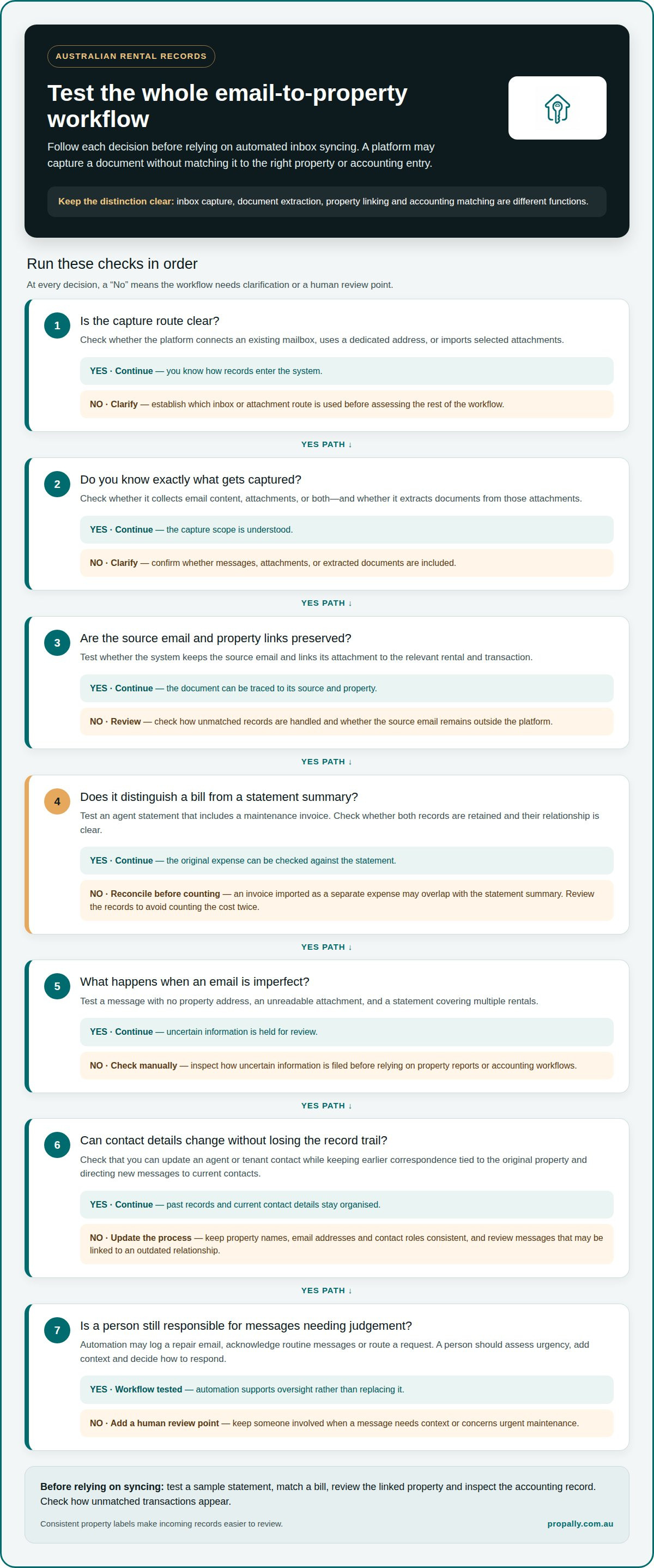
Before relying on automated inbox syncing for landlords across Australia, test a sample workflow. Sync an agent statement, match a bill, review the linked property and inspect the accounting record. Check how unmatched transactions appear, and confirm that reminders, tenant contacts and reports use consistent information.
Which Australian property management platforms sync email inboxes automatically?
Australian property platforms do not all offer the same inbox-sync features. Some collect documents sent to a dedicated address; others connect an existing mailbox or import selected attachments. Check whether the platform collects emails, extracts documents, links them to a rental or updates property records. These functions are not interchangeable.
Compare the workflow, not just the feature name. A platform might store an invoice without matching it to the right property or accounting entry. Another might import an agent statement but leave the original email outside its records. If you have several properties, check whether the system preserves the source email and links its attachment to the relevant property and transaction.
Use a practical checklist when reviewing platform details or requesting a demonstration. Does the system connect to an existing inbox, or require forwarding? Does it capture message content, attachments or both? Then check how it handles unmatched emails, links documents to property records and transfers information into your accounting process. Clear answers at each step help distinguish a complete workflow from basic email storage.
Test with a realistic example before relying on automation. Send an agent statement containing a maintenance invoice, then check whether the platform retains both records and shows how they relate. If it imports the invoice as a separate expense without recognising the statement’s summary, reconciliation could count the cost twice. A review queue makes that mismatch easier to investigate.
Check how the platform handles changes as well. An agent may change, a tenant may leave, or a property may use a different inbox. Confirm you can update contact details while keeping earlier records. A useful workflow ties past correspondence to its original property and directs new messages to current contacts.
Automated inbox syncing for landlords across Australia should also be tested with imperfect messages. Ask the platform to process an email without a property address, an unreadable attachment and a statement covering multiple rentals. These examples show whether uncertain information is held for review or filed automatically. That difference matters when records feed property reports or accounting workflows.
Finally, distinguish inbox capture from tenant communication automation. A platform that sorts incoming messages may not draft or send replies. If it supports acknowledgements or maintenance routing, keep a person responsible for assessing urgency and deciding how to respond. Test the full workflow from email arrival to final review, so automation supports oversight rather than bypassing it.
What privacy and data security rules apply to syncing tenant emails in Australia?
Syncing tenant emails brings personal information into another system, so set a clear purpose and access limits before connecting an inbox. Rental emails may contain names, contact details, maintenance photos or payment information. Decide which records are needed for property administration, and avoid syncing unrelated messages from a personal mailbox.
Start with a dedicated property-management inbox or a carefully scoped connection. Limit access to the mailbox or folders needed for rental records. An inbox used for tenancy correspondence, for example, is easier to separate from personal banking and family emails than a general-purpose account. Restrict administrator access to people responsible for managing those records.
Australian privacy obligations can depend on who handles information and how it is used. Distinguish your own recordkeeping from an agent’s or software provider’s handling of information. Connecting an inbox does not transfer responsibility for appropriate use, access and retention. Document why you sync records and who can view, export or change tenant information.
Before activation, review the service’s privacy and security information. Look for clear explanations of:
- Information collected: Does syncing capture message content, attachments, sender details or all three?
- Access controls: Can permissions be limited by role, property or task?
- Storage and deletion: How are records retained, exported or removed when no longer needed?
- Third-party handling: Which service providers may process the information?
- Incident process: Who receives notice if unauthorised access or loss occurs?
Test the connection before syncing live tenant correspondence. Send a sample maintenance request with fictional details, then check which fields and attachments appear in the property record. Confirm that unrelated messages remain outside the system. This practical test shows whether the connection captures more information than the rental workflow needs.
Protect account access with unique credentials and multi-factor authentication where available. Remove access when an agent or staff member no longer handles the property. When management changes, for example, update inbox permissions and review who can still access earlier tenancy correspondence. These controls reduce unnecessary exposure while preserving records needed for ongoing administration.
Set a retention process that suits the purpose of each record. A repair invoice, lease-related email and casual enquiry may not need the same treatment. Keep essential correspondence organised by property, and remove duplicate or irrelevant copies according to your process. Privacy controls work best when built into inbox setup, staff access and routine record reviews.
How does inbox syncing comply with the Australian Privacy Act and tenancy record-keeping requirements?
Inbox syncing does not establish compliance by itself. Consider the Australian Privacy Act and tenancy recordkeeping separately when designing the workflow. Decide why each email is collected, which rental record it supports, who can access it and how long it remains useful. The system should make these decisions visible, not hide them behind automatic filing.
Start by matching email types to their purpose. A maintenance request supports repair coordination; a rent statement supports financial reconciliation; a general enquiry may not need a permanent property file. Define which categories enter the synced record and who reviews them. This creates a consistent approach instead of capturing every message by default.
Next, set permissions according to the work people do. Someone managing repairs may need maintenance correspondence, while an accounts role may need statements and invoices. Avoid giving every user access to every tenant email. Record who can view, export or change documents, and remove access when someone stops working on the relevant properties.
Recordkeeping needs a deliberate structure. Use a consistent property identifier, document type and received date so tenancy emails are easy to find later. File a repair approval with the relevant rental record, for example, rather than leaving it only in an inbox folder. Keep the original email or attachment when it provides useful context.
Australian tenancy requirements can vary by document and by state or territory. Create a record schedule that identifies the applicable rule for each category, such as agreements, notices, payment records and repair correspondence. Avoid applying the same retention setting to every email. A casual enquiry and a signed tenancy document serve different purposes.
A practical setup process is:
- List the email and attachment types the workflow will capture.
- Assign each type to a property record and a responsible role.
- Set access, review and retention controls for each category.
- Test retrieval using a sample tenancy email and a saved attachment.
- Review unmatched items and permissions when management arrangements change.
Keep a record of these settings and any changes. If an agent’s email address changes, document the new contact and preserve access to relevant earlier correspondence. Exclude information unrelated to the tenancy from the property file. These practices help distinguish useful records from unnecessary copies.
Review the workflow against the applicable privacy and tenancy rules for the property’s jurisdiction. A clear audit trail should show what was captured, where it was filed, who had access and how it was handled. This supports accountable record management without treating automation as a substitute for sound decisions.
What are the risks of automated email syncing, including missed messages, duplicates, and incorrect records
Automation can make an inbox easier to manage, but each connection creates potential failure points. A tenant’s repair email might stay in the mailbox instead of entering the property record. A supplier invoice could be attached to the wrong rental. A property manager’s statement might appear alongside the original bill as a separate expense. Each error can disrupt follow-up and reconciliation.
Missed messages can result from a disconnected account, changed mailbox permissions or an unsupported attachment. A tenant might email a repair photo after a property manager’s access changes, for example. The message exists, but the shared system may not capture it. Keep the original inbox available and review sync status, failed imports and messages without a property match.
Duplicates often arise when the same document arrives through different routes. An agent might email an invoice and then include it in a monthly statement. A landlord might also forward the invoice to another address. If each copy becomes a new transaction, expenses can be counted twice. Compare the supplier, date, amount and property before treating similar records as separate costs.
Incorrect records can result from similar property names, outdated tenant contacts or vague subject lines. A message titled “urgent repair” may not identify the rental. Automated matching might rely on sender details or text that no longer reflects the tenancy. Put uncertain records in a review queue rather than letting them update financial reports automatically.
Use these checks to contain common errors:
- Review sync failures and unmatched messages in the inbox workflow.
- Match bills using the property, supplier, date and transaction details.
- Keep the source email linked to its attachment and recorded entry.
- Update agent and tenant contacts when management changes.
- Escalate urgent repair requests for a person to assess and respond.
A clear exception process matters as much as automatic capture. If an invoice lacks a property address, for example, leave it unassigned until someone reviews the source email. If two statements contain the same maintenance charge, compare their supporting documents before reconciliation. This keeps uncertain matches from quietly becoming accepted records.
Schedule routine reviews around the records you rely on, such as incoming statements and maintenance correspondence. Confirm that important emails appear in the right property file, attachments open correctly and duplicate expenses are not carried into reports. If syncing is interrupted, use the original mailbox to identify messages needing manual handling, then record their final status.
For a more controlled view of synced property documents and transactions, organise your rental records alongside their source information.
PropAlly
PropAlly gives Australian property investors a central dashboard for rental records across properties and states. It can automatically read statements from agents and inboxes, bringing documents into one view to support cash-flow tracking, reconciliation and compliance oversight. When bills and property manager statements arrive through different channels, the consolidated view helps you identify source documents and review property information together.
The dashboard includes state-specific compliance checklists, bond authority workflows and ATO-aligned tax calculations. PropAlly’s Starter Plan suits portfolios of one to four properties, while the Business Plan supports portfolios of up to twenty. If you want inbox and agent-statement data organised alongside rental records, explore PropAlly’s plans and choose the fit for your portfolio.
Make your next inbox setup deliberate
Start with one representative rental inbox before connecting every property. Map how an email becomes a saved record, who reviews uncertain matches and how the original message remains accessible. Use this workflow to identify gaps before expanding syncing across your portfolio.
Automated inbox syncing for landlords in Australia is about more than switching on an integration. Decide how incoming records should support your property administration, then build those decisions into a consistent process. As your portfolio or management arrangements change, review the workflow to keep inbox access and property records aligned.
PropAlly can bring agent statements and inbox information into a central property dashboard. If you’re ready to discuss how it could fit your rental recordkeeping, contact PropAlly to get started. A clear first step can make your next setup easier to manage.
Frequently Asked Questions
How do I get up and running?
Choose the rental inbox and records you want to organise. Separate property correspondence from personal email, then connect the mailbox using the software’s authorisation process. Test with a non-sensitive agent statement or maintenance message. Confirm the property match, attachment capture and review process before relying on the workflow for live tenant correspondence.
So what would I actually do?
Set up the connection, choose which emails and attachments it should process, and link each property to its relevant contacts. Then review the first imported records. Check, for example, whether a supplier invoice is attached to the correct rental and whether a statement summary is identified as a separate document. Keep a person responsible for unclear or urgent messages.
What do I save by doing this?
Inbox syncing can reduce repetitive sorting, attachment filing and manual property matching. The practical benefit depends on how many emails arrive and how consistently they identify a rental. An investor receiving agent statements for several properties, for example, may spend less time finding source documents during reconciliation. Unmatched records still need review, and financial decisions still require assessment.
What does automated inbox syncing do for Australian landlords and property managers?
Inbox syncing brings selected email information and attachments into a property-record workflow. Depending on the software, it may match a rent statement, invoice or maintenance email to a rental and extract useful details. A repair request, for example, can be associated with the relevant property record, making correspondence and supporting documents easier to find.
Can Gmail and Microsoft Outlook sync with Australian landlord software?
Some software supports Gmail and Microsoft Outlook connections, but the method varies by platform. PropAlly’s AI Email Automation reads Gmail or Outlook through OAuth with a read-only token. It scans PDF and image attachments, then categorises information by property. The connection reads email data rather than sending messages directly from the connected inbox.
How do inbox syncing integrations capture and link tenant emails to properties and maintenance requests?
An integration can read sender details, message content and attachments, then use clues such as an address, rent amount or contact record to identify a property. PropAlly’s AI Email Automation categorises documents by property and can draft replies based on tenancy-state rules. You approve or edit a draft before sending. Clear property identifiers in emails make matches easier to review.
What are the setup steps for connecting an email inbox to property management software?
Select the mailbox used for rental correspondence and review the software’s connection method. Authorise the connection, set the document workflow, and associate relevant properties and contacts. Test it with a familiar statement or maintenance email. Review the captured fields and categorisation, then approve or correct the results before processing regular correspondence.
How much do Australian property management platforms with inbox syncing cost?
Costs depend on the plan and document-processing allowance, so compare what each subscription includes. Check property limits, included email processing and whether extra document volumes require an add-on. PropAlly offers Free, Starter, Pro and Business plans, with optional email document add-ons. Review the plan details to match included capacity to your portfolio’s workflow.