

Your rental inbox can do more than hold messages. An automated email parser for rental portfolios extracts useful details from emails and attachments, organises them into structured records, and can send the data to spreadsheets, databases or connected systems. That turns incoming agent statements and other property correspondence into information that’s easier to track across an Australian portfolio.
Manual sorting may feel manageable at first, but repeated data entry makes consistent records harder to maintain as a portfolio grows. The right approach depends on the emails you receive and the systems you use.
This guide explains how email parsing works, how rule-based and AI methods differ, and what to consider when connecting extracted data to property portfolio workflows. It also covers where automation helps, where human review matters and how to assess whether a parser suits your needs.
Key Takeaways
- Map the rental details you need to capture before choosing an email automation tool, then assess how it will pass data into your existing systems.
- Match the extraction method to your inbox: fixed templates suit rule-based rules, while AI can interpret less predictable wording and attachments.
- Use text boundaries and regular expressions to target reliable, repeatable patterns, and plan how exceptions will be handled.
- Connect extracted information to portfolio workflows so agent statements and other property records are easier to organise and review.
- Look for Australian-focused portfolio software that brings email data together with property cash flow, compliance and bond evidence.
Email automation tool evaluation and integrations
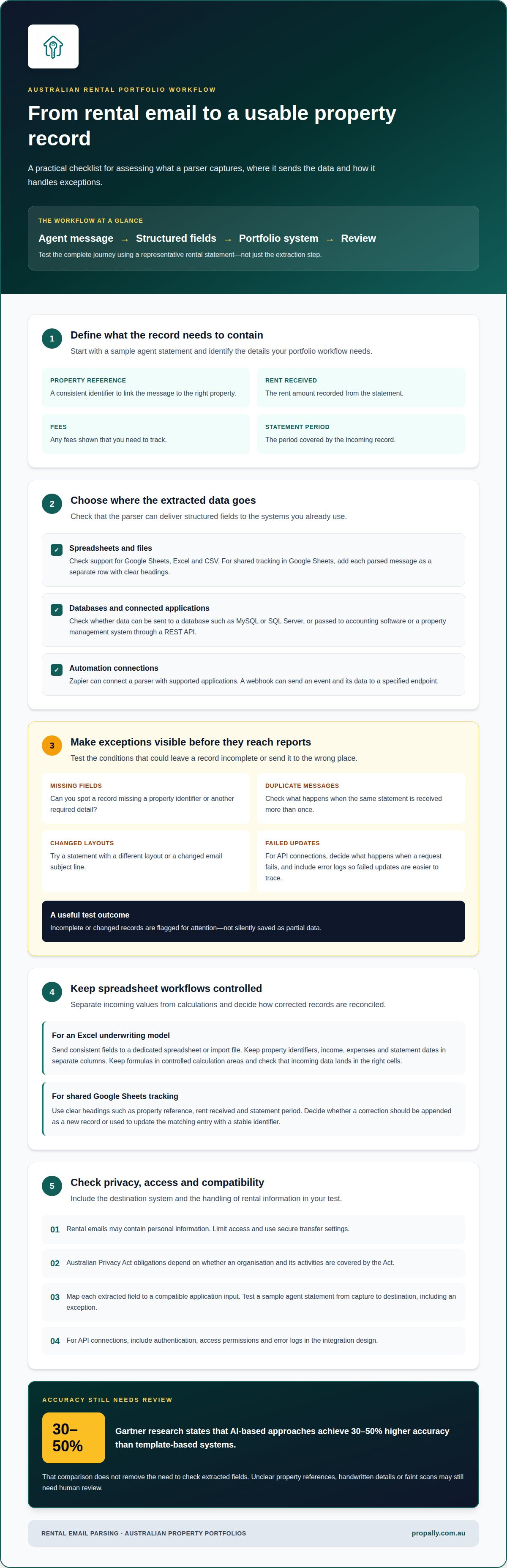
Evaluate a parser by what it extracts, where it sends the data and how it handles exceptions. For an Australian rental portfolio, test the entire process, from an agent’s message to a usable property record.
Start with a representative message, such as a rental statement, and list the fields you need: property reference, rent received, fees and statement period. Then check whether the tool can output structured data to Google Sheets, Excel, CSV or a database such as MySQL or SQL Server. Test how it handles missing fields, duplicate messages and changed layouts. Incomplete records should be easy to spot before they reach reports or an underwriting model.
API and External Application Connections
A REST API can pass extracted fields to an external application, such as accounting software or a property management system. Map each field to its destination and decide what happens if a message lacks a property identifier or an API request fails. Include authentication, access permissions and error logs in your integration design. These controls help secure data transfers and make failed updates easier to trace.
Zapier can connect a parser with supported applications through a workflow, while a webhook sends an event and its data to a specified endpoint. For example, a new statement email could trigger a step that records the property reference and statement period in a spreadsheet. Keep the workflow focused: capture the message, map the fields and send the result. Test changed subject lines and incomplete messages to confirm exceptions are flagged rather than silently recorded as partial data.
For an Excel underwriting model, send consistent fields to a dedicated spreadsheet or import file rather than mixing extracted values with formulas. Separate property identifiers, income, expenses and statement dates into columns. Keep formulas in controlled calculation areas and check that incoming data lands in the right cells. This helps prevent a new agent statement from overwriting assumptions or changing the model’s structure.
Google Sheets can support shared portfolio tracking when each parsed message is added as a separate row. Use clear headings, such as property reference, rent received and statement period, to keep records readable and filterable. Decide how to handle corrections: append a corrected record or update the matching entry using a stable identifier. This choice affects how you reconcile statements with portfolio summaries.
Privacy and Software Compatibility
Australian Privacy Act obligations depend on whether an organisation and its activities are covered by the Act. Rental emails may contain personal information, so limit access and use secure transfer settings. How do parsers integrate with Australian property management software and accounting systems? They map extracted fields to compatible application inputs through a REST API, webhook or supported automation connection. Test a sample agent statement from capture to destination, including an exception, to see whether the integration supports your required fields and workflow.
What is an AI Real Estate Parser?
An AI real estate parser identifies useful information in property emails and documents, then organises it into fields. For Australian investors, it can help sort correspondence by property and record type, particularly when a portfolio spans states and includes different tenancy documents and compliance records.
State-by-state administration makes document organisation an important part of portfolio oversight. A parser can identify details such as a property address, lease dates or document category, helping bring incoming records into consistent workflows. AI can interpret natural-language variations instead of relying on a fixed phrase in the same position every time.
PDF, Spreadsheet and XML Attachments
Rental records may arrive as a signed lease PDF, an Excel rent schedule or an XML export. A parser can extract fields from PDF, Excel and XML attachments. Scanned PDFs need text recognition before extraction software can read their contents. A clear scan helps, while handwriting or a faint image can make fields harder to interpret.
Australian tenancy documents vary by state, agency and document type. One lease might label a date “commencement”, while another record calls it “start date”. AI can interpret the variation and map both phrases to a consistent field. For compliance workflows, retain the document’s state and property context so a date or attachment isn’t filed without its relevant background.
Accuracy and Processing Speed
Assess extracted fields against the original document. A legible lease with clearly labelled dates may be straightforward, while an application with handwritten details or an unclear property reference may need review.
Processing speed depends on message volume, file size and the steps required after extraction. An Australian investor might process a new lease immediately, then direct its dates and property identifier into a record for review. Older correspondence can be processed on demand. The key measure isn’t just how quickly software reads a document, but whether the data reaches the right workflow in a usable form.
Payment-related documents need careful handling. A rental statement or invoice may contain a supplier, amount and property reference to support reconciliation. Extraction can prepare these details for an accounting workflow, while the appropriate person retains control of approvals and payment decisions. This is useful when statements arrive through different inboxes or use varied layouts.
An automated email parser for rental portfolios can structure incoming records, but its output still depends on readable source material and suitable field mapping. For Australian investors with properties across states, the value is making varied correspondence easier to organise while preserving each record’s property context.
Rule-based extraction with text boundaries and regular expressions
Rule-based extraction works best when rental messages follow a predictable structure. It searches for defined text boundaries or patterns, then places matching values into structured fields. For example, a rule can capture the text after “Property address:” and before “Tenant:” in a standard agent email. Consistent templates make these workflows easier to maintain.
Regular expressions, or regex, identify text by pattern rather than meaning. A date rule can recognise a day, month and year; another can capture an amount after “Rent received”. Text boundaries narrow the search, such as looking only between “Tenant details” and “Lease details”. This can extract tenant, landlord and property details from an application or statement while reducing the chance of matching a similar value elsewhere.
Build the extraction process around the fields your portfolio uses. First identify the message type, locate the relevant text, extract each value and assign it to a named field. A tenancy email might include tenant name, landlord name, property address and rent amount. If the property reference is missing, flag the record rather than assigning it based on a guess.
Rule-based methods can also capture check-in and check-out dates from short-stay booking messages. A pattern can recognise date formats, while labels such as “Arrival” and “Departure” provide context. If a sender changes “Check-out” to “Departure date”, the existing rule may no longer match. Rules depend on expected wording, layouts and formats, so changes can lead to missing or incorrectly assigned data.
AI extraction takes a different approach. A natural-language prompt can request the tenant, property address, lease dates and amount from an email, even when the wording varies. This suits messages without a single template. Rule-based extraction is generally clearer for stable, repeated formats; AI can interpret more variation, but results still need field-level controls and review.
What are the risks and limitations? A parser can miss details in altered templates, misread an ambiguous amount or attach a message to the wrong property. Human validation is especially useful for unusual formats, incomplete messages and important fields such as payment amounts or lease dates.
Set validation rules for specific exceptions. For example, require a property identifier before forwarding a record, and send unmatched messages to a review queue. Compare sample outputs with their original emails, checking names, dates and amounts individually. This distinguishes successful extraction from a complete, reliable record and helps show whether rules or AI better suit each message type.
Automating property portfolio management
Start by defining the message types, fields and destination systems for each workflow. Parsing can classify tenancy, maintenance, inspection and invoice emails, then extract data for review, record keeping or follow-up.
Automation Setup Steps
Begin with an existing inbox and choose a clear pilot, such as rent statements for one property group. Define the fields to capture, including property reference, message date and communication type. Choose a destination for each record and decide which missing or unusual values need human review. Test the workflow against real examples before routing new messages automatically.
Next, define what each message should trigger. A lease renewal email might create a tenancy task, while an inspection confirmation could update a tracking sheet. Keep parsing separate from decisions that require judgement. An extracted maintenance request can be routed for assessment, for example, but the parser shouldn’t decide whether a repair is urgent or approve work.
Set clear identifiers before connecting the workflow to existing records. A property reference or address can match an email to the right property; a sender name alone may not distinguish properties managed by the same agency. Configure duplicate handling too. If an agent forwards an invoice twice, flag a possible duplicate rather than creating two expense records.
Tenancy, Maintenance and Invoice Communications
Tenancy emails can provide lease dates, renewal requests and tenant correspondence. Maintenance messages may include the property, reported issue and an attached quote. Inspection emails can provide an appointment date and confirmation status. Invoice communications can yield the supplier, invoice date, amount and property reference for accounting review.
Use separate workflows for different communication types. An inspection confirmation and a plumber’s invoice need different fields and destinations. A booking email may contain arrival and departure dates, while a maintenance report may describe a leaking tap. Classification helps route each message to the right record instead of treating every attachment the same way.
Parsing can extract data from a message and pass it to a task list, spreadsheet or accounting system. It doesn’t complete an inspection, resolve a maintenance issue or pay an invoice. Keep those actions assigned to the appropriate person or existing software. This prevents an extracted amount from being mistaken for payment approval.
For reliable workflows, connect each extracted record to its source message and keep a review path for exceptions. A missing property identifier, unreadable attachment or changed invoice layout should go to a queue for resolution. This makes automation useful without hiding gaps in the underlying data.
A defined workflow can reduce repetitive handling by directing messages into consistent records, while staff focus on exceptions and property decisions.
What rental portfolio management software in Australia includes automated email parsing?
In Australia, rental portfolio software may include email parsing or connect to a separate parser. The key question is whether extracted information becomes a property record or another spreadsheet that still needs manual entry.
For example, an agent’s rental statement could provide a property reference, income and statement period. A connected system should map those details to the right property and make them available in the relevant portfolio view. Check which message types and attachments the workflow supports and whether it retains a link to the original correspondence.
Some tools focus on one task, such as capturing fields from incoming messages and sending them to Google Sheets. Portfolio software may combine that data with other property records. Assess the whole process: inbox, extraction, property matching, review and destination. A parser that extracts an amount but can’t associate it with the right property leaves a significant gap.
For Australian investors, useful software can organise information across properties and states. Consider whether records connect with the work you already manage, such as cash flow tracking, compliance tasks or bond evidence. State-specific checklists help organise compliance records, while extracted agent statements support cash flow oversight. Email parsing helps handle records; it doesn’t replace property management work or professional financial and tax advice.
Use a practical evaluation sequence:
- Choose a message type. Start with an agent statement, invoice or lease email that represents your normal records.
- Identify required fields. Define the property identifier, date, amount and document type needed for that workflow.
- Trace the destination. Follow the extracted details into the property record, spreadsheet or accounting workflow.
- Review exceptions. See how the system handles a missing reference, duplicate message or changed statement layout.
For instance, test whether a statement with an unfamiliar property label enters a review queue instead of attaching to the wrong record. Consider inbox access permissions and how staff can find the source message later. These details matter to oversight as much as the parser’s extraction method.
Ask how updates move between the parser and portfolio software. A direct connection, REST API, webhook or spreadsheet export each creates a different workflow. The right fit depends on your existing systems, required fields and exception review process. Don’t judge an integration by one successful message; test different document formats and realistic changes in agent wording.
For a portfolio dashboard that brings rental statements and property records together, organise rental portfolio information in one place.
PropAlly
PropAlly helps Australian property investors bring rental information from agent statements and inboxes into one portfolio dashboard. The platform can automatically read rental data across properties and states, helping investors track cash flow, compliance and bond evidence.
State-specific compliance checklists, bond authority workflows and ATO-aligned tax calculations help organise property records for Australian investors. PropAlly brings rental information together with portfolio oversight, without managing properties on your behalf or providing financial and tax advice. Starter Plan and Business Plan options suit different portfolio needs.
If you’d like to discuss organising rental email data within your portfolio, contact PropAlly.
Make your rental inbox part of a clearer system
Decide what you want your property records to make easier: tracing an agent statement to a property, organising tenancy correspondence or bringing portfolio information together. A well-designed automated email parser for rental portfolios should support how you work, not create another set of records to manage.
Start with the outcome that matters most to your day-to-day oversight. Then shape an email workflow around the information you receive and how you manage your Australian properties. PropAlly brings rental data and portfolio tracking together, giving you a more organised view of your records.
Discuss your rental email workflow with PropAlly and take a considered next step towards simpler portfolio oversight.
Frequently Asked Questions
What Is an Email Parser?
An email parser turns selected information in an email or attachment into fields another system can use. For example, it could separate a supplier name, invoice date and amount from a rental invoice sent by email. The fields can then be stored or routed for review. The parser doesn’t decide whether an invoice is valid or should be paid; those decisions remain part of the approval process.
What is an automated email parser for rental portfolios?
An email parser processes rental-related messages and organises useful details for property records. An investor could capture an agent statement’s property reference and reporting period, then associate them with portfolio information. This lets incoming records flow into a consistent system instead of relying on inbox searches. PropAlly’s dashboard brings rental information together with cash flow, compliance and bond evidence.
Which email formats and rental documents can property management email parsers extract data from?
Supported documents depend on the parser, but rental workflows can include email text and attachments such as PDF leases, Excel statements and XML records. A scanned document is an image, so extraction depends on whether the software can read text from images. A parser may capture lease dates from a readable PDF, for example, but a blurred scan or unclear handwriting may need review.
How much do email parsing and property management automation tools cost in Australia?
Costs depend on the software’s pricing model and workflow needs. Document volume, portfolio size, attachment processing and integrations can all affect the plan. PropAlly offers a Free Plan and paid plans, with optional email document add-ons priced by processed document volume. Compare each option with your inbox workload and required functions, not just the subscription fee.
How accurate are automated email parsers, and how are exceptions reviewed?
Accuracy depends on readable source material, consistent field definitions and variation in message wording. An exception process catches records without a property identifier, with an unclear amount or with fields that don’t match expectations. For example, an unmatched invoice can go to staff for review instead of being assigned automatically. Keep the original email available so the reviewer can check the source.