

A property management system is only as dependable as the information entered into it. Automated document ingestion for rental properties can read incoming documents, match key details to the right property or tenancy, and flag exceptions for review before records are updated. The workflow needs clear rules for what enters the system and where each item belongs.
Rental records arrive in many formats, from agent statements and invoices to lease documents and compliance files. Automation can reduce repetitive data entry, but it still needs checks: unclear fields, mismatched records and incomplete documents should go to review rather than be treated as reliable data.
This guide explains how document extraction can connect with Australian property management systems, how to handle tenant information with privacy in mind, and what to do when a document falls outside the usual workflow. It also covers the features to compare in a document automation tool, so you can see where automation helps, where human review matters and how to organise information across your rental properties.
Key Takeaways
- Intelligent document processing turns information in varied rental documents into structured data that a property management system can use.
- Tenant application workflows should limit document access to authorised users and use safeguards such as encryption and audit logs.
- Custom field extraction can map information to the right property records, while unclear or mismatched documents need an exception pathway.
- Human review remains important for corrections and decisions that automated checks can’t resolve reliably.
- Compare tools by how they connect with your PMS, protect tenant information, handle exceptions and support oversight.
What is real estate document automation?
Real estate document automation captures information from rental records, organises it and transfers it into property management systems. It can process documents that arrive as PDFs, scans or images rather than neat spreadsheets or database records.
Processing Unstructured Property Documents
Intelligent document processing identifies relevant details in varied files, then converts them into structured data for systems to use. Scanned leases, emailed invoices and agent statements can contain information that needs to be extracted before another system can use it. Software can extract fields such as a property address, tenancy dates or invoice amount, then match them to a record. Robotic process automation works well with structured data, but needs this conversion before it can reliably act on information inside varied documents.
For an Australian rental portfolio, this can reduce repeated data entry across properties and states. Commercial property teams can also use automation for lease tracking and document processing. Test the workflow with representative documents and measure the time spent reviewing and correcting the results.
OCR and Broader Document Processing
Optical character recognition (OCR) turns text in a scanned page or image into machine-readable characters. Document processing goes further: it identifies document types, extracts selected fields and routes the information to the right workflow. OCR might read an invoice total; broader processing can also classify the file as a maintenance invoice and associate it with a property.
Different layouts require different extraction and matching. A scanned maintenance invoice, a PDF agent statement and a typed lease each contain different details. A system can send captured invoice information into an approval or payment workflow, while a person reviews missing fields or uncertain matches. This reduces repetitive work without assuming every extracted value is correct.
Document Types and Ingestion Setup
Australian rental property software may process leases, tenant notices, agent statements, maintenance invoices and compliance documents such as insurance certificates, permits and licences. The workflow depends on the system’s supported document sources and the fields it needs to capture.
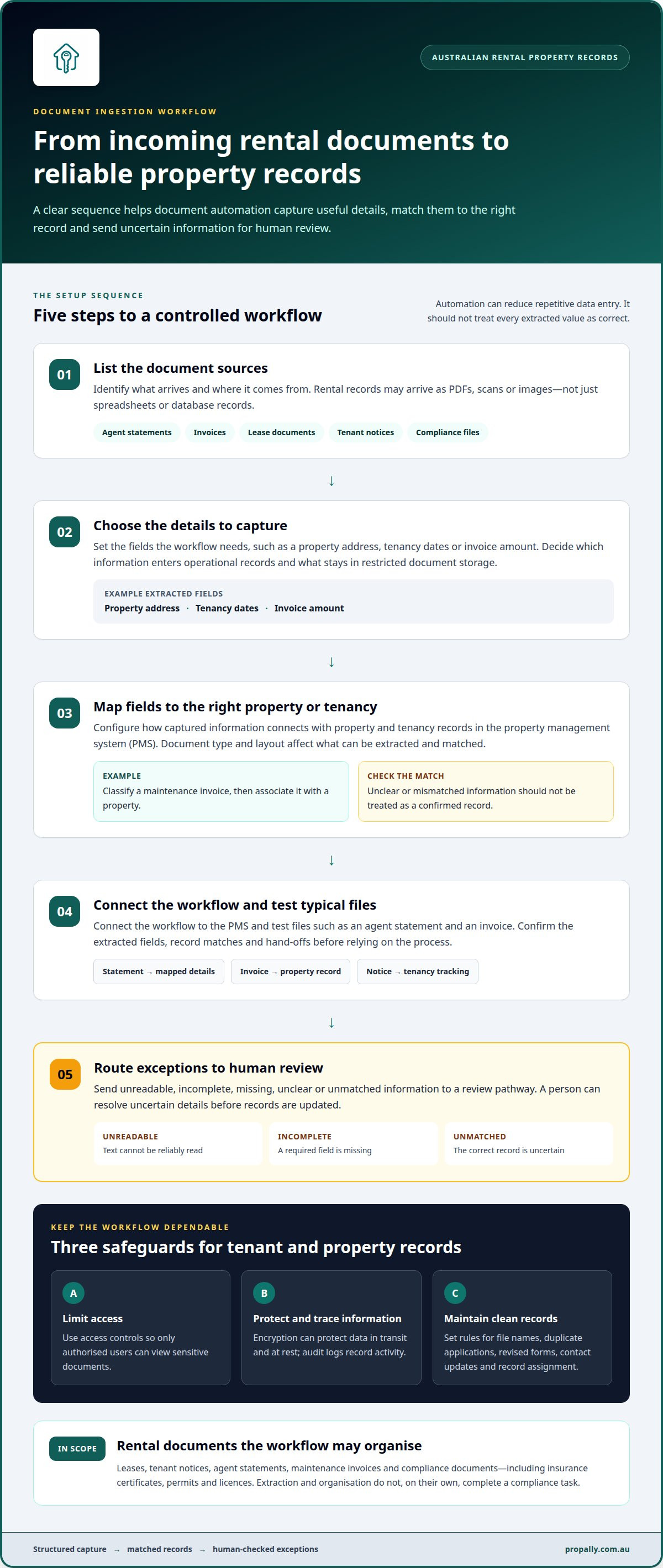
To set up document ingestion, list the sources, choose the details to extract, map those fields to property and tenancy records, then connect the workflow to the property management system. Test typical files, such as a statement and an invoice, and set a review path for unreadable or unmatched information. These steps help keep records consistent at each hand-off.
Tenant notices can be classified and tracked, including rent reminders and lease renewal documents. A workflow can route each notice to the relevant tenancy record and show its processing status. Compliance documents can follow a similar process, with certificates, permits and licences organised by property. This makes incoming records and outstanding reviews easier to see, without treating extraction alone as completion of a compliance task.
How Do AI Tools Handle Data Security and Tenant Privacy?
Automated ingestion can extract information from rental applications and onboarding documents, then transfer selected fields into property records. It reduces repeated data entry, while review rules help catch mismatches before they affect other records. For landlords and property managers, the benefit is a consistent workflow, not an assumption that every extracted field is correct.
An application may include a tenant’s contact details, proposed tenancy information and supporting documents. Document processing can classify files, capture relevant fields and link them to an applicant record. A property team can decide which fields enter its operational system, which need review and which should stay in restricted document storage. This helps avoid unnecessary copying of sensitive information.
Security depends on how a system stores, transfers and exposes records. Document processing systems can use encryption for data in transit and at rest, access controls that limit document visibility, and audit logs that record activity. Data-handling procedures can also be aligned with relevant privacy obligations. These controls work together: access permissions restrict who can view an application, while logs make activity traceable.
Manual handling carries its own risks. A staff member might mistype an email address, enter a lease date in the wrong field or attach an application to the wrong property. Those errors can flow into communications, tenancy records or reporting. Automation applies consistent business rules, such as matching an applicant to a selected property and flagging incomplete fields. It standardises processing, but people still need to resolve ambiguous information.
Good data hygiene requires an ongoing process. Set rules for naming files, identifying duplicate applications, updating contact details and assigning documents to the right tenancy. When an applicant submits a revised form, the workflow should distinguish the latest version from earlier copies. A review queue helps resolve conflicts before inconsistent records build up.
Staff turnover can disrupt manual data-entry routines when process knowledge sits with one person. Documented extraction rules and consistent workflows make handovers easier: applications follow defined steps, and exceptions remain visible to the next authorised staff member. This supports continuity without giving every employee access to every tenant document.
For Australian property investors seeking a more organised view of property records, PropAlly’s Business Plan can support tracking across rental properties. Its dashboard brings together property information, while automated statement reading helps reduce repetitive handling. Explore property tracking for rental portfolios as a way to keep records more systematically organised.
Custom field extraction and exception handling
Extraction accuracy varies by field, document quality and workflow. Test important fields against the original documents and define when a person must review the result.
Extraction Accuracy and Language Support
Custom field extraction captures selected details and maps them to fields used by a property team. For a lease, these might include the property address, tenant names, rent amount and lease dates. The value comes from matching information to the right record, not simply detecting text. Accuracy depends on document quality, layout, terminology and how clearly the required fields are presented.
Language and context matter. Documents may use abbreviations, local terms or wording that differs between agencies and states. A system needs to interpret the source document or route uncertain text for review. If a scanned lease contains an unclear date, for example, the workflow should flag it rather than silently add it to a tenancy record.
Set extraction rules around the fields that drive operational decisions. A rent amount must be distinguished from a bond amount, even when both appear in the same document. Review queues can focus attention on missing, conflicting or uncertain values. This keeps exceptions visible and makes correction part of the process.
AI Extraction for Real Estate Documents
AI document extraction identifies document types, locates relevant content and converts it into structured fields for other systems. In real estate, a lease, maintenance invoice and inspection report each require different information. The workflow can apply the appropriate fields for each document, then match extracted details to a property or tenancy record.
Multi-page tables need careful handling because headings and values may continue across pages. A maintenance invoice, for example, may list several jobs, quantities and charges in rows. Extraction should preserve the link between each line item and its description rather than combine separate entries. Page breaks, repeated headers and merged cells can complicate this process.
Exception handling determines what happens when a document does not fit the expected structure. A missing property identifier, unreadable amount or unfamiliar table layout can pause the transfer and send the file for review. After correction, the team can refine the relevant field rule or document classification to improve consistency with similar files. This prevents unusual leases and invoices from being forced into inaccurate records.
For Australian portfolios, custom fields can reflect the records a team needs across properties and states. Keep the original document alongside extracted values so staff can check the source when resolving an exception. Clear field definitions, language handling and escalation rules make automated extraction more useful than text recognition alone.
Accuracy and human oversight
Automation can reduce repetitive checks, but property teams still need defined review points. Human oversight helps catch inaccurate fields, missing documents and workflow failures before they affect records or decisions.
Accuracy and Human Review
Human oversight means reviewing extracted information and exceptions before treating them as trusted property records. This matters because lease details can affect tenancy records, payment workflows and reporting. A reviewer can compare a captured field with its source, correct errors and return the document to the right workflow.
Use structured review rules. Check key fields such as tenant identity, property, lease dates and rent amount, then approve or correct the record. Templates can make recurring lease agreements more consistent, but staff should review the populated details before issuing them. The same applies when a workflow prepares an agreement after an application is approved or a renewal is due.
Document volume and complexity affect the oversight required. Track incoming leases, amendments and financial statements alongside the time needed to review them. Defined review queues help direct staff attention to records that need intervention.
Errors and Missing Records
Automation risks include inaccurate extraction, duplicate records, misfiled documents and files that never reach the intended system. A missed amendment, for example, can leave a lease register inconsistent with the current agreement. A misread invoice amount can affect a downstream payment workflow.
Build controls around these failure points. Track when a document arrives, its processing status and its destination record, then flag failed uploads, unmatched properties and incomplete fields. Retain the source file so a reviewer can check extracted values against the original. Reconcile expected documents with processed records to find missing files before they disappear in an inbox.
Manual corrections provide a useful performance signal. Track the time spent on manual corrections and unresolved errors to evaluate whether the system still fits the workflow. Review recurring error types, such as unreadable scans or inconsistent lease layouts, and refine the relevant extraction rules. Reducing correction effort depends on fixing repeatable causes, not simply adding more approvals.
Keep a clear route for exceptions. Staff can correct a field, request a readable copy or assign an unresolved record for follow-up. Record how the issue was resolved so it can be handled consistently next time. This lets automation process routine documents while people retain control over uncertain records and important tenancy information.
Australian rental property document automation tool comparison
For Australian rental property portfolios, compare two platform models: a property management system with document workflows, or a document-processing platform integrated with a PMS. The right fit depends on which documents need handling, how records move between systems and where staff review exceptions. There isn’t enough verified information here to name specific Australian platforms as offering these capabilities.
Start with the workflow, not an AI label. Map a document from arrival to its final record. A rental agreement, for example, might be received, classified, linked to a property and stored for later retrieval. A renewal workflow may need to surface the agreement for review, capture updated terms and retain the completed document. Compare where each stage happens and which system holds the authoritative record.
Next, compare integration models. Native PMS workflows keep document handling within one platform, while a connected processing layer sends extracted information to the PMS. The first can reduce hand-offs between systems. The second may suit teams handling varied incoming files or property records across platforms. In either case, find out how the workflow handles failed transfers, duplicate files and records it cannot match.
Assess how each option fits your portfolio’s recurring tasks. A team processing maintenance invoices may prioritise supplier details and line-item capture. A team managing rental agreements may focus on renewal dates, amendments and searchable records. Natural-language searches for agreements expiring next quarter can also be useful, but only when the underlying agreement data is captured consistently and kept current.
Involve property managers and administrative staff when setting comparison criteria. They can identify where manual work builds up, which documents arrive in different formats and which exceptions interrupt daily tasks. Compare platforms against the same sample workflow, such as receiving and filing a rental agreement renewal. Record both what processes successfully and what staff must do when a document needs review.
Make the decision on workflow coverage, integration, record traceability and review controls, rather than feature counts alone. A platform that handles one document type well may not support the agreements, invoices and notices your portfolio relies on. PropAlly helps Australian property investors organise information across rental properties; explore property portfolio tracking as a practical next step.
PropAlly
PropAlly helps Australian property investors organise rental information across multiple properties and states. Its dashboard tracks cash flow, tax, compliance and bond evidence, while automatically reading statements from agents and inboxes to consolidate property data. This can complement document workflows by keeping key financial and compliance information together, without replacing a property management system or property manager.
Turn to PropAlly when information from different properties is becoming difficult to track in one place. State-specific compliance checklists, bond authority workflows and ATO-aligned tax calculations help bring property administration into a clearer view. The Starter Plan is suited to investors tracking a smaller portfolio, while the Business Plan supports tracking up to twenty properties.
Explore PropAlly’s plans to choose a practical way to organise rental property records alongside your document workflows.
Turn document handling into a clear workflow
Start by defining how information should move from an incoming document into your property records. Choose one recurring workflow and decide which details to capture, where they belong and which exceptions need human review. Assign responsibility too, so staff know who resolves an unmatched lease, missing invoice field or failed transfer.
That operating model gives you a practical basis for refining automated document ingestion for rental properties. It also helps keep automation aligned with your portfolio as document types, internal processes and property management systems change. PropAlly helps Australian property investors organise rental information alongside these workflows.
Contact PropAlly about document workflows to discuss the next step for your portfolio. A well-defined process gives your team a clearer foundation for managing property records with confidence.
Frequently Asked Questions
Can property document workflows integrate with property management systems?
Yes. A document workflow can connect with a property management system when both systems support a compatible way to transfer and match records. For example, an incoming maintenance invoice could be linked to a property and sent to the relevant expense record. Use consistent property identifiers and supplier details, and decide how failed transfers will be flagged so records do not go missing unnoticed.
Can these solutions handle handwritten notes on inspection reports and appraisals?
Some document tools can attempt handwriting recognition, but handwritten notes are harder to extract reliably than clear printed text. Cursive writing, abbreviations and notes over photos can be difficult to interpret. Treat handwritten observations as requiring review, particularly when they describe damage or a change in property condition. Keep the original report available so a reviewer can compare extracted text with the source.
How can lease agreement data extraction reduce manual review?
Lease extraction can pre-fill recurring fields such as the property address, tenancy dates and rent amount, helping staff focus on exceptions rather than transcribing every agreement. A reviewer, for example, can prioritise a lease when the extracted start date conflicts with the renewal record. Extraction supports triage, not automatic approval: check important terms against the executed agreement before using them to make a decision.
What accuracy level should I expect for extracting critical fields like property addresses and interest rates?
Accuracy depends on the field, document quality, layout and clarity of the source. An address printed clearly in a standard statement is generally easier to identify than an interest rate embedded in a scanned loan document. Use confidence indicators and field-specific review rules where available. Check critical financial details against the original before using them in cash-flow calculations, tax records or investment decisions.
How does automated document ingestion work for rental property records?
Document ingestion captures incoming files, identifies their type and extracts information needed for rental records. A property investor might receive an agent statement by email, then have its income and expense details organised against the relevant property. The workflow can retain the source file for reference and send unusual or incomplete records for review. The process depends on document sources, field requirements and connected systems.
How can rental property documents be integrated with accounting and property management systems?
Integration connects extracted document details with the records used for property operations and accounting. An agent statement may provide a property’s rental income and expenses, while a maintenance invoice needs to be linked to the correct asset. Use consistent property identifiers and accounting categories across workflows. This helps prevent duplicate entries and makes it easier to trace a recorded amount to its source document.
What Australian privacy, data security, and record-keeping rules apply to rental property documents?
Applicable obligations depend on the organisation collecting or holding the information, the data involved and the relevant jurisdiction. Australian property teams should establish who can access tenant documents, how information is protected, and how records are retained or disposed of under applicable obligations. Use access controls, secure data handling and an audit trail for document activity. Keep tenancy records separate from material staff do not need to access.