

Importing is the easy part; reconciliation makes the records useful. To auto-import agent statements to landlord software, bring in the statements and bank transactions, match related entries, then categorise each line as rental income or a property expense. Review unmatched or unclear transactions before relying on the figures.
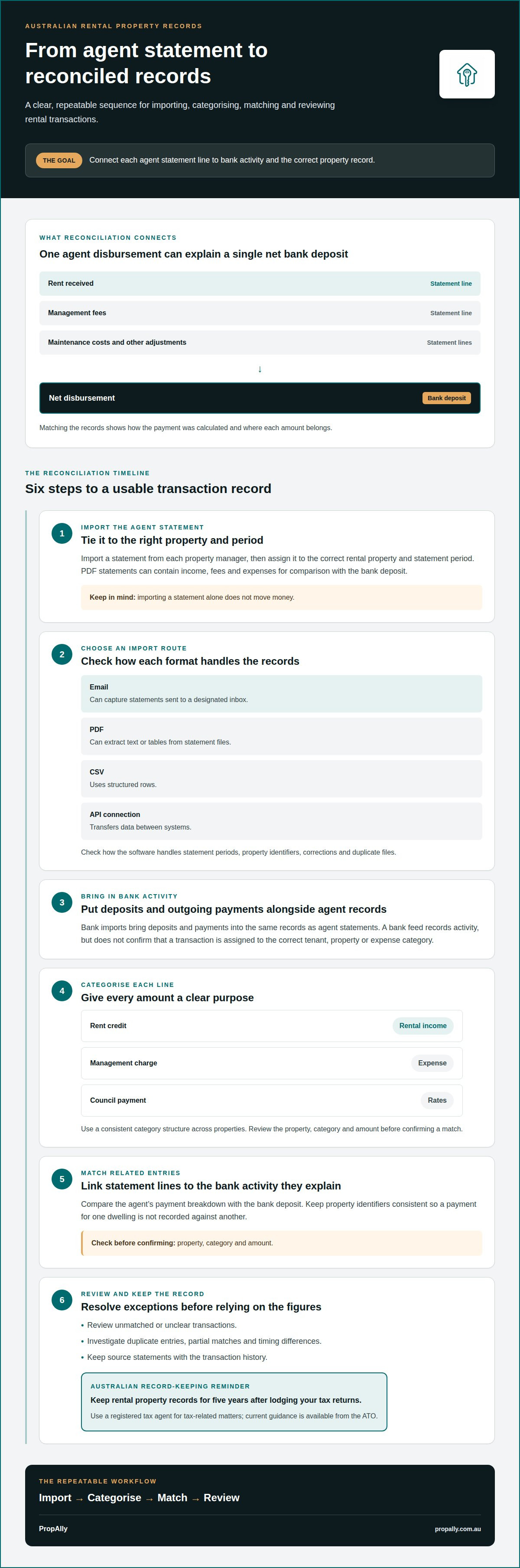
It’s easy to assume importing a statement is enough. But an agent’s disbursement can combine rent received with management fees, maintenance costs and other adjustments, while the matching bank deposit may be a single net amount. Reconciliation connects these records so you can see how the payment was calculated and where each amount belongs.
This guide explains how to import agent statements and bank activity, organise transaction categories, and reconcile rental income and expenses across Australian properties. You’ll also learn how to handle discrepancies, fit lender statements into your records, and use landlord software to keep information organised. The aim is a repeatable process, not another spreadsheet to untangle.
Key Takeaways
- Import agent statements and bank activity, then match deposits to the transactions that explain them.
- Separate rental income, agent fees and property expenses so each line has a clear purpose.
- Use consistent categories and review unmatched entries to make discrepancies easier to spot.
- Check how your software handles statement imports and connections with the tools you already use.
- For a consolidated view across rental properties and states, PropAlly can automatically read agent statements and inbox documents.
Automated reconciliation of rental income and property expenses
Reconciliation links each rental-agent statement line to bank activity and a property record. The key steps are importing, categorising, matching and reviewing exceptions.
Rental Agent Statement Imports
Import a statement from each property manager, then assign it to the correct rental property and statement period. PropAlly can extract income, fees and expenses from PDF statements so you can compare the agent’s net disbursement with the bank deposit.
For multiple Australian property managers, the best fit is software that can process each manager’s statements, keep properties distinct and show unmatched lines for review. Automated disbursement handling should also make clear whether it records the agent’s payment breakdown or initiates a payment; importing a statement alone doesn’t move money.
Transaction Categorisation and Bank Imports
Bank imports bring deposits and outgoing payments into the same records as agent statements. Automatic categorisation can suggest that a rent credit is rental income, a management charge is an expense, or a council payment relates to rates. Review the property, category and amount before confirming the match.
Use a consistent category structure across properties, then investigate duplicate entries, partial matches and timing differences. Retention periods depend on the record and circumstances. Keep acquisition and ownership records while you own the property; capital gains tax records generally need to be retained for five years after disposal, and longer periods can apply. Check ATO guidance or your registered tax agent before deleting records. Keep the source statements with the transaction history, and use a registered tax agent for tax-related matters; current guidance is available from the ATO.
Import Formats and Platform Support
Email imports can capture statements sent to a designated inbox; PDF imports extract text or tables from statement files; CSV imports use structured rows; and API connections transfer data between systems. For each route, check how the software handles statement periods, property identifiers, corrections and duplicate files. Australian property-management platforms support automated trust-accounting statement imports when their available exports or integrations connect with the landlord software.
Import software pricing varies by provider, document volume and included features. PropAlly publishes its plans on its pricing page; email automation is a separate add-on for Free and Starter plans and is included in Pro and Business plans, subject to their document limits. Before uploading statements, limit account access to people who need it and review how the software handles document storage, retention and deletion. That matters because agent statements can contain banking details, property information and transaction histories.
Integrations with property and lease management software
Integrations connect property and lease records with financial activity, reducing duplicate entry across a rental portfolio. Before connecting systems, map which information each one owns: a management platform may hold tenant and lease details, while landlord software organises income, expenses and owner records. A reliable workflow keeps property identifiers consistent, so a payment for one dwelling doesn’t appear against another.
Start by checking what the connection actually transfers. Does it pass rent charges, receipt dates, tenant references, lease changes and agent disbursement details, or only selected records? A connection that imports a tenant name but omits the property identifier can still leave you sorting transactions manually. Use a test property or sample records first, then compare imported fields with the source system before relying on the workflow.
Tenant management and rent collection are separate from financial record-keeping. Landlord software may organise a rent receipt or flag a short payment, but that doesn’t necessarily mean it manages the tenancy, contacts tenants or collects rent. For example, if a tenant pays less than the rent due, records should distinguish the amount received from the balance outstanding. Confirm where arrears are tracked and which system holds the authoritative lease details.
Bank feeds can bring transaction activity into a portfolio record, while mobile access can help you review or allocate a payment away from a desk. Check whether the feed shows the transaction date, description and amount, and whether mobile edits appear in the main ledger. A bank feed records activity; it doesn’t confirm that a transfer is correctly assigned to a tenant, property or expense category.
Bill-payment workflows need the same distinction. Some systems record an invoice and its payment status; others may connect payment approval or processing. Check which steps are supported, who authorises outgoing payments and how a paid bill is linked to its invoice. For instance, a plumbing invoice should remain traceable to the property, supplier, bill and bank transaction, rather than appearing only as an unexplained debit.
Use a short integration check before connecting a full portfolio:
- Match property and tenant identifiers between systems.
- Compare imported lease, receipt and payment fields with their source records.
- Confirm how arrears, corrections and duplicate transactions are handled.
- Separate recording a bill from approving or sending its payment.
For owners bringing agent, property and financial records into one view, a property portfolio dashboard can support centralised tracking without replacing tenancy management or rent collection.
Importing bank transactions and letting-agent statements
Use bank activity and agent records together to build a clear accounting trail for each rental property. Choose an import route, map the transaction fields, then check that each record is correct before tracking it against the property.
Bank Statement File Formats
CSV files store transactions in rows, making them useful for importing dates, descriptions, withdrawals and deposits. QIF files use a financial data format, while PDF files preserve the bank’s statement layout. The software must support the selected format and identify the relevant columns. For example, check that a CSV debit hasn’t become rental income because its amount appears in the wrong column.
For manual imports, download a statement for the required account and period, then upload it to the accounting system. Select the matching rental property or portfolio account before importing. Compare the first and last transaction dates with the statement, and confirm opening and closing balances where available. This helps catch a missing month or overlapping file before it distorts your records.
Connected Bank and Credit Card Feeds
A connected bank feed brings transactions into the software without requiring a new file for each review. A credit card feed can add property purchases paid by card, such as a smoke alarm or locksmith invoice. Link each feed to the right account, then assign transactions to the correct rental property. Keep personal spending separate so private purchases don’t enter the property’s expense records.
Feeds and imports serve different needs. A feed can streamline ongoing transaction capture, while a manual file can fill a gap or provide a specific statement period. Check the transaction date, bank description and amount before matching entries. A rent deposit may appear in the bank feed after the agent’s statement date, so compare the underlying details rather than relying on dates alone.
PDF Statement OCR
Optical character recognition, or OCR, reads text from a PDF statement and converts it into transaction fields. It can help process a scanned bank statement when selectable text isn’t available. Check that OCR has captured the date, description, debit and credit columns correctly. A misread minus sign, decimal point or digit can change the transaction amount and send it to the wrong category.
Review extracted entries against the original PDF before confirming the import. Focus on rows with unclear text, split descriptions or unusually formatted amounts. For example, compare a maintenance payment with the source line and invoice before assigning it to a rental property. Keep the original statement alongside the imported record so a later accounting review can trace the transaction to its source.
For letting-agent statements, keep the statement file and related bank activity distinguishable during import. An agent’s rent summary may explain a net payment, while the bank statement shows only the amount received. Importing both records creates a clearer trail from rent collected to the deposit in your account. After each upload, review duplicates, missing transactions and incorrect property assignments before using the totals.
AI extraction and categorisation of statement lines
AI tools can turn agent statements into structured records by identifying dates, descriptions and amounts. A practical workflow still needs a review step: confirm the extracted fields, assign each transaction to the right property, then reconcile it with the related bank activity.
Start with the source document. After you upload an agent statement, extraction software reads its text or tables and separates individual lines into transaction records. For example, a statement might show rent received, an agent fee and a repair charge. Check that each line retains its original date, description and amount before categorising it.
Next, apply categories that reflect how each transaction relates to the rental property. A rent line belongs under rental income; a maintenance charge belongs among property expenses. A receipt attached to a repair line can help explain the expense later. Keep category names consistent across properties so similar transactions appear together in reports instead of being split between different labels.
AI categorisation can use descriptions and past coding choices to suggest a category. A description such as “plumbing repair” could be assigned to maintenance, while “management fee” could be grouped with agent expenses. Treat each suggestion as a starting point. Confirm the property, category and transaction direction, especially where a line could represent a refund, adjustment or reversed payment.
Some statement entries need separate treatment. A bond-related amount, rent adjustment or lease renewal charge may not fit the same category as routine rent or repairs. Read the line description and supporting document, then record its purpose clearly. This keeps unusual items visible and helps prevent them from blending into recurring rental income or ordinary expenses.
Use a consistent review sequence after each upload:
- Compare extracted dates and amounts with the original statement.
- Confirm the property and category for each transaction.
- Match rent and expenses against bank entries or receipts.
- Set aside unclear lines for manual review before finalising records.
For a transaction that doesn’t match immediately, inspect the statement period, description and amount before changing its category. A bank deposit may combine several agent-statement lines, while a correction may appear in a later statement. Keep both records linked where possible, and note the reason for any adjustment. That creates a clearer trail from the agent’s source line to the final property record.
AI is most useful for reducing repetitive data entry, not replacing review. Clear categories, attached receipts and a repeatable checking process help keep extracted transactions organised. For Australian landlords, that means rental income and expenses remain traceable to the statement lines that explain them.
Reconciling statements with landlord software
Reconciliation checks whether an agent’s breakdown agrees with the money recorded in your bank account. Software can capture both records automatically, but the useful result is a traceable match between statement lines, deposits and the right property. Treat every difference as something to explain, not a number to force into balance.
Begin with the agent’s statement period and the bank transaction date. Match the net disbursement to the deposit, then compare its components, such as rental income, fees and supplier charges. If the deposit doesn’t match the statement total, check for a payment arriving on a different date, a partial disbursement or a transaction recorded twice. Keep the original documents attached to their records.
A practical workflow is to review exceptions before accepting a completed reconciliation:
- Match each bank deposit to the relevant agent statement and property.
- Compare the statement’s income and expense lines with the imported entries.
- Identify missing, duplicated or differently dated transactions.
- Record why an adjustment was made, and retain its supporting document.
For example, an agent statement may show rent collected and expenses deducted before one net payment reaches you. The bank feed captures that single deposit, while the statement explains its components. Reconcile the deposit to the net amount, then preserve the individual income and expense lines. This keeps the property-level record useful for cash-flow review instead of showing only an unexplained credit.
Don’t treat every unmatched entry as an error. A timing difference can place an agent’s statement and bank deposit in separate periods. A supplier payment might also appear in the agent’s breakdown before it appears in bank activity. Check the dates, descriptions and linked documents, then leave the item open until its treatment is clear. Avoid creating a second expense just to make a report appear complete.
Landlord software can also import mortgage interest information from a lender’s annual statement. Keep the lender document connected to the relevant property and period, then compare imported information with the source statement. Mortgage interest is distinct from principal repayments, so categorise the information according to what the lender document identifies. A reconciled record should show the source, property and purpose of each entry.
Use reports to check whether recorded totals make sense across the portfolio. Compare agent-statement income with bank deposits, and scan expense categories for entries assigned to the wrong property. If property management records and financial records disagree, investigate the underlying transaction rather than changing a total without evidence.
For a consolidated view of rental cash flow and supporting records, organise your property records in one dashboard.
PropAlly: Starter Plan
PropAlly gives Australian property investors a dashboard for tracking rental cash flow, tax, compliance and bond evidence. Its platform automatically reads agent statements and documents from inboxes, bringing information together across properties and states. You can review imported records alongside your own reconciliation checks in one place.
The Starter Plan suits investors who want to organise rental records in landlord software. It covers one to four properties and includes two portfolios, unlimited photos per tenancy, twenty PDF imports a month and fifty expense extractions a month. The Pro and Business plans support larger portfolios, with email automation included in both.
Visit PropAlly’s property dashboard to explore the platform.
Build a repeatable statement workflow
Make statement handling part of a repeatable property administration routine. Decide who reviews new records, how unmatched entries are tracked, and where supporting documents are kept. A consistent process helps you spot changes in rental activity without rebuilding your approach each time an agent sends a statement.
As your portfolio changes, revisit the workflow. A new property manager, bank account or ownership arrangement can affect how incoming records are identified. Keep property names and transaction categories consistent, and update your review process when those details change. The goal is not simply to auto-import agent statements to landlord software, but to make the imported information useful for ongoing oversight.
PropAlly can bring agent statements and inbox documents into a central dashboard for Australian rental properties. If you’re ready to discuss how statement imports fit your records workflow, contact PropAlly about statement imports. A clear process gives you a practical foundation for managing your property records with confidence.
Frequently Asked Questions
So what would I actually do?
Set a simple record-keeping routine around each agent statement: save the source document, identify its property and period, and note any item that needs follow-up. Retention periods depend on the record and circumstances. Keep acquisition and ownership records while you own the property; capital gains tax records generally need to be retained for five years after disposal, and longer periods can apply. Check ATO guidance or your registered tax agent before deleting records. A reliable archive is useful beyond day-to-day cash-flow checks. For each statement, record who reviewed it and where the supporting documents are stored.
Which Australian landlord and property management software imports real estate agent rental statements automatically?
PropAlly is a landlord platform for Australian property investors, with tools for reading agent statements and inbox documents, tracking tax calculations and managing state-specific compliance. It is designed for property owners tracking their investments, rather than for managing tenancies on their behalf. When comparing software, look beyond the import feature: consider whether the same platform supports the property-level records and reporting you need to review your portfolio.
What file formats and Australian real estate agency systems are compatible with landlord software statement imports?
Compatibility depends on whether the agency can provide a file or email that the landlord platform can process. PropAlly’s AI Email Automation scans PDF and image attachments from Gmail or Outlook, while its statement-reading tools extract information from PDFs. For an agency-specific workflow, check that the statement reaches the import route with property identifiers and transaction details intact.
How do I set up automatic agent statement imports in landlord software?
To auto-import agent statements to landlord software, decide which inbox receives agent correspondence and how each property is identified in your records. PropAlly’s AI Email Automation connects to Gmail or Outlook using read-only access. Set clear property references in incoming documents, then review the first imported records for correct allocation. This keeps statement processing separate from authorising payments or sending messages to tenants.
Can imported agent statements automatically reconcile rent, management fees, repairs, and owner payouts?
Statement extraction can organise listed income and expenses, but it doesn’t transfer an owner payout or authorise a supplier payment. The distinction matters when a property manager reports a net disbursement alongside deductions. Use the imported breakdown to understand the statement, while treating payment approval as a separate financial action. This keeps record capture distinct from control over money entering or leaving an account.
How accurate are automated statement imports, and what manual checks are needed?
Automated extraction can organise document details, but unclear layouts and amended statements need closer attention. Check whether a replacement statement supersedes an earlier version, and whether refunds or credits have been recorded in the right period. Keep original and amended documents distinguishable in your records. For Australian tax-related decisions, use a registered tax agent; imported data helps organise records but doesn’t replace professional tax advice.
Editorial update: 4 November 2026
This update clarifies plan inclusions and record-review guidance. See PropAlly’s current plans and the ATO’s guidance on capital gains tax records. This is general information, not personalised tax advice.