

What if moving your rental records out of spreadsheets didn’t mean losing control of them? Re-entering figures from agent statements, receipts and property files takes time and can make it harder to see cash flow across your portfolio. To switch from rental property spreadsheets to automated dashboard tools, start by organising your records, not by rushing the data transfer.
It makes sense to be cautious. You need to keep important documents accessible and maintain the records that support your Australian tax and compliance workflows. The ATO requires landlords to retain income and expense records for five years from the date they lodge their tax return. A new system should make records easier to organise and review, not harder to find.
This guide takes you through a staged process: prepare and check your spreadsheets and source documents, organise records in a dashboard, then review how statements and inbox documents are read before relying on the new view. You’ll learn how to keep a clear record trail while improving visibility of cash flow, tax records and state-specific compliance tasks across your properties.
Key Takeaways
- Start with a property-by-property inventory of spreadsheets, agent statements, receipts and supporting documents so you know what needs to move.
- Standardise property names and record categories before capturing data to make portfolio views easier to review.
- Use a staged plan to switch from rental property spreadsheets to automated dashboard tracking: inventory, clean, map, capture and reconcile.
- Automated reading of agent statements and inbox documents can reduce repeat entry, while your review remains part of the process.
- Bring cash flow, tax records, compliance tasks and bond evidence into one dashboard, with state-specific checklists and workflows.
Why Australian rental property spreadsheets become harder to manage as portfolios grow
Another agent statement to copy. A receipt saved in a different folder. A property tab updated, but the summary sheet still showing last month’s figures. Spreadsheets can work well for a small portfolio, particularly when you want a familiar format you can adapt. The strain starts when keeping files aligned takes more effort than using the information to understand your portfolio.
Each additional property can bring more income and expense entries, supporting documents and compliance records to organise. When details sit across separate files, you may need to check several places to answer basic questions: what has come in, what has gone out, and which records need attention? The spreadsheet may still calculate correctly, but the work of updating and reviewing it can make the overall picture harder to see.
A spreadsheet is a file where you enter and arrange information. A dashboard brings records from multiple sources into a consolidated view, so you can review activity across properties without treating each property tab as a separate picture. An automated rental property dashboard reads selected property documents and organises their details into a central view for investor review.
What spreadsheet signals suggest it is time to change?
Look for friction in the process, not a failing spreadsheet. Duplicate entry is one signal: you may record the same amount from an agent statement, enter it in a property tab and carry it into a portfolio summary. Categories can also drift, with similar expenses labelled differently across properties. Formulas may remain sound, but changes to rows, tabs or categories still need checking.
Separate property tabs can make each rental’s activity easy to inspect while making portfolio-wide cash flow harder to scan. If you regularly combine figures by hand or search multiple folders to confirm what a transaction relates to, manual upkeep may be obscuring the information you need. That’s a useful point to consider whether to switch from rental property spreadsheets to automated dashboard tracking, while keeping source files and review in the process.
What should an Australian investor expect from an automated dashboard?
Look for a clearer structure, not an expectation that every task happens without oversight. A dashboard can bring together cash flow, tax records, compliance and bond evidence. For an Australian portfolio spanning states or territories, the records and processes to organise can differ by location. State-specific compliance checklists and bond authority workflows help keep those administrative details visible in one system.
Automated document handling can reduce routine copying. For example, a system may read details from agent statements and inbox documents, consolidate information across properties, then present it for you to review. You remain responsible for checking that a document has been categorised appropriately and that the record reflects what happened. The broader category of property management software includes tools for organising property-related information. For an investor dashboard, the practical value is a central view of your own records, not a replacement for your judgement.
Automation can reduce repetitive handling and improve visibility, but it doesn’t remove the need to review records or make decisions. If your spreadsheets still give you a reliable, timely view, they may remain useful. If maintaining them has become a task of reconciling files rather than understanding your portfolio, a staged move to a dashboard can make the overview more manageable without surrendering control.
How an automated rental property dashboard organises data from statements to portfolio views
A useful dashboard starts with the source record, not just a figure copied into a cell. The information journey is straightforward: a document is captured, relevant details are read, you review them, and the checked information contributes to a property or portfolio view. Keeping the source document accessible helps you trace a summary back to the evidence behind it.
A consolidated dashboard brings property records into shared portfolio views, while a collection of spreadsheets keeps information divided across separate files and tabs. That distinction matters when you hold several properties or rentals in different states. Property technology covers a broad range of digital tools for real estate operations; PropTech for landlords and property managers provides an overview of the category. For your records, the practical focus is how documents become organised information you can review.
Which rental property records should move into the dashboard?
Begin by grouping records by property, then sort them by purpose. A consistent structure makes it easier to trace a dashboard figure back to its source and spot gaps during review.
- Income and expenses: rental income details, expense records and agent statements.
- Tax records: relevant documents and supporting information used to organise each property’s tax records.
- Compliance records: documents and evidence associated with property-related tasks, organised with the relevant state or territory in mind.
- Bond evidence: records kept separately from routine income and expense information, so they’re easier to locate when needed.
Retain original statements, receipts and other source documents. Give each record a clear property association, even if it arrives in a shared inbox or is saved in a general folder. If you own rentals in different states or territories, keep location details clear as you organise compliance records. Requirements and processes can differ, so a state-specific structure helps you avoid treating every property’s paperwork as interchangeable.
How does statement reading turn documents into useful data?
Agent statements and inbox documents often contain details that would otherwise need to be entered by hand. An automated dashboard can read these documents and bring information together across properties and states. That can reduce repetitive handling, but document capture and reconciliation are different jobs. A detail appearing in a dashboard doesn’t, by itself, confirm that it’s complete or correctly understood.
Make review part of the routine. Check entries that look unusual, incomplete or unclear against the original document. If a statement includes a transaction you can’t readily match to a property or category, resolve that exception before relying on the summary. Keep a note of what you checked and maintain access to the source record.
Once reviewed, information can support both a property-level view and a broader portfolio picture. You can examine one rental’s activity, then compare records across your holdings without manually assembling figures from separate files. If you’re preparing to switch from rental property spreadsheets to automated dashboard records, a central place to organise cash flow, tax, compliance and bond evidence can make the workflow more manageable. PropAlly’s property dashboard brings these record groups together for Australian investors, with document reading and investor review kept in the process.
Spreadsheet versus automated dashboard: compare control, review and Australian recordkeeping
Neither format removes the need to keep clear records. A spreadsheet gives you direct control over its layout and formulas. A dashboard can reduce repeated document handling and bring information into shared views. The useful comparison is how each fits your review habits and the way you organise Australian rental records.
| Task | Spreadsheet | Automated dashboard |
|---|---|---|
| Setup | Familiar, flexible and shaped around your own categories, but needs a structure you maintain. | Requires an initial setup of properties and record categories before consolidated views are useful. |
| Repeat entry | Figures from statements and receipts may need to be entered and carried between tabs manually. | Document reading can reduce routine entry, with exceptions still needing your attention. |
| Portfolio visibility | Separate property tabs can work well individually; comparing them may mean compiling figures. | Can bring information across properties into portfolio-level views. |
| Review | You check entries, formulas and summaries as you update them. | You review extracted details, categories and unusual transactions before relying on summaries. |
| Record retrieval | Finding evidence depends on how consistently files and spreadsheet references are organised. | Can centralise record views, while source documents should remain accessible and associated with the right property. |
Spreadsheets remain a practical option if your portfolio is easy to maintain and you can retrieve supporting records without friction. A dashboard is worth considering when repeated capture and manual consolidation take time away from reviewing the portfolio. If you decide to switch from rental property spreadsheets to automated dashboard tracking, treat it as a change in workflow, not a handover of responsibility.
Which tasks benefit most from automation, and which still need review?
Repeatedly capturing agent statement details and consolidating figures across properties are good candidates for automation. Categorisation and reconciliation still need your judgement. A statement entry may be extracted as an expense, for example, but check the source document and confirm that it relates to the correct property and category before treating it as a verified record.
That distinction matters for tax-related information. Keep source records organised and review figures before using them for tax reporting. A dashboard can help arrange information, but it doesn’t guarantee a tax outcome or replace advice from a qualified tax professional.
How should multi-state investors think about compliance information?
Organise compliance records against the relevant property and state or territory, rather than assuming one workflow applies across your portfolio. State-specific checklists and bond workflows can help keep tasks and evidence grouped in context. They’re organisational tools, not legal advice or a guarantee of compliance. For a compliance decision, assess the requirements relevant to the property and seek appropriate professional guidance where needed.
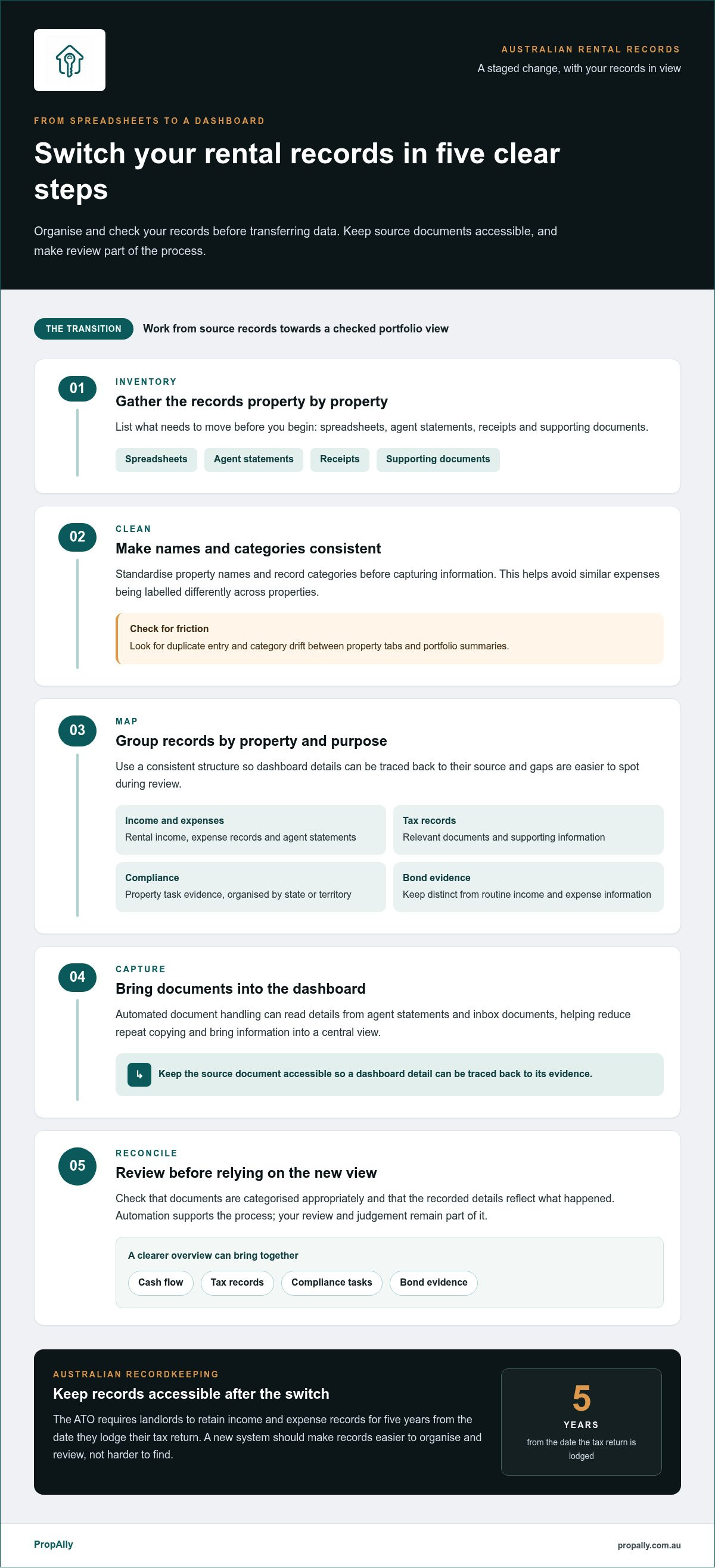
Switch rental spreadsheets to a dashboard in 5 steps
A controlled move protects your records and keeps the transition manageable. Start with one property as a pilot, check the workflow against its source documents, then extend the process across the portfolio. Keep your existing files until you’ve reviewed the new records and resolved any differences.
- Inventory each property’s records. List the spreadsheets, agent statements, receipts, tax-related documents, compliance records and bond evidence you currently hold. Note where each item is stored and which property it relates to. Include shared inboxes and general folders, not just neatly labelled property files. This gives you a practical register of what needs organising, rather than relying on memory.
- Clean the working data. Remove duplicate rows, standardise property names, dates and transaction categories, and flag unclear entries. Record missing documents and unresolved items instead of guessing or silently filling gaps. Keep an untouched copy of each original workbook and source record so you can refer back to it during checks.
- Map your categories. Decide how existing spreadsheet headings correspond to the categories you’ll use in the dashboard. For example, if one workbook uses “repairs” and another uses “maintenance”, choose a consistent label and note the mapping. Keep property identifiers clear, especially for holdings in different states or territories, so records and compliance information stay associated with the right rental.
- Import or capture one property’s information. Use a single property to test the new workflow before moving the full portfolio. Bring in the prepared records and capture relevant agent statements or inbox documents. Review what’s been extracted, paying attention to incomplete documents, unusual entries and categories that don’t match your mapping. A pilot makes it easier to adjust your process before the same issue appears across several properties.
- Reconcile, then extend. Compare selected statement periods and property totals in the dashboard with the original statements and supporting records. Investigate mismatches before treating the dashboard summary as your working view. Once the pilot is checked, use the same steps for each remaining property and set a regular routine for reviewing new statements, receipts and exceptions.
Reconcile records before relying on the totals. A clear dashboard is useful only when its figures have been checked against their sources. Compare like with like: confirm the statement period, check that income and expenses are assigned to the right property, and account for entries that may have been recorded differently in the spreadsheet. Keep a brief note of unresolved items so they remain visible during the transition.
After the move, make the review routine repeatable. For each new document, confirm its property, check the extracted details and resolve anything unclear. Keep source documents accessible alongside the organised records. This creates a steady process for maintaining reliable information, rather than treating migration as a one-off clean-up.
For a central dashboard covering cash flow, tax, compliance and bond evidence, see how PropAlly organises rental records.
How PropAlly helps Australian investors manage rental records beyond spreadsheets
The move from a workbook works best when the new system supports the controls you’ve established: clear property records, review of captured information and a portfolio view you can interpret. PropAlly brings cash flow, tax records, compliance and bond evidence into an Australian property dashboard, helping keep these information groups together rather than scattered across separate spreadsheets and folders.
PropAlly can read agent statements and inbox documents automatically, then consolidate information across properties and states. This can reduce repetitive document handling while keeping your review in the workflow. Check details against their source and resolve discrepancies instead of assuming that a captured entry is correct simply because it appears in a dashboard.
Which PropAlly capabilities support the move from manual records?
Automatic reading of statements and inbox documents helps reduce repeated data entry. Consolidated property information gives you a more orderly way to review records across your portfolio. For Australian investors, state-specific compliance checklists and bond authority workflows help organise records in context. ATO-aligned tax calculations are also available to support record organisation, but they don’t guarantee a tax outcome or replace advice from a qualified tax professional.
You remain in control of the review. Check that a document relates to the right property, look over extracted details and follow up on entries that are incomplete or unexpected. The dashboard helps organise the information; your checks help establish whether it reflects the source record. View the PropAlly dashboard to see how these records can sit in one place.
How can an investor start small and expand the workflow?
Begin with one property and a defined set of current records, such as recent agent statements, receipts and relevant compliance documents. Use that property to understand how your records are organised in the dashboard and establish a review routine. Once the workflow is familiar, apply the same structure to other properties, including holdings in different states or territories.
PropAlly’s Free Plan is available for one property, so you can start organising records without moving your whole portfolio at once. This measured first step lets you see how document reading, record review and consolidated views fit your process before you expand. If you’re ready to switch from rental property spreadsheets to automated dashboard records, begin with the property and documents you know best.
Start organising your property records in PropAlly’s free tier and build your dashboard one property at a time.
Make your next recordkeeping step a manageable one
A better system doesn’t require you to change everything at once. Choose a clear starting point, keep your source records accessible and make review part of your regular routine. Your process can then grow alongside your portfolio without making the transition feel like a leap into the unknown.
If you’re ready to switch from rental property spreadsheets to automated dashboard recordkeeping, start with the property and records you know best. Build confidence in the workflow, then extend it at a pace that suits your portfolio. Small, deliberate steps can create a more organised foundation for managing your Australian rentals.
Start organising your rental property records with PropAlly and take the next step towards a clearer, more controlled recordkeeping routine.
Frequently Asked Questions
Can I keep my rental property spreadsheet as an archive after switching to a dashboard?
Yes. Keep the old workbook as a reference archive rather than continuing to update it alongside the dashboard. Record the date you stopped using it for live entries, and store it with the related source documents. This makes it easier to distinguish historical figures from current records. Switching from rental property spreadsheets to automated dashboard recordkeeping doesn’t require you to discard the original files.
What happens if an agent statement contains a correction after its information has been recorded?
Keep the corrected statement and compare it with the version or details you first recorded. Identify which entries changed, then update the relevant property record and note why it was amended. Don’t assume the dashboard will revise an earlier entry automatically. Retaining both documents and a clear note of the change helps explain differences later, including when reviewing a statement period with your accountant or tax agent.
Can I review rental property records for different Australian states in one dashboard?
Yes. PropAlly can consolidate information across properties and states in one dashboard. Keep each record clearly associated with its property and state or territory, so a document for one rental isn’t mistaken for another’s. When reviewing bond evidence or compliance records across your holdings, the location context helps you identify the property and workflow each record relates to.
Do automated rental property dashboards replace advice from an accountant or tax agent?
No. A dashboard can help organise rental information and provide ATO-aligned tax calculations, but it isn’t a substitute for advice from an accountant or registered tax agent. If you’re unsure how an expense should be treated or how a change affects your circumstances, seek advice from a qualified professional. Use organised records to support that discussion, and check the underlying documents rather than relying on a summary alone.
How should I handle a missing receipt when I move records from a spreadsheet?
Mark the entry as missing supporting documentation instead of creating or guessing at a receipt. Note what the transaction relates to, its date and the property, then check whether a copy is available from the supplier or in your email records. Keep any related evidence together and leave the item flagged for follow-up. That way, an unresolved gap stays visible during migration and later review.
Can I start using a dashboard with just one investment property?
Yes. PropAlly’s Free Plan is available for one property. You can begin by organising that rental’s current records and getting familiar with the review process before deciding whether to extend the workflow. Starting with one property can also help you settle on consistent names and categories before adding another, without reorganising your whole portfolio at once.