

The platform with the longer feature list isn’t automatically the better fit for your rental portfolio. What matters is how well it handles the work behind your records: tracking rent, sorting agent statements, keeping documents together and staying on top of state-based compliance. This rentingsmart vs PropAlly feature comparison looks at everyday Australian investor workflows, not just a checklist of tools.
It’s easy to see why the choice can feel unclear. Both platforms support property administration, but they approach it differently. Rentingsmart focuses on self-management tasks such as rent tracking, tenant communication and document storage. PropAlly brings portfolio cash flow, ATO-aligned tax calculations, state-specific compliance workflows and automated agent statement reading into a connected view.
We’ll compare the platforms against practical tasks, including financial record-keeping, compliance documentation and managing information across properties. You’ll also get a clearer view of plan and feature boundaries, so you can judge which setup better matches your portfolio and how you prefer to organise its records.
Key Takeaways
- Use the rentingsmart vs propally feature comparison to match each platform to your day-to-day investor tasks, not just its feature list.
- Compare how each platform supports rental records, tax preparation, bond evidence and Australian state-based compliance workflows.
- See how automated statement and inbox document reading can bring portfolio information together in PropAlly.
- Match your property count and document-handling needs to the plan structure, including PropAlly’s free option for one property and paid plans covering up to twenty.
- Use a workflow-based decision to identify which platform better fits the way you organise and maintain property records.
Rentingsmart vs PropAlly: What should Australian property investors compare?
Choose software by the work you need it to support, not by the length of its feature list. In this rentingsmart vs propally feature comparison, the useful test is how each platform fits your portfolio, record-keeping habits and Australian property workflows.
This is a comparison of investor software, not property management services. A platform can help organise information and support oversight, but that’s different from having someone manage a tenancy or handle operational work for you. The aim is to make your records easier to track, review and keep connected.
Start with four areas: records, including rental income, expenses and bond evidence; automation for handling statements and documents; compliance workflows relevant to properties across Australian states and territories; and plan fit for your property count and document volume. These sit within the wider activity of real estate investing, where organised records help you maintain oversight of your assets.
Which investor tasks should a property platform support?
Map your routine first. Can you bring rental income and expenses together, find agent statements, organise tax records and retain bond evidence? If you own properties in different states, consider whether the platform helps you organise state-specific records rather than treating every property’s requirements as identical. An investor dashboard supports your own visibility; it isn’t a substitute for property management or tax advice.
PropAlly’s dashboard tracks cash flow, tax, compliance and bond evidence. It also provides ATO-aligned tax calculations, state-specific compliance checklists, bond authority workflows and automated reading of agent statements and inbox documents. These are platform functions, not a promise of a particular financial or compliance outcome.
How to read this feature comparison accurately
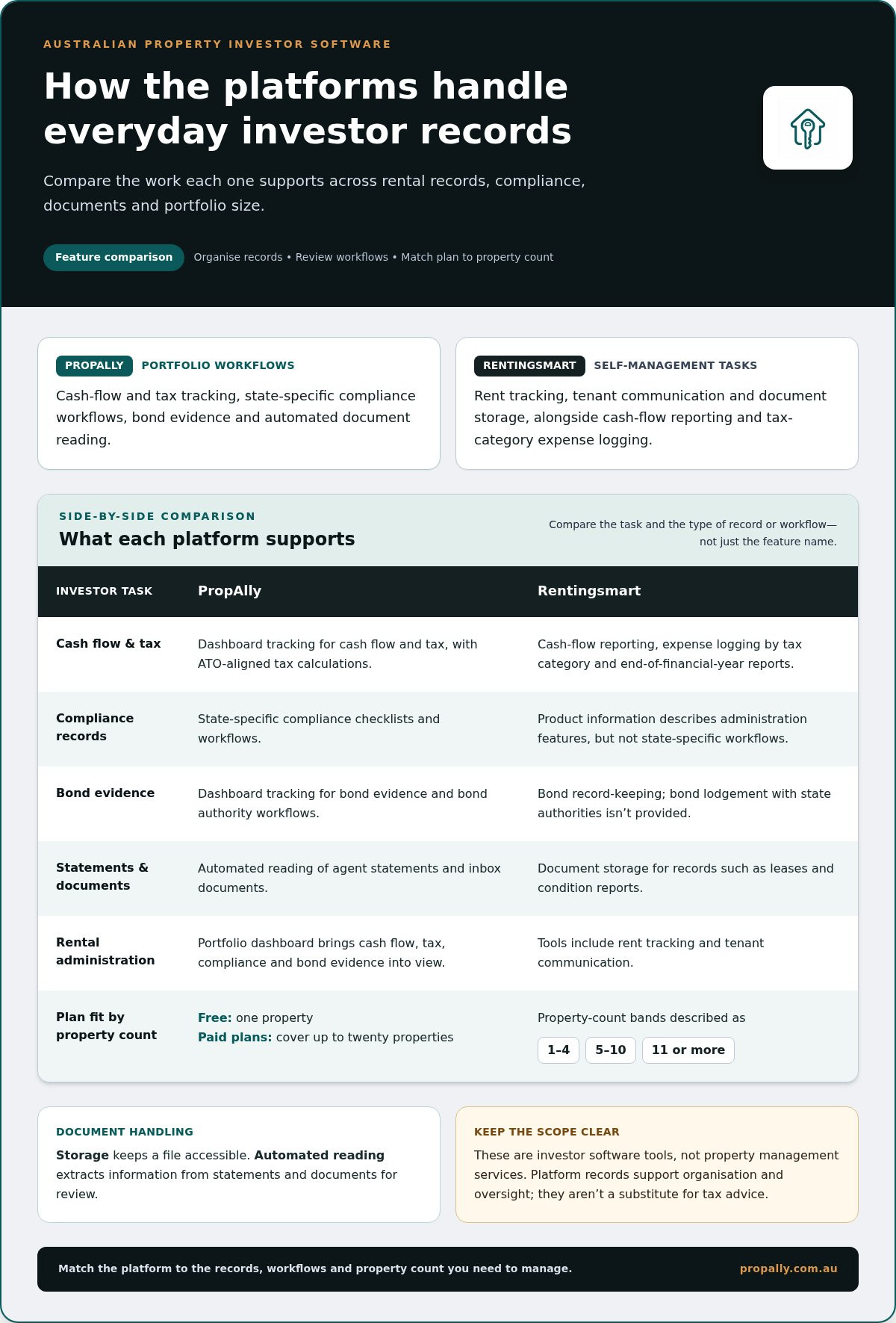
Use the same task for each platform, then distinguish what a feature does from what its name suggests. Rentingsmart’s described tools include rent tracking, tenant communication and document storage, with further details set out below. PropAlly’s capabilities include portfolio tracking, compliance workflows and automated document reading. The table summarises these practical differences without treating document storage and automated data extraction as the same task.
| Investor task | PropAlly | Rentingsmart |
|---|---|---|
| Cash flow and tax records | Dashboard tracking and ATO-aligned calculations | Cash-flow reporting, tax-category expense logging and end-of-financial-year reports |
| Compliance records | State-specific checklists and workflows | Product information describes administration features, but not state-specific workflows |
| Bond evidence | Dashboard tracking and bond authority workflows | Bond record-keeping; bond lodgement with state authorities isn’t provided |
| Statements and documents | Automated reading of agent statements and inbox documents | Document storage for records such as leases and condition reports |
| Plan fit | Free option for one property; paid plans cover up to twenty | Property-count bands described as 1-4, 5-10 and 11 or more |
Pay attention to what happens to a document after it arrives. “Document handling” might mean keeping a file accessible, while automated reading extracts information for review. If you receive regular statements, this difference can affect how much manual sorting and data entry your workflow involves.
Compare Rentingsmart and PropAlly features for rental records and compliance
Look beyond feature names to the records each platform helps you organise. Rental income, deductible expenses, agent statements and bond documents all feed into your own reporting and portfolio oversight. The Australian Taxation Office’s guidance on rental property records is a useful reference for understanding the information landlords need to manage.
Cash flow, tax records and reporting workflows
PropAlly’s dashboard tracks cash flow and tax, and its calculations are ATO-aligned. This supports record organisation and tax preparation, but it isn’t tax advice and doesn’t guarantee compliance. Rentingsmart’s product information describes cash-flow reporting, expense logging by tax category and end-of-financial-year reports. These features address similar record-keeping tasks, while the platforms differ in their other portfolio and document workflows.
Bond evidence and state-specific compliance workflows
PropAlly provides state-specific compliance checklists and bond authority workflows, alongside bond evidence tracking. These tools help organise records across a portfolio, but state requirements aren’t interchangeable. Rentingsmart’s product information describes bond record-keeping and states that the platform doesn’t lodge bonds with state authorities. Bond storage and bond authority workflows are distinct functions, so consider which one fits the records you need to maintain.
For broader context, pair platform records with an investment property compliance checklist and guidance relevant to each property’s state. A checklist in software can organise tasks, but a feature label alone doesn’t establish what it covers or whether a particular obligation is met.
| Task | PropAlly | Rentingsmart |
|---|---|---|
| Cash flow | Dashboard tracks portfolio cash flow. | Cash-flow reporting is described in Rentingsmart product information. |
| Tax records | Tax tracking and ATO-aligned calculations. | Tax-category expense logging and EOFY reports are described in Rentingsmart product information. |
| Compliance | State-specific compliance checklists and workflows. | Product information describes general administration features, rather than state-based compliance workflows. |
| Bond evidence | Bond evidence tracking and bond authority workflows. | Bond record-keeping is described; the product information says bond lodgement isn’t provided. |
| Statements | Automated reading of agent statements and inbox documents. | Product information describes document storage, rather than automated statement reading. |
Rentingsmart’s described features include cash-flow reporting, tax-category expense logging, EOFY reports and bond record-keeping. PropAlly combines cash flow, tax, compliance and bond evidence in a dashboard, with automated reading of agent statements and inbox documents. Plan-level feature allocation is separate from this feature comparison.
For a closer look at how PropAlly organises records and compliance workflows, read about the PropAlly Starter Plan.
How do Rentingsmart and PropAlly handle statements and portfolio data?
An agent statement arrives. You need to identify the property, review income and expenses, and keep the record with the right portfolio information. The difference between storing a file and extracting information from it matters: one keeps a document accessible, while the other can help structure its contents for review.
Statement reading and document processing
PropAlly can automatically read agent statements and inbox documents, helping consolidate information across properties and states. In a typical workflow, a statement is received, its information is read and brought into the investor’s organised property records, then reviewed alongside other portfolio data. Automation can reduce manual entry, but the investor still needs to check that information is accurate and assigned to the right property.
Rentingsmart’s product information describes central document storage for records such as leases, condition reports and bond records. This supports keeping important files together, while PropAlly’s automated reading handles a different task: extracting information from agent statements and inbox documents for portfolio records.
Keeping information usable across a property portfolio
One statement is manageable. A portfolio’s records become harder to review when documents, expenses and property details sit in disconnected places. PropAlly is designed to consolidate inbox documents and agent statement information across multiple properties and states, bringing those records into a broader view of the portfolio. This can help make information easier to review, but it doesn’t replace professional tax or financial advice.
Rentingsmart’s described document storage supports keeping files such as leases, condition reports and bond records accessible. A file repository and automated data extraction are different workflows, even if both involve documents. If you receive regular agent statements, consider whether you need storage alone or want information from those statements read and consolidated.
To assess the rentingsmart vs propally feature comparison for your own portfolio, follow one statement from arrival through to review. Note which steps are automatic, which require manual handling, and how you find the final record by property. A guide to automating rental property data entry can also help you identify where repetitive admin sits in your workflow.
Which platform and plan fits your Australian property portfolio?
Plan fit depends on more than the number of properties you own. Consider how many records arrive each month, whether you manage properties across different states, and which jobs you want software to support. The rentingsmart vs propally feature comparison is most useful when you match these needs against property limits and document workflows, rather than assuming a higher tier automatically suits a larger portfolio.
Choosing by property count and portfolio complexity
One property may mean a manageable flow of statements and compliance records. As you add properties, states and incoming documents, keeping information organised can take more effort. PropAlly offers a Free Plan for one property and paid plans that cover portfolios of up to twenty properties. Consider your workflow alongside property count, and distinguish plan coverage from the features available at each level.
Rentingsmart’s product information describes property-count bands of 1-4, 5-10 and 11 or more. These bands provide a basis for comparing portfolio size with PropAlly’s coverage of up to twenty properties. Property limits are only one part of the decision: document handling and the tasks you need to support also matter.
Assessing subscription structure and document add-ons
Document volume matters too. An investor who receives occasional statements has different processing needs from someone handling inbox records for several properties. PropAlly offers optional email document add-ons; weigh them against the volume and type of records you need to process. Its plans include different subscription tiers, and the email add-ons are priced according to document volume.
For a fair comparison, list your property count, approximate document workload and must-have tasks, then compare each platform’s property limits, document-processing options and included features. PropAlly’s optional email document add-ons are designed for automated reading of statements and inbox documents. Compare the boundaries, not just the subscription labels. No price or savings claim is needed to decide whether a plan’s scope fits your workflow.
For plan-specific context, see the PropAlly Starter Plan details. Consider its scope alongside your portfolio size and document workload.
Rentingsmart vs PropAlly: Make a confident software decision
The right choice is the platform that fits your actual record-keeping workflow. Compare how each handles information, not how many features appear on a page. In this rentingsmart vs propally feature comparison, the key differences are how records are organised, what document tasks can be automated, how Australian compliance workflows are supported and whether the plan suits your portfolio.
A practical four-step comparison before you choose
- Map your current admin. List what’s spread across emails, agent statements, spreadsheets and files, such as rental income, expenses, tax records and bond evidence.
- Match features to those tasks. Compare the stated product features with each step. Distinguish document storage from automated reading, and bond record-keeping from bond authority workflows.
- Compare plan boundaries. Consider property limits, document-processing needs, add-ons and which features matter to your workflow. PropAlly offers a free option for one property and paid plans covering up to twenty.
- Decide on workflow fit. Prioritise the tasks that take the most effort or create the most fragmented records. Choose based on how the described features fit your portfolio, not on unsupported claims that one platform is universally better.
When PropAlly suits your investor workflow
PropAlly suits investors seeking a connected Australian property data dashboard. It brings cash flow, tax, compliance and bond evidence into a portfolio view. Automatic reading of agent statements and inbox documents helps consolidate information across properties, while state-specific checklists and bond authority workflows support records for properties across Australian jurisdictions.
These capabilities support organisation and oversight. They don’t replace professional tax or financial advice, and feature availability can vary by plan. Consider plan boundaries alongside your property count and document volume.
For an overview of PropAlly’s platform and plans, visit PropAlly.
Choose the workflow that keeps your portfolio clear
The rentingsmart vs propally feature comparison comes down to how each platform supports your records, document handling, Australian compliance workflows and portfolio needs. Match features against the tasks you manage, including whether you need document storage, automated statement reading, or state-specific workflows.
PropAlly brings cash flow, tax, compliance and bond evidence into a single dashboard. Its automated reading of agent statements and inbox documents can consolidate property information, while state-specific checklists and bond authority workflows support record-keeping across Australian jurisdictions.
If connected portfolio oversight fits your needs, explore PropAlly and organise your property records in one dashboard.
Frequently Asked Questions
What is the difference between Rentingsmart and PropAlly for Australian property investors?
Rentingsmart and PropAlly support different property-investor workflows, so compare the tasks each helps you manage. PropAlly brings cash flow, tax, compliance and bond evidence into a dashboard, with automated reading of agent statements and inbox documents. Rentingsmart’s described tools focus on self-management administration, including rent tracking, tenant communication and document storage. The rentingsmart vs propally feature comparison is most useful when you match these features to your records and portfolio needs.
Does PropAlly automatically read rental property statements?
Yes. PropAlly can automatically read agent statements and inbox documents, helping consolidate information across properties and states. This can reduce manual data entry and make portfolio records easier to review. Investors should still check extracted information and its property allocation for accuracy. Automated document reading supports record organisation; it doesn’t replace professional tax or financial advice, nor does it guarantee that records or tax reporting are complete.
Can PropAlly track compliance and bond evidence across different Australian states?
PropAlly’s dashboard tracks compliance and bond evidence, and the platform provides state-specific compliance checklists and bond authority workflows. These features can help investors organise records across a portfolio that spans different Australian jurisdictions. State requirements can differ, so use the relevant state-specific workflow for each property rather than assuming one checklist applies everywhere. The platform supports record-keeping and oversight, but a checklist alone doesn’t establish that every obligation has been met.
Does Rentingsmart include automated rental statement processing?
Rentingsmart’s described product features include document storage and expense logging, while PropAlly automatically reads agent statements and inbox documents. Document storage keeps files accessible; automated reading extracts information for portfolio records. These are different workflows, so consider which one better matches the way you handle rental statements.
Which platform is better for tracking multiple investment properties?
It depends on the records and tasks you need to manage across your properties. PropAlly is designed to consolidate information across multiple properties and states, with a dashboard for cash flow, tax, compliance and bond evidence. Its paid plans cover up to twenty properties. Rentingsmart’s described property-count bands are 1-4, 5-10 and 11 or more. Compare these limits with your portfolio, then consider document processing and how easily you can review records property by property.
Does PropAlly have a free plan, and how many properties can it cover?
Yes. PropAlly’s free option covers one property. Its paid plans cover portfolios of up to twenty properties. Property count is only one part of plan fit. Also consider document volume, required workflows and which features are included at each plan level.
How should I compare property investor software plans without focusing only on price?
Start with your workflow. List the records you handle, such as agent statements, expenses, bond evidence and compliance documents, then compare how each platform supports them. Consider property limits, document-processing options, add-ons and plan-level feature allocation. Also assess whether records can be organised across the properties and states in your portfolio. A plan is a better fit when its features support your routine, not simply because it has a lower price.