

The right RentBetter alternative may depend less on how many features a platform offers and more on which financial tasks you need it to handle. If you’re weighing a rentbetter alternative for property finances, start by listing the records you need to bring together and the decisions you want to make from them.
Rental income and expenses can be spread across agent statements, inbox documents and your own records. A tool that supports tenancy tasks may not give you the portfolio-level financial view you need. Compare the workflows each option supports, not just its feature list.
This guide explains what to look for in property-finance software, including income and expense tracking, document handling, tax-related records and compliance workflows. It also looks at where PropAlly may fit: an Australian-focused finance dashboard that can read agent statements and inbox documents, with ATO-aligned tax calculations and state-specific compliance checklists. PropAlly isn’t a property manager or tax adviser, so the comparison focuses on its finance role and how it might complement your existing setup. Use the steps below to assess your options against your portfolio and record-keeping needs.
Key Takeaways
- Define the financial records and workflows you need before comparing a rentbetter alternative for property finances.
- Check each tool’s coverage for income and expenses, document capture, portfolio views and compliance workflows. Verify RentBetter’s current features rather than assuming what it includes.
- A separate finance dashboard is worth considering when it fills a clear tracking gap, not when it repeats tasks you already do.
- Use a practical selection process: map your tasks, check tool coverage, confirm Australian workflows, trial your shortlist and review how well each option fits.
- Assess whether PropAlly’s cash-flow, tax, compliance and bond-evidence tracking, plus agent-statement reading, suits your portfolio. It’s a finance dashboard, not a property manager or tax adviser.
A RentBetter alternative for property finances: first define what you need
Searching for a rentbetter alternative for property finances doesn’t necessarily mean you want to replace your whole management system. You may simply need a clearer view of the money side of owning a rental property, particularly when records are stored in different places.
Property-finance tracking means organising rental income, expenses, cash flow, tax-related records and the documents that support them. Bringing these details together can make it easier to review what’s coming in and going out. This is different from renter reward apps, which serve a different purpose, and from property-management services focused on tenancy tasks.
A property-finance dashboard brings rental income, expenses, cash flow and supporting records into one view. It helps organise information, but it doesn’t provide tax advice or guarantee compliance. This can support the financial oversight involved in real estate investing without confusing record-keeping software with professional advice.
What does a property-finance tool need to help you manage?
Start with visibility. Seeing income, expenses and cash flow together can make it easier to review a property’s financial activity than piecing together separate records. Agent statements and receipts provide supporting detail for transactions. A tool that can capture or organise documents may reduce manual consolidation, but you’ll still need to check that the information is accurate and complete.
Keep the workflows distinct. Financial tracking isn’t the same as tenant communication, maintenance coordination or leasing. If you already handle those tasks elsewhere, you may not need another system for them. You may need a focused way to organise the financial records those tasks generate.
Is RentBetter the right category for your comparison?
Before comparing options, list the RentBetter tasks you currently use. Separate the features you rely on from the financial gaps you want to address. This simple audit can help you avoid replacing functions you already value when your actual need is more specific.
RentBetter’s finance capabilities aren’t established here, so check its current official product information rather than assuming what it tracks based on its name or category. Look for details on income and expense tracking, document handling and portfolio-level views. Then compare confirmed features with your requirements. The goal isn’t the longest feature list. It’s a workflow that keeps your rental finances organised without unnecessary duplication.
Compare RentBetter alternatives by the rental-finance workflows they support
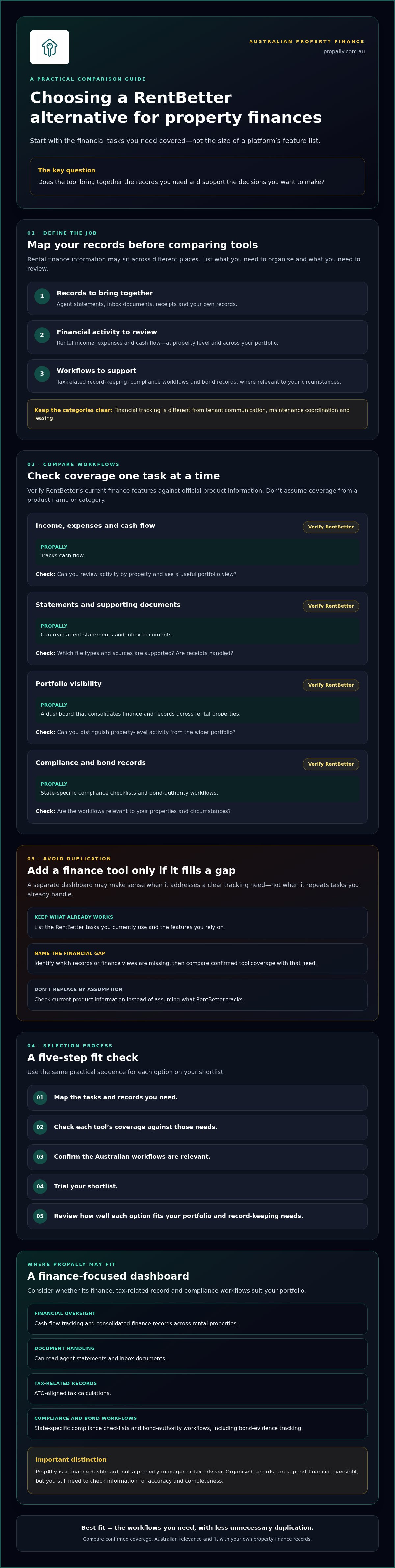
Compare tools against the work you repeat, not the length of their feature lists. The right fit depends on your recurring workflow: what you need to track, where the records come from and how you review them. Use the table as a verification checklist. Check RentBetter’s current finance capabilities against its official product information instead of making assumptions.
| Workflow | RentBetter | PropAlly | What to check |
|---|---|---|---|
| Income, expenses and cash flow | Verify current coverage | Tracks cash flow | Can you review transactions by property and see a useful portfolio view? |
| Statements and supporting documents | Verify current coverage | Can read agent statements and inbox documents | Which file types and sources are supported? Are receipts handled? |
| Portfolio visibility | Verify current coverage | Dashboard consolidates finance and records across rental properties | Can you distinguish property-level activity from the wider portfolio? |
| Compliance and bond records | Verify current coverage | Includes state-specific compliance checklists and bond-authority workflows | Are the workflows relevant to your properties and circumstances? |
Which finance features make the biggest practical difference?
A property-level view lets you inspect one rental’s income and costs. A portfolio view helps you see activity across several properties. Confirm what each platform actually displays instead of assuming it offers particular reports. If your agent sends statements and you store receipts elsewhere, check whether the tool can organise the records you need or whether some manual filing will remain. Forbes also discusses best practices for managing rental properties, including using software to help organise finances and operations.
State-specific compliance checklists and bond workflows may be useful if you want those records alongside financial information. Treat them as workflow features to assess, not legal guidance. Check whether the coverage matches the states where your properties are located, and confirm relevant requirements independently.
How should you assess automation and record access?
Automation can reduce repeated data entry, but only if it works with the documents you receive. Ask which sources a platform can process, what setup is required and how you can review extracted information. PropAlly can read agent statements and inbox documents. Check before assuming it supports other document types.
Before choosing, review current product information for export options, account access and data-retention details. These affect how easily you can retrieve records and maintain your own files. For a closer look at the workflow, read about automating rental-property data entry. If you’re assessing whether a finance dashboard fits, explore PropAlly’s property-finance tools and verify current plan inclusions.
Will a separate finance tool duplicate your RentBetter setup?
It might. A second platform earns its place only if it fills a clear financial-tracking gap, such as bringing cash-flow information or supporting documents together when your existing setup doesn’t. If it repeats work you already do, it could add administration instead of improving oversight.
Think in tasks, not software labels. One tool might support tenancy activity, while a separate finance dashboard helps organise financial records. That combination is a possible workflow, not proof that the platforms connect. Confirm compatibility, integrations and migration options directly with each provider before relying on them.
When can a finance dashboard complement existing software?
Consider an investor who uses an existing system for tenancy tasks but reviews agent statements, receipts and cash flow separately. A finance dashboard might provide a consistent place for those records while the other tool continues to serve its specific purpose. Map each tool to a task before subscribing or switching. For broader portfolio visibility questions, see this property portfolio performance tracker guide.
Keep financial records organised for your own review, and consult the Australian Taxation Office rental guide for official Australian rental-property information. Software can help organise records, but it doesn’t replace your responsibility to check them or seek professional guidance where needed.
When might adding another platform create extra work?
Look for friction before committing. Re-entering the same figures, keeping competing versions of a record or switching between separate logins can add time and make it harder to tell which source is current. Ask each provider which export formats are available, how you can access your records and what information you retain if you stop using the service. Don’t assume data will transfer automatically.
A small, reversible test is more useful than moving everything at once. Choose one finance task, such as organising a set of agent statements, and assess whether the process is clearer without creating duplicate entry. First check the provider’s current terms and capabilities, including any limits that apply to your documents.
If you’re weighing a rentbetter alternative for property finances, write down the gap you want to solve, the records involved and where the final version of each record will live. Then assess whether a finance-focused dashboard fits that workflow. You can review PropAlly’s finance dashboard as one option, while checking current plan inclusions and confirming whether it suits your existing setup.
Use this checklist to choose a RentBetter alternative in Australia
Use a repeatable process to assess whether a tool fits your portfolio. A rentbetter alternative for property finances should cover the records and review tasks you need, not simply look comprehensive on a feature list.
- Map your tasks. List what you need to organise, such as rental income, expenses, agent statements, tax-related records or bond evidence. Note which tasks your current setup already covers.
- Check the coverage. Compare your list with each provider’s current documentation. Confirm whether the tool supports the records, property-level views and portfolio-wide visibility you need.
- Verify Australian workflows. Check that any state-specific compliance checklists or bond workflows are relevant to your properties. Treat them as software features to verify, not universal legal advice. Review the Australian investment-property compliance checklist as a prompt for your assessment.
- Trial a real task. Choose a recurring workflow, such as consolidating an agent statement, and test it from document entry through to review. Check whether property-level and portfolio-level records are easy to find.
- Review the result. Record setup effort, exceptions and any manual corrections. Before committing, confirm current plan limits, document-processing inclusions, data-handling terms and how you can access or export your records.
What should you test before committing?
Use a representative document and follow the entire process rather than judging the dashboard from a quick look. Can you identify which property a record belongs to? Can you review information across your portfolio? Note where the workflow needs extra steps or corrections. A focused test can show whether the tool reduces friction for that task, without assuming it will suit every part of your record-keeping.
How do Australian tax and compliance needs affect your choice?
Check how a platform organises tax-related records, but don’t treat software as professional tax advice. Verify state-specific workflows against current official guidance and the provider’s documentation. For a records-focused overview, see ATO rental property records guidance. PropAlly’s dashboard includes ATO-aligned tax calculations, state-specific compliance checklists and bond-authority workflows. Check current plan inclusions and document limits before deciding whether they fit. Review PropAlly’s property-finance dashboard against your checklist.
Could PropAlly be the finance-focused alternative you need?
If your main gap is keeping rental-property finances and records organised, PropAlly may be worth assessing as a rentbetter alternative for property finances. It’s an Australian property-finance dashboard, not a property manager or standalone tax adviser. It brings selected financial and record-keeping workflows into view, so you can decide whether it complements or suits your current setup.
Which investors may find PropAlly relevant?
PropAlly may suit investors who want a central place to track cash flow, tax-related information, compliance records and bond evidence across rental properties. It can read agent statements and inbox documents, which may help reduce manual consolidation. You’ll still need to review extracted information and keep records accurate. Its Australian focus includes state-specific compliance checklists and bond-authority workflows, which you can assess against your properties and circumstances.
Set expectations clearly: PropAlly doesn’t manage tenancies, coordinate maintenance or provide financial and tax advice. Its tax calculations are ATO-aligned, but the dashboard isn’t a substitute for professional advice and doesn’t guarantee compliance. It’s designed to give property owners a view of their finances and records.
How can you assess the Starter Plan before choosing?
PropAlly has a Free tier for one property, while paid plans cover portfolios of up to twenty properties. The PropAlly Starter Plan may be relevant if you’re comparing options for a growing portfolio. Before signing up, confirm current plan features and property limits, as well as document-processing inclusions and data-handling terms. Don’t assume a plan covers every file type or workflow you need.
Use your task checklist to test the fit. Identify which records you want to centralise, confirm how statements and inbox documents are handled, then check whether the resulting view supports your review routine. If a feature is essential, verify it against current product information before relying on it.
Ready to check the fit against your own requirements? Explore PropAlly and check whether it fits your property-finance workflow.
Choose the finance workflow that gives you a clearer view
The right rentbetter alternative for property finances depends on the records and tasks you need covered, not the biggest feature list. First confirm what your current setup already handles. Then compare tools for income and expense visibility, document handling, portfolio records and Australian compliance workflows. Check current capabilities rather than making assumptions.
PropAlly is an Australian-focused dashboard for tracking cash flow, tax, compliance and bond evidence. It can read agent statements and inbox documents, helping bring financial records together for review. It isn’t a property manager or tax adviser. A free tier is available for one property, but check current plan inclusions and document-processing limits before choosing.
If those workflows match your needs, explore PropAlly and check whether it fits your property-finance workflow. A clear comparison can help you choose an approach that keeps your portfolio records organised.
Frequently Asked Questions
Is RentBetter suitable for tracking rental-property finances?
It depends on the financial workflows you need and RentBetter’s current features. Check its official product information for details on income and expense tracking, cash-flow visibility, document handling and portfolio-level records. Don’t assume these capabilities based on the platform’s name or category. If your main gap is consolidating agent statements and financial records, compare confirmed features with that specific need before deciding whether to keep your current setup or assess another tool.
What should I compare when choosing a RentBetter alternative for property finances?
Compare how each option handles rental income, expenses, cash flow, supporting documents and records across your properties. Check whether you can review information at both property and portfolio level, and whether Australian tax-related records and relevant state-specific workflows are covered. Confirm document-processing inclusions, data access and export options too. The right rentbetter alternative for property finances is the one that fits your recurring record-keeping tasks without adding unnecessary duplication.
Can I use a finance dashboard alongside property-management software?
Yes, if each tool has a clear role and the combination doesn’t create more administration than it removes. For example, you might use one system for tenancy tasks and a finance dashboard to organise cash flow and supporting documents. Don’t assume the platforms integrate or transfer data automatically. Confirm compatibility with both providers, decide which system is the source of truth for each record, and test a defined workflow before moving more information.
How do I compare property-finance tools for a portfolio across Australian states?
List the properties and financial records you need to track, then check whether each platform can organise them in useful property-level and portfolio-wide views. If state-specific compliance checklists or bond-authority workflows matter to you, verify their coverage with the provider and check relevant details against current official guidance. Treat software features as organisational tools, not legal advice. Also confirm plan limits and document-processing inclusions for your portfolio before choosing.
Does PropAlly provide tax or financial advice?
No. PropAlly is a property-finance dashboard, not a tax adviser or provider of financial advice. It helps investors track cash flow, tax-related information, compliance records and bond evidence, and its tax calculations are ATO-aligned. That doesn’t mean the platform provides professional advice or guarantees compliance. Review your records carefully and seek qualified guidance if you need advice about your individual tax or financial circumstances.
Can PropAlly read rental agent statements automatically?
Yes. PropAlly can automatically read statements from agents and documents received in inboxes, helping consolidate information across rental properties. Document reading may reduce manual entry, but it doesn’t remove the need to review records and correct information where needed. Before relying on the workflow, check current plan inclusions and document-processing arrangements, including whether they cover the statement sources and document volume relevant to your portfolio.
Is there a free PropAlly plan for one investment property?
Yes. PropAlly has a Free tier for one property. If you’re considering it, check the current inclusions and any document-processing limits before signing up, as these details affect whether it covers your workflow. Paid plans are available for portfolios of up to twenty properties, but compare their current features with the records you need to manage. Don’t choose by property limit alone; check that the plan supports the tasks you’ll use regularly.