
The platform with the longest feature list may be the wrong fit for your portfolio. The real question behind re leased vs dedicated landlord software australia is whether you need to manage tenancies or keep your investment records organised. Property-management platforms and dedicated landlord tools have different priorities, even when some of their workflows overlap.
It’s easy to assume one system should handle everything. But paying for workflows you won’t use can add complexity. Meanwhile, scattered agent statements, cash-flow details and compliance records can make it harder to see the full picture, particularly when you own properties in different states.
This comparison explains what each type of software is designed to do, how it fits different ownership and management arrangements, and what to consider for Australian record-keeping. You’ll see where tenancy workflows matter, where an investor-focused dashboard can consolidate property, tax, cash-flow and bond evidence, and how to match your choice to your day-to-day responsibilities. The goal is to make a clearer decision without confusing managing a property with managing the records behind an investment.
Key Takeaways
- The re leased vs dedicated landlord software australia decision starts with the job you need done: tenancy management or investor record-keeping.
- Map your regular admin tasks before comparing features, so you can avoid paying for workflows your portfolio doesn’t need.
- Assess your management setup and information gaps, not just the number of properties you own.
- For Australian portfolios, consider how you’ll organise property, cash-flow, tax and state-specific compliance records.
- PropAlly is an investor-focused dashboard that brings together records such as agent statements, cash flow, tax, compliance and bond evidence.
Property-management software vs landlord software: what does each tool do?
These tools can sit in the same property ecosystem, but they’re built around different responsibilities. Property-management software helps organise the running of tenancies. Dedicated landlord software focuses on the owner’s view of an investment, including property records, income, expenses and documents for ongoing oversight.
Property-management platforms may support workflows such as lease administration, arrears follow-up and maintenance coordination. Dedicated landlord tools may help private owners gather information from agents and keep portfolio records in order. The categories can overlap, so a label alone won’t tell you exactly what a platform does. For a general overview, see What is property management software?
Tenancy software coordinates property operations; investor software brings the owner’s portfolio information into view. Compare tools by their purpose rather than assuming one category always replaces the other.
What does property-management software refer to in this comparison?
Here, property-management software means a platform designed to support the administration and operation of properties or tenancies. Depending on the product, its intended users may include professional managers, agencies or owners who manage rentals themselves. The term describes a broad category, not a fixed feature set. Assess each platform against its documented capabilities and the responsibilities you need it to support.
For Australian investors, a product’s intended property market also matters. A system centred on commercial property operations may serve a different purpose from software designed around private residential investment records. Don’t assume a general category label means the product includes specific Australian workflows or investor-focused functions.
What counts as dedicated landlord software?
Dedicated landlord software generally centres on the private owner’s administration: tracking property details, cash flow and supporting records across one or more rentals. The exact scope varies. One tool might focus on tenancy tasks, while another puts more emphasis on financial records or tax-time organisation. “Landlord software” doesn’t guarantee that every product includes the same functions.
PropAlly is an Australian investor dashboard. It tracks cash flow, tax, compliance and bond evidence by property, and can read agent statements and inbox documents to consolidate property information. Its state-specific compliance checklists and bond authority workflows help organise records. The dashboard is not a property manager or tax adviser.
Consider an owner whose agent handles tenant communications and maintenance. The owner may still want to review investment information across their holdings. Someone who self-manages may also need software for recurring tenancy tasks. These are different requirements. Identify the work you need the system to support, then compare its documented capabilities rather than relying on category names alone.
How the two software approaches handle everyday landlord workflows
Day-to-day administration can split into two streams: keeping a tenancy moving and keeping the investment’s records in order. A property manager or self-managing owner may need to coordinate tenancy-related tasks. An investor may also need to track rental income, expenses and documents across properties. One stream doesn’t automatically cover the other.
Software fit depends on the administrative job you need to do, not simply on the fact that you own a rental property. Compare tools by the recurring work they support and the information you need to see together.
When tenancy administration is the main requirement
Tenancy administration can involve coordinating lease activity, responding to arrears, arranging maintenance and organising property-related communications. These are broad workflow categories, not a promise that every platform supports each task in the same way. A property manager may prioritise operational coordination; a self-managing owner may want structure around recurring tenant and property tasks.
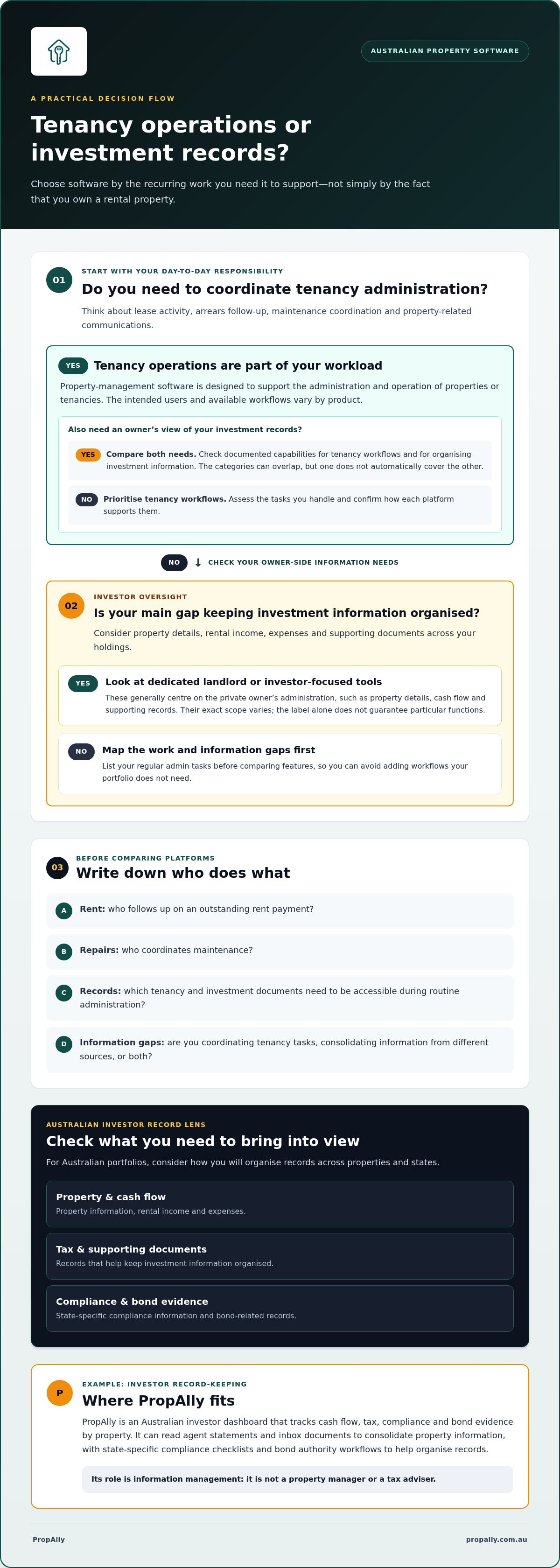
Start with responsibilities. Who follows up on an outstanding rent payment? Who coordinates a repair? Which tenancy records need to be accessible during routine administration? Your answers define the operational workload before you compare software. Assess each platform’s documented capabilities rather than assuming all property-management tools handle these tasks identically.
When investor oversight and records are the priority
Using a property manager can reduce your direct involvement in tenancy tasks, but it doesn’t remove the need to organise investment records. You may still want a clear view of cash flow, tax-related documents and compliance information across your holdings. Often, the challenge is consolidating information from different sources rather than coordinating the tenancy itself.
PropAlly can read agent statements and inbox documents, then consolidate property information. Its dashboard tracks cash flow, tax, compliance and bond evidence by property, helping investors bring relevant records into one view. This is an information-management role. It doesn’t replace an agent’s management work or provide tax advice.
For owners handling statements and other documents manually, rental property data entry automation explains how document reading can fit into an organised record-keeping workflow.
Map a routine month before choosing software: note what you do for tenancy administration, what information you collect from your agent, and what you need to review across your portfolio. If the main friction is coordinating tenancy tasks, assess software against those operations. If it’s scattered statements and limited portfolio visibility, focus on investor records. For owners who want to consolidate property information, PropAlly’s investor dashboard is designed around that records-focused role.
Compare property-management and landlord software against these Australian investor criteria
Use this comparison to identify which type of system aligns with your role and the records you need to manage. A commercial property-management platform and dedicated landlord software may serve different users. Compare their documented purpose rather than assuming they offer equivalent tools.
| Criterion | Commercial property-management platform | Dedicated landlord software |
|---|---|---|
| Typical user | May be designed for commercial property professionals and operational teams. The intended user depends on the product. | Generally aimed at private landlords or investors, though the audience varies by product. |
| Primary job | May support property operations such as lease administration, arrears processes or maintenance coordination. Confirm the product’s documented scope. | May focus on owner administration, tenancy tasks or investment records. Check the individual tool’s stated purpose. |
| Records focus | May organise records connected with property operations. The available record types vary by platform. | Varies by product. An investor dashboard such as PropAlly tracks cash flow, tax, compliance and bond evidence, and can read agent statements and inbox documents. |
| Portfolio visibility | Some platforms describe portfolio analytics. Identify which views are documented and relevant to your ownership needs. | Portfolio views differ. PropAlly consolidates property information and tracks records by property. |
Which records and portfolio views do you need?
Make an inventory of the information you need to review: agent statements, receipts, property expenses and documents associated with each rental. Note whether you can find each item quickly and distinguish records by property. Then decide whether your priority is operational visibility, an owner-level view of investment information, or both. The ATO’s rental property records app guide can help you consider how you keep rental records organised.
How should Australian compliance context affect the choice?
For a portfolio spread across states or territories, assess whether software organises relevant information by location and supports your record-keeping process. PropAlly provides state-specific compliance checklists and bond authority workflows. These tools help organise records, but they don’t guarantee compliance. Consider whether the workflow helps keep the information you need accessible for each property, while recognising that software doesn’t replace your own responsibilities.
Separate product claims from category assumptions. A platform may document a particular operational workflow, but that doesn’t establish that it includes investor-focused records or every Australian state-specific function. Compare the specific views, processes and record types each product describes against your requirements. A good fit should make clear what the software helps you organise and what remains part of your existing management or record-keeping arrangements.
Choose software by portfolio size, management setup and information gaps
Choose around the work that still sits with you. A property manager may handle tenancy operations, but you may still need to review statements, keep investment records together and understand portfolio cash flow. A specialist records tool can address a separate information gap without duplicating the manager’s role.
Map your responsibilities before assessing software
Start with a simple task map. Record who handles each recurring job, then identify what you still need to see or organise as the owner. This separates operational task management from investor oversight and makes it easier to compare tools against your actual needs.
- Define your role. Note whether you self-manage, use a property manager or share responsibilities. Include any regular information you receive from an accountant.
- List recurring administration. Write down tasks such as coordinating tenancy matters, reviewing agent statements, storing receipts and tracking cash flow or property documents.
- Find the gaps. Identify records that are hard to locate, figures that are difficult to review across properties, or information that arrives in different formats.
- Set the software job. Decide whether you need support for property operations, a clearer investor-level record system, or both distinct functions.
This also answers a common concern: will a dedicated tool repeat what the property manager already does? It can, if you select a platform for operational tasks that are already covered. A records dashboard can serve a different purpose by organising statements and portfolio information for the owner rather than taking over tenancy management.
Match the tool to your portfolio’s actual information needs
Property count is only one consideration. With one rental, your main need might be keeping its records accessible. With multiple properties, you may want a consistent way to review information for each property and across the portfolio. If your holdings span states or territories, state-specific records and workflows may matter more than a broader feature list.
Consider document volume, too. How often do agent statements and other property documents arrive? Do you spend time transferring information by hand, or is the bigger issue finding it later? PropAlly can read agent statements and inbox documents to consolidate property data. Its email add-ons are optional, so assess them against your actual document workflow rather than assuming you need them.
A useful rule for the re leased vs dedicated landlord software australia decision: choose the narrowest toolset that covers your recurring responsibilities and information gaps. Owning more properties doesn’t automatically mean you need broader operational software.
If portfolio tracking and records are your core need, explore the Starter Plan for investor record keeping. A focused Australian property portfolio tracker can help bring property information into one organised view.
Where PropAlly fits: an investor dashboard for organised Australian property records
PropAlly is designed for the investor’s side of property ownership: organising information and keeping portfolio records visible. It isn’t a property manager or tax adviser, and it doesn’t replace an agent’s work. Instead, it can sit alongside your existing management arrangements, bringing property and financial records together for your own oversight.
That distinction helps clarify the re leased vs dedicated landlord software australia decision. If your main need is coordinating tenancy operations, an investor dashboard serves a different purpose. If your challenge is finding statements, tracking cash flow or keeping records organised across rentals, an investor-focused tool may address that information gap.
How PropAlly supports investor oversight
PropAlly tracks cash flow, tax, compliance and bond evidence by property. It can read agent statements and inbox documents, helping consolidate property information across a portfolio. For an investor with rentals in different states, state-specific compliance checklists and bond authority workflows provide structured ways to organise relevant records.
PropAlly also provides ATO-aligned tax calculations as a software function. That’s not financial or tax advice, and the dashboard doesn’t promise a compliance outcome. It gives investors a more organised view of property-related information to support their record-keeping.
Document reading can reduce the need to gather information from each statement manually, but it shouldn’t be treated as a guarantee that every detail will be captured perfectly. Keep the original documents accessible and use the consolidated view as part of your records process.
When to explore the PropAlly Starter Plan
The Starter Plan is worth exploring once you’ve identified portfolio records and visibility as your core need. Consider the regular work you want to organise: reviewing agent statements, tracking cash flow by property, or keeping compliance and bond evidence together. Start with the workflow you want to improve, not a feature list you may never use.
PropAlly’s free tier covers one property, while paid plans support portfolios of up to twenty properties. This gives investors a way to consider the scale of their records without assuming a larger portfolio automatically calls for broader tenancy-management software. Focus on the information you need to bring together and how often you need to review it.
If organised property data is the gap you’re ready to address, explore the PropAlly Starter Plan and see how an investor dashboard could fit alongside your existing Australian property management arrangements.
Make your next software decision with confidence
Your property administration will change as responsibilities shift, records accumulate and your portfolio evolves. Treat software selection as a practical review, not a once-and-for-all decision. Ask whether the tool still supports the work you actually do or has become another place to manage information.
That perspective keeps the re leased vs dedicated landlord software australia choice grounded in your needs rather than assumptions about what a landlord platform should include. Start with the task that causes the most friction, then choose a system that supports it without blurring the line between tenancy management and your investment oversight.
If organised investor records are the next step for your portfolio, explore the PropAlly Starter Plan. Build a clearer process around the information you rely on and move forward with greater confidence in how you manage your property records.
Frequently Asked Questions
Is commercial property-management software designed for Australian private landlords or property managers?
It depends on the product’s intended users and property focus. A platform centred on commercial buildings may suit professional property operations better than an owner tracking a residential investment. Match the product’s intended use to your property type and role. Check whether its workflows support the tasks you personally handle rather than assuming software labelled “property management” is built for every landlord.
Can dedicated landlord software replace a property manager?
No. Software doesn’t take on the judgement, communication or on-the-ground coordination involved in managing a tenancy. A system may help record a maintenance issue, for example, but that doesn’t mean someone has inspected the problem, arranged access or overseen the work. Decide who is accountable for each task, and use software to support the agreed process rather than treating it as a substitute for a person’s responsibilities.
Can I use investor software if a real estate agent manages my rental property?
Yes. You can use a separate records tool without changing the agent’s role. A practical approach is to file each statement under the relevant property and review it alongside your own records, such as receipts or loan-related documents. This can help you prepare a consistent information set for your own reviews or discussions with your accountant, while leaving the agent’s tenancy processes intact.
Do I need separate software for investment properties in different Australian states?
Not necessarily. A single system may work if it lets you keep each property’s details and documents clearly distinguished. Consider whether you can label records by property and state, keep relevant documents together, and produce a clear view for each holding. Separate systems may create extra administration, so weigh that against your need to keep information distinct and the functions the software provides.
Can commercial property software and dedicated landlord software be used together?
They can be used together if each has a clear role, but don’t assume the platforms share data automatically. Decide which system holds the master version of key information, such as lease records or owner expense records, and how updates will be reflected in the other. If information must be entered twice, factor that effort into your decision. A simple record-ownership rule can reduce confusion and conflicting versions.
What should I check before moving rental property records into new software?
Choose a clear cut-off date and decide which historical records need to be available in the new system. Check that property names are consistent and that income and expense categories make sense for your reporting process. Keep a secure copy of the original files, then compare selected entries and totals after transfer. This makes it easier to spot missing documents, duplicates or categorisation differences before relying on the new records.
Does landlord software provide tax or financial advice?
No. A calculation or report generated by software isn’t personalised advice about your financial or tax position. The result may depend on the information entered and how the tool processes it, so use it as an administrative aid rather than a decision on its own. Keep supporting documents available and discuss questions about deductions, treatment or your circumstances with a qualified tax professional or accountant.