

The most flexible tracker can become the most manual one. A Notion property investment tracker vs dedicated landlord platform comparison matters when your Australian portfolio grows beyond a few rent entries and you’re juggling agent statements, receipts, tenancy documents and records across different states. Notion can give you a workspace shaped around your needs. But organising information isn’t the same as automating rental-property workflows.
If you’re unsure whether a template will keep pace, start by looking at the work you repeat: recording statement details, sorting receipts, keeping bond evidence together and monitoring obligations across different states. Clear records matter when you need to find evidence, review cash flow or prepare information for your accountant. This guide compares customisable tracking with purpose-built workflows, so you can judge what fits your portfolio, document volume and appetite for manual admin. You’ll see where a general workspace can work well, where a dedicated platform can connect the process, and how PropAlly supports both agent-managed and self-managed rentals. The aim is a confident system choice, without confusing record organisation with tax or legal advice.
Key Takeaways
- The notion property investment tracker vs dedicated landlord platform choice comes down to how much control you want and how much ongoing setup you’re prepared to maintain.
- Compare systems across setup, customisation, document handling, compliance tracking and portfolio visibility, not just how neatly they organise information.
- Map your regular landlord tasks, property count, document locations and state obligations to identify where your current process creates extra admin.
- Test how quickly you can retrieve key records. A tracker is only useful if you can find the right information when you need it.
- See how PropAlly connects RentSmart statement extraction and income and expense records with Cashflow portfolio views in an owner-side platform.
Notion property investment tracker vs landlord platform: what is the difference?
A Notion tracker is a configurable workspace built from databases, views and linked records. An investor might create a database for each property, then connect it to records for agents, tenants, maintenance projects, rental income and expenses. A dedicated landlord platform, by contrast, is organised around rental-property owner workflows, with features designed for tasks such as keeping rental records, handling documents, viewing cash flow or tracking compliance.
Both approaches can bring information together. The difference is how much work the system does beyond storing and displaying it. A tracker organises records; rental-workflow automation captures, processes or moves information through landlord tasks.
What can a Notion property investment tracker organise?
A marketplace template may offer a starting structure for properties, contacts, projects and finances. Relations can link a property to its related records, while different views can help you focus on a particular portfolio, upcoming project or category of expense. You can adapt the layout to suit your Australian record-keeping habits, whether properties are agent-managed or self-managed.
That flexibility has a trade-off. You decide what fields to include, how records connect and what process to follow when a new agent statement or receipt arrives. For example, a database can hold a statement’s date, property and amount, but the template’s structure alone doesn’t establish that the document has been read, its figures checked or the expense categorised. You may need to enter and maintain those steps yourself.
What makes a dedicated landlord platform different?
A purpose-built platform starts with rental-property tasks rather than a blank workspace. It may bring together rental records, document processing, cash-flow views and state-specific compliance tracking. That focus can make routine information easier to find in the context of a property and its rental activity. Features vary between platforms, so compare what each one actually does rather than relying on the category name.
Look closely at the difference between storing a document and processing it. A platform might let you upload an agent statement for safekeeping. A document-reading feature can extract information from it for review or use elsewhere in the workflow. Those are distinct capabilities. Similarly, a compliance checklist can help organise obligations, but it isn’t the same as legal advice or confirmation that every requirement has been met.
The broader idea of property management includes responsibilities and services that can extend beyond an owner’s record-keeping system. Here, the comparison is narrower: how software helps an Australian investor organise and work with their own rental-property information. The practical question is whether you want to design the process yourself or use software with workflows built around landlord administration.
How Notion and landlord platforms handle Australian rental-property workflows
The practical difference appears as information moves through a task. In the notion property investment tracker vs dedicated landlord platform comparison, follow the same record through four stages: capture it, categorise it, monitor it and retrieve it. A custom workspace can support each step, but what happens depends on how you’ve configured its databases, templates and reminders. A purpose-built workflow can connect more of those steps, depending on its features.
Agent-managed doesn’t mean hands-off for the owner. You may still want a clear view of rental income, property expenses, tenancy documents and follow-up items across your portfolio. The agent can handle agreed management tasks while you maintain owner-side records and oversight. Your system should help you see what has arrived, what needs review and where the supporting document is stored.
From agent statement to usable rental record
With a Notion workspace, you might save an agent statement, then manually enter its date, property, rent amount and expense details into a database. You can build fields to categorise records using details such as the property address, rent amount and ABN, but the capture and checking process depends on your setup.
Document extraction changes the hand-off: instead of retyping statement details into a tracker, extraction can read document information and help move it into a usable rental record for review. PropAlly’s AI Email Automation reads Gmail or Outlook using a read-only token and can scan PDF and image attachments, then categorise documents by property using details such as address, ABN and rent amount. It can draft replies based on tenancy-state rules, but you approve or edit each draft before sending. That keeps the final decision in your hands.
From tenancy photos to bond evidence
A folder of entry and exit photos preserves images, but it may leave you to locate, date and compare them later. An evidence workflow can assemble those records in context. PropAlly’s BondShield creates timestamped entry and exit photo records with GPS verification, supports side-by-side AI damage comparison and produces one-click evidence PDFs. It also supports state-specific condition-report templates, including QLD Form 1a, VIC CAV and NSW Fair Trading. These tools help organise documentation; they don’t promise a particular outcome in a bond dispute or tribunal matter.
From general reminders to state-aware compliance
A generic reminder can tell you to review an obligation, but it may not reflect which state or territory applies to a rental. Australian tenancy requirements can differ across jurisdictions and change over time, so a checklist should be treated as an administrative prompt, not a substitute for checking current official guidance or obtaining legal advice.
PropAlly’s ComplianceTracker provides state-specific checklists across QLD, NSW, VIC, SA, WA, TAS, NT and ACT, with automated deadline tracking and email or in-app alerts. It monitors items such as smoke alarms, pool safety, RCD testing and gas certificates. The aim is to keep relevant tasks visible alongside property records, rather than relying on scattered calendar notes. For owners comparing ways to centralise these workflows, PropAlly’s property portfolio tracking brings rental administration into an owner-side view.
Notion tracker vs dedicated platform: compare control, effort and coverage
The right choice depends less on the number of properties alone than on the work attached to them. A hands-on investor with straightforward records may prefer designing a system around their own habits. Someone handling regular documents, follow-ups and state-specific tasks may value workflows that require less manual upkeep. In the notion property investment tracker vs dedicated landlord platform decision, neither option wins for every portfolio.
| Area | Notion tracker | Dedicated landlord platform |
|---|---|---|
| Setup | Build or adapt databases, links and views to suit your records. | Start with rental-owner workflows, with setup depending on the platform. |
| Customisation | Shape fields and layouts around your preferred process. | Use the workflows and options the software provides. |
| Documents | Organise document details and files within your configured workspace; entering or processing information may remain manual. | Document storage may be available; extraction or processing depends on specific features. |
| Compliance | Create your own reminders and tracking fields. | Some platforms offer compliance tools, but coverage varies. |
| Portfolio visibility | Build views to compare properties and records. | Portfolio views may bring rental information together in a purpose-built dashboard. |
Choose Notion for the control to design your system; choose a dedicated platform for workflows built around rental administration. The trade-off is initial flexibility versus the ongoing effort of keeping a custom setup accurate, consistent and useful as your workload changes.
When a Notion tracker may be enough
For a low-complexity portfolio with limited properties and uncomplicated record-keeping, a Notion tracker can be a practical fit. It may suit an investor who wants custom fields, personally designed views and a workspace that also connects property records with other projects. Be honest about the maintenance: will you reliably update entries, file documents and review reminders yourself? If that feels manageable, flexibility may matter more than built-in rental workflows.
When a dedicated landlord platform earns its place
Recurring agent statements, documents across several properties and obligations that vary by state or territory can add administrative load. If you’re repeatedly entering the same details, switching between records or rebuilding portfolio views, connected workflows may reduce that friction. The value isn’t simply having more software; it’s whether the system fits tasks you perform often. A platform can support organisation and oversight, but it doesn’t transfer landlord responsibilities or replace professional advice.
Use your actual workload to decide. List the tasks you repeat, then consider how much manual handling each option leaves with you. A simple tracker can be sufficient if it stays current. As the volume and variety of records grow, purpose-built coverage may become more useful.
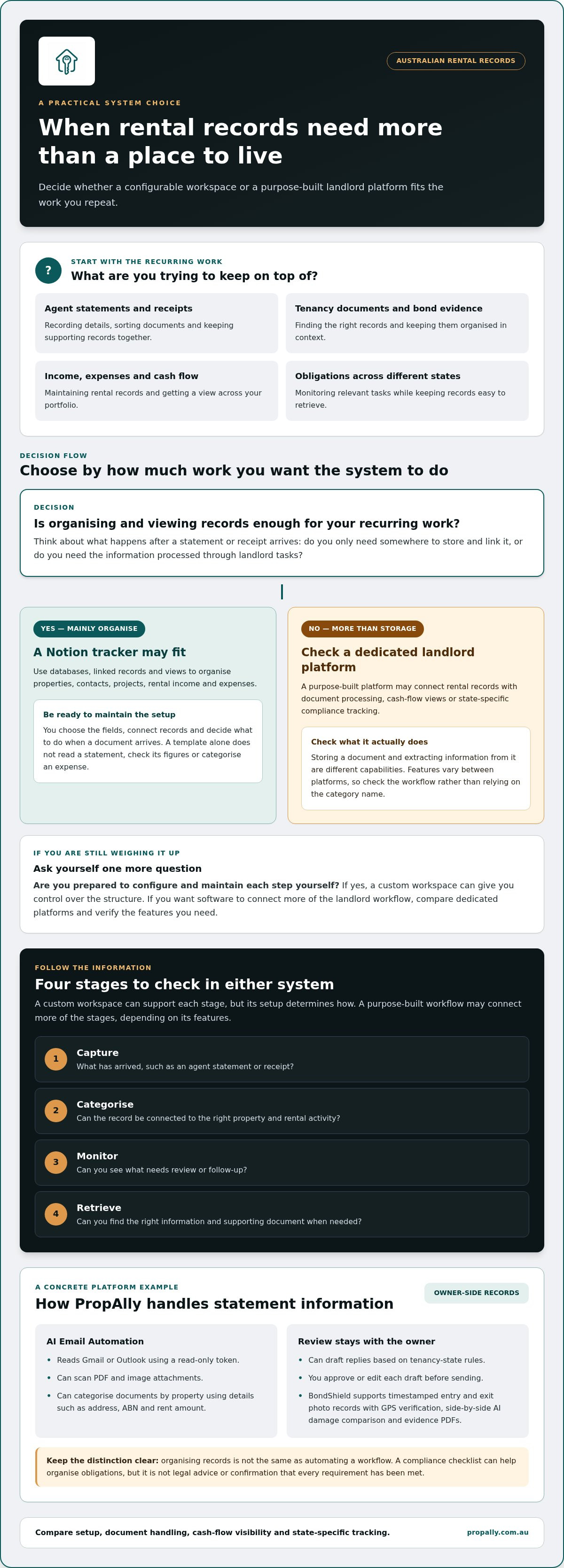
Choose a property investment tracker with this five-step decision framework
Choose a system by testing it against your real workload, not an idealised portfolio dashboard. This five-step check helps Australian investors compare a custom workspace with purpose-built software. Include the admin handled by your property manager as well as the records you keep yourself. Agent-managed and self-managed rentals can create different tasks, but both need clear ownership of information and a reliable way to retrieve it.
- List the tasks. Write down the records you manage, such as property details, agent statements, receipts, tenancy photos, bond records and upcoming obligations. Mark which tasks you repeat manually and where you lose time finding information. Separate essential workflows from optional dashboards or custom reports. This keeps attractive extras from distracting you from daily admin.
- Count the properties. Note how many rentals you oversee and whether they share the same record-keeping routine. For an agent-managed property, you may mainly review statements and retain owner records. A self-managed rental can involve more direct document handling and follow-up. The number matters, but so does the volume and variety of work attached to each property.
- Map the documents. Record where information currently lives: email, cloud folders, paper files, spreadsheets or a workspace. Note how often you update each record and who is responsible for it. If an agent sends a statement, for example, identify where you save it, where you record relevant details and how you’d find it again. A system should make those steps clear, not just provide a place to upload files.
- Identify state obligations. List the jurisdictions where your rentals are located and the obligations or reminders you need to track. Treat this as an administrative inventory, not legal advice. Check current official guidance for the applicable requirements, and decide whether your chosen system can help keep relevant tasks visible without making you rely on a generic reminder.
- Test retrieval. Use a recent agent statement, a tax receipt and a tenancy evidence record as practical test cases. For each, ask: who owns the next action, where does the source document live, and what path gets you back to it? The ATO’s rental property records guidance can help you understand record-keeping expectations. It doesn’t replace advice about your circumstances.
Now compare the results. If you can maintain a custom setup and retrieve key information without friction, a flexible tracker may meet your needs. If repeated entry, scattered documents or state-based admin are the pressure points, assess how a connected platform handles those tasks. For a wider overview of digital options, explore property management tools for investors alongside your own workflow checklist.
Use the test cases to see how an owner-side portfolio tracker could fit your records and oversight needs. Explore PropAlly’s property tracking platform.
How PropAlly brings Australian landlord workflows into one platform
PropAlly is an owner-side portfolio command centre for Australian residential investors, including agent-managed and self-managed landlords. It brings rental records, cash-flow tools, tax tools, bond evidence and compliance tracking into one platform. It helps owners organise and review their records, while owners remain responsible for their decisions and obligations.
Connected records for cash flow, tax and compliance
RentSmart extracts income, expense and tax information from PDF statements using AI, and connects it with rental records. Cashflow provides portfolio-level views of cash flow, equity, yield and loan-to-value ratio, alongside ten-year quarterly projections for each property. Investors can also model scenarios such as interest rates, vacancy, rent growth and capital expenses. These tools bring property and portfolio information together rather than requiring you to build each view manually in a separate tracker.
PropertyTax tracks expenses using ATO categories, including Division 40 and Division 43 depreciation, and provides a downloadable tax pack for your accountant. It also supports negative-gearing analysis and capital gains tax tracking. These tools can help organise records and support modelling, but they aren’t tax or financial advice. Discuss your circumstances and tax treatment with a qualified professional.
ComplianceTracker provides state-specific checklists and deadline alerts across QLD, NSW, VIC, SA, WA, TAS, NT and ACT. It gives owners a structured way to keep relevant tasks visible alongside property records. Check current official guidance for obligations that apply to your rental, as a digital checklist is workflow support, not legal advice or confirmation of compliance.
For investors weighing a notion property investment tracker vs dedicated landlord platform, the practical difference is how these connected workflows fit together. A general workspace can be customised, while PropAlly brings owner-focused records and portfolio tools into a system designed for rental administration.
A low-friction way to see whether the workflow fits
You can assess the setup against your own portfolio before deciding whether its workflow suits you. PropAlly’s Free plan supports one property and requires no credit card. Paid tiers include a seven-day free trial. You can cancel from your account, and your property, photo, bond evidence and expense history data is retained. These options let you consider the platform in light of your records and routine, without assuming it will be the right fit for every investor.
As you assess it, consider whether statement information, income and expenses, portfolio views and state checklists match the work you actually do. Agent-managed owners may focus on reviewing statements and keeping owner records together. Self-managed investors may have additional records and follow-ups to organise. The useful test is whether the system makes your own workflow clearer.
If you’re ready to see how those records and tools come together, explore PropAlly’s property portfolio tracker.
Choose a system that can grow with your portfolio
Your record-keeping needs won’t necessarily stay the same. A portfolio change, a new property manager or a shift to self-management can alter who handles each task and where information needs to flow. Set a simple review point whenever your workload changes. Ask whether your current setup still makes responsibilities clear, keeps records consistent and lets you find what you need without rebuilding the process.
That’s the practical test behind the notion property investment tracker vs dedicated landlord platform decision. Don’t choose based on the longest feature list or the most attractive template. Choose the approach that fits the work you’re prepared to maintain, and reassess if manual steps start getting in the way. Your system should support sound administration, not create another process to manage.
If you’re ready to assess an owner-focused option against your portfolio needs, explore PropAlly’s property portfolio tracker. Take the next step by comparing your regular admin with the platform’s tools, then build a workflow that gives you confidence as your investment plans evolve.
Frequently Asked Questions
Is Notion good for tracking investment properties?
Notion can suit investors who want to shape and maintain their own property records. A real estate investor template can use connected databases for properties, contacts, projects and finances, with views and relations. For example, you could link a repair project and its costs to one property. Before adopting it, consider how you’ll handle recurring tasks such as reviewing statements or locating tenancy evidence, not just entering information once.
Can I use a Notion template to manage Australian rental properties?
Yes, you can use a template to organise Australian rental-property information, but you’ll need to define how it supports your own administration. Consider adding fields for the relevant state or territory, document type, property and review date. Then decide how you’ll keep state-related records current and retrieve them. A tidy template isn’t proof that an obligation has been met, so check applicable requirements through current official guidance.
What is the difference between a property tracker and landlord software?
A property tracker helps you record and review investment information; landlord software may also provide task-specific workflows, depending on its features. The useful comparison is what happens to a record after it arrives. For an agent statement, check whether you must enter each figure yourself, whether the software can read document details, and how you review the result. The notion property investment tracker vs dedicated landlord platform choice depends on that practical workload.
Do I need dedicated landlord software if my properties are agent-managed?
Not necessarily. Agent management doesn’t remove your need to review your investment records and understand your own cash flow. You might keep a simple system if statements arrive consistently and you can reconcile them without difficulty. If you oversee several properties, compare your owner records with the agent’s statements and note any follow-up items. Choose software based on the work you still handle, rather than assuming the agent’s system covers your needs.
Can a landlord platform calculate my Australian rental property tax?
Some platforms offer tax-related tracking or calculations, but these tools don’t replace advice for your circumstances. PropAlly’s PropertyTax supports ATO-categorised expense tracking, negative-gearing analysis and a downloadable tax pack for your accountant. Treat the outputs as organised records and modelling support, not a final tax position. For example, ask your accountant to review expense categories and assumptions before relying on them for a return or investment decision.
How do I move from a Notion property tracker to a landlord platform?
Begin with an inventory of what you already track, then reconcile it against your original documents. Flag duplicate properties, missing dates and entries that need review before transferring information. Set a clear point at which new records will go into the new system, while keeping your existing material accessible during the changeover. Test the routine with one statement and one receipt first, so you can spot gaps before moving across the rest of your records.
Is a dedicated landlord platform worth it for one investment property?
It can be, if the property creates recurring admin you’d rather not manage through a custom process. A single rental may still involve agent statements, receipts, tenancy records and reminders. Write down which of these you handle regularly, then assess the effort of keeping each record organised and finding it later. If the routine is simple and manageable, a template may be enough; if repeated tasks cause friction, compare dedicated workflows.