

The accounting platform that keeps your finances in order may not be the tool that keeps each rental property in order. That’s the key distinction in the myob vs property management tracker for landlords decision. When agent statements sit in emails, receipts are buried in inboxes and records are spread across accounts, it can be difficult to see each property’s financial position and find the evidence behind a figure.
MYOB is built for broader accounting tasks. A landlord-focused tracker organises rental information at property level, bringing cash flow, documents and records into a clearer view. They have different jobs, so choosing between them isn’t always an either-or decision. The right setup depends on what you need to record and how you want to prepare information for review and tax time.
This article explains where MYOB fits, what a property tracker such as PropAlly can add, and how the two can sit alongside each other without assuming an integration or automatic data transfer. You’ll also get a practical way to map your workflow, reduce duplicate entry and keep Australian investment property records organised.
Key Takeaways
- See how myob vs property management tracker for landlords comes down to distinct tasks: broader financial bookkeeping versus property-level record organisation.
- Compare how each type of tool can support financial records, rental documents, compliance tracking and portfolio reporting.
- Decide whether one accounting workspace is practical for your portfolio or whether property-specific records need a clearer home.
- Build a workflow that assigns each record-keeping task to one system, helping reduce duplicate entry and uncertainty.
- Explore how PropAlly’s property-level dashboard, statement reading, state-specific checklists and bond authority workflows can support Australian landlords.
MYOB vs a property management tracker: what problem does each solve?
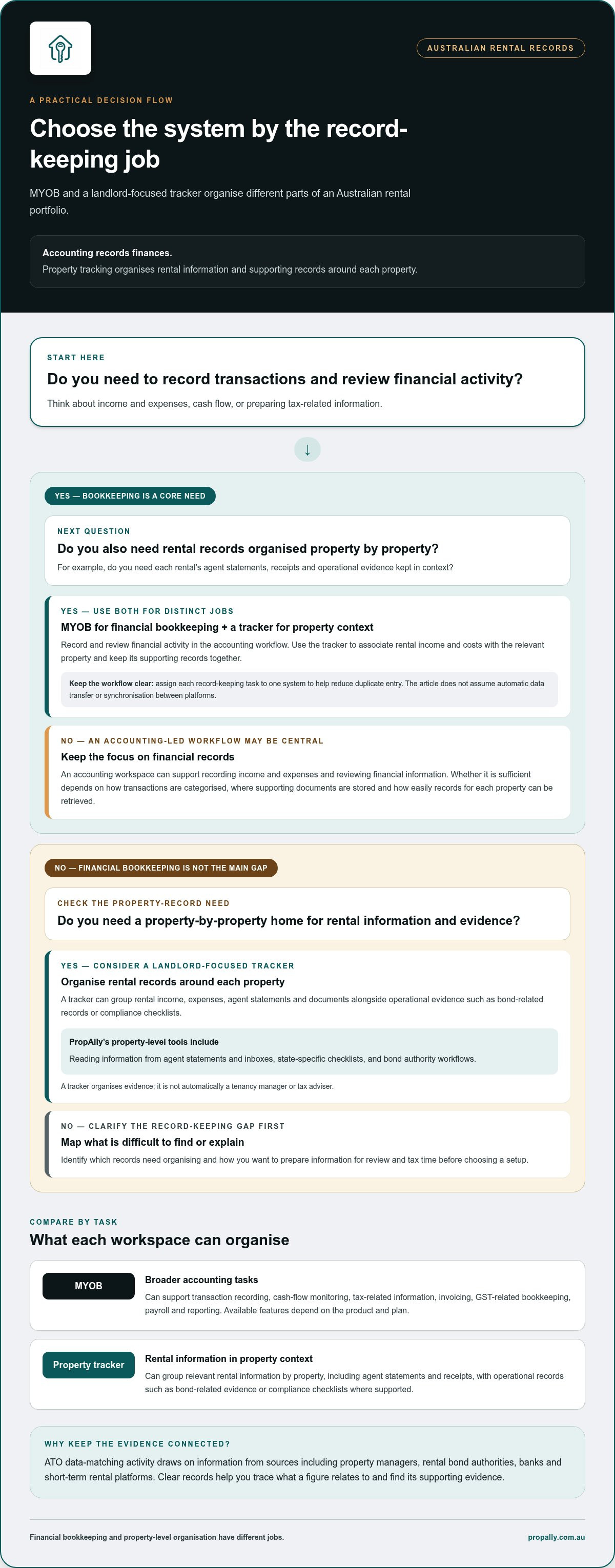
For an Australian landlord, the choice isn’t simply which software is better. It’s what needs organising: financial bookkeeping, records for each rental property, or a coordinated combination. MYOB is general accounting software, while a property tracker is a property-by-property workspace for rental information and supporting records. Accounting records finances; tracking organises property context.
That difference matters when one transaction needs to make sense in two ways. A maintenance invoice is an expense in the books. At property level, it also needs to connect to the relevant rental, agent statement and supporting document. The accounting entry supports financial reporting; the property record helps explain the activity behind it.
What does MYOB do for a landlord?
MYOB’s general accounting tools can support tasks such as recording transactions, monitoring cash flow, preparing tax-related information, invoicing, GST-related bookkeeping, payroll and reporting. Available features depend on the product and plan. Its role is to organise financial activity in an accounting workspace, rather than automatically arranging every record around a landlord’s portfolio.
A landlord might use an accounting workflow to record rent received and expenses paid, then review financial reports or prepare information for a bookkeeper or accountant. Whether that’s sufficient depends on how transactions are categorised, where supporting documents are stored and how quickly information for each property can be retrieved. The selected MYOB plan and the landlord’s bookkeeping process both matter.
What does a property management tracker do?
Here, “tracker” means a landlord-focused record-keeping workspace, not a system that manages tenancies or replaces an agent. Property management systems can cover different operational needs, as outlined in this general overview of a property management system. A rental-property tracker has a narrower purpose: keeping information attached to the relevant property.
That can mean bringing together rental income, expenses, agent statements and documents, alongside operational evidence such as bond-related records or compliance checklists. For example, a landlord with multiple rentals can review each property’s cash flow and find its agent statement without relying on one undifferentiated folder. A tracker helps organise evidence; it isn’t automatically a tenancy manager or tax adviser, and it doesn’t make professional decisions for the landlord.
PropAlly can read information from agent statements and inboxes, and provides state-specific checklists and bond authority workflows. These property-level organisation tools don’t establish an integration with MYOB or mean records synchronise automatically between platforms.
So the practical question is where your record-keeping becomes difficult. If the main need is to record and review finances, an accounting workflow may be central. If you also need a clear property-by-property view of documents and operational evidence, a tracker can fill a different organisational role.
MYOB and landlord trackers handle different parts of the rental record
Australian landlords need to keep rental income and claims connected to the records behind them. The ATO’s data-matching activity draws on information from sources including property managers, rental bond authorities, banks and short-term rental platforms. Clear records help you trace what a figure relates to and find its supporting evidence. That makes it useful to compare software by task, not by feature count.
MYOB’s published capabilities include accounting tools such as cash-flow management and tax-related reporting, with availability depending on the product and plan. The MYOB accounting software features overview describes its accounting functions. Compare those with the landlord-specific organisation you need. The table shows how the tasks differ; it doesn’t assume every MYOB plan or property tracker offers the same functions.
| Record-keeping area | General accounting task | Landlord-tracking task |
|---|---|---|
| Financial bookkeeping | Record income and expenses, categorise transactions and review cash-flow information. Tools and reporting options can depend on the MYOB plan selected. | Associate rental income and costs with the relevant property, so portfolio activity can be reviewed in context. |
| Property records | Maintain financial records within the categories and structure used for bookkeeping. | Group relevant rental information by property, alongside its operational records. |
| Documents | Use source documents to support bookkeeping, according to the selected workflow and available features. | Keep agent statements and receipts connected to the property they relate to. |
| Compliance and bond evidence | Record relevant financial transactions. General accounting tools don’t necessarily provide landlord-specific checklists or bond workflows. | Organise operational evidence, including bond-related records and state-specific checklists where supported. |
| Reporting | Review financial summaries and reports available in the selected product and plan. | Review rental information property by property to see which records support each part of the portfolio. |
Compare cash flow, tax records and property-level context
An accounting view can summarise money received and spent, but a landlord may also need to see the property context behind an entry. A maintenance cost belongs in the financial records; its invoice and related information can also be organised with the relevant property. That connection helps when reviewing a figure against its source. Neither an accounting platform nor a tracker, by itself, guarantees an accurate tax return.
Compare statements, receipts, bonds and compliance records
Agent statements and receipts may arrive separately from the bookkeeping workflow. Filing them with a property identifier makes it easier to match a source document to a recorded amount. PropAlly can read information from agent statements and inboxes, and offers bond authority workflows and state-specific checklists. These capabilities help organise records; they don’t replace tenancy management or professional tax advice.
Accounting tools organise financial activity; landlord trackers organise the property evidence that gives it context. If property-level organisation is missing from your current process, PropAlly’s rental-property dashboard is one option to explore.
Is MYOB enough for landlords, or does a property tracker add value?
A second system earns its place only if it solves a record-keeping problem your accounting workflow doesn’t already handle well. If rental income, expenses and supporting documents are easy to trace for each property, another workspace may create more administration than value. Make the myob vs property management tracker for landlords decision by looking for a real gap, rather than assuming every portfolio needs both.
When MYOB may be sufficient for your workflow
A landlord with straightforward records may prefer to keep bookkeeping in one accounting workspace, particularly if the current process already links transactions to the right property and keeps supporting documents easy to retrieve. Review a typical month: can you follow each rental amount from the accounting entry to its source record? If so, a separate tracker may add little. The answer depends on your workflow and chosen plan.
When a property tracker can fill a genuine gap
A specialist layer can help when property records are spread across agent emails, inboxes and folders, or when you oversee several rentals with different document trails. Cross-state holdings also mean organising property-level operational records alongside different state-specific information. A tracker brings these records into a clearer view, making portfolio review and follow-up more orderly. It should complement, not duplicate, your accounting process.
Before adding a tool, identify exactly what will live in it and what will remain in MYOB. Decide which system is the working home for each record and how you’ll pass relevant information between them. Don’t assume an integration, automatic synchronisation or a particular export workflow. Platform features and plan inclusions vary, so define the hand-off you intend to use.
Potential advantages of using MYOB alone
- One accounting workspace may keep routine bookkeeping simpler.
- You avoid maintaining a second set of records if property documents and context are already organised.
- Your existing setup may suit a smaller or less complex portfolio.
Potential advantages of adding a tracker
- Property-by-property organisation can make documents and operational records easier to locate.
- A consolidated portfolio view can help reveal which property needs a follow-up.
- Landlord-focused workflows can help organise records that aren’t part of everyday bookkeeping.
There are trade-offs on both sides. One system may be simpler, but only if it captures the property context you need. Two systems can divide tasks more clearly, but unclear ownership can lead to duplicate entry or missed updates. MYOB features vary by plan, while tracker capabilities vary by product. Neither setup guarantees complete records or a correct tax outcome.
Try a recent agent statement: can you identify the property, trace the relevant financial entries and locate the supporting documents? If that process feels fragmented, explore whether a property-focused PropAlly Starter Plan could give those records a dedicated home.
How to choose a MYOB and property tracker workflow for Australian rentals
A reliable workflow starts with the records you need to manage, not with adding another app. For the myob vs property management tracker for landlords decision, map each record to one clear home. That keeps accounting entries distinct from property-level evidence and makes it clear where to update or retrieve information.
Map your records before selecting the software split
List the records you handle, then decide whether each supports bookkeeping, property context or both. Australian portfolios may span states, so attach state-specific operational records to the relevant property without assuming the same checklist applies everywhere.
- List financial transactions. Assign rental income and expenses to your accounting workflow, including MYOB if that’s the workspace you use for bookkeeping.
- List agent statements. Choose one destination for the original statement and note how you’ll connect it to the relevant property and financial entries.
- List receipts and invoices. Decide where source documents will be stored and how you’ll identify the property and expense they relate to.
- List bond evidence and compliance reminders. Keep operational records property by property, with a way to distinguish information relevant to properties in different states.
- Assign ownership. Record which system is authoritative for each item. Avoid entering the same detail in both systems unless there’s a defined reason and process.
This map also exposes gaps. If you can record a payment but can’t readily locate its statement or supporting receipt, the issue is document organisation. If the documents are clear but bookkeeping is inconsistent, focus first on the accounting process.
Set a repeatable process for documents and review
Use a consistent naming approach, such as property identifier, document type and date, and apply it wherever files are stored. Set a regular review routine for incoming agent statements, receipts needing attention and outstanding property-level records. Keep the routine simple: every document needs a destination, an owner and a next step.
Statement-reading automation may reduce manual handling if it fits how you receive agent documents. PropAlly can read information from agent statements and inboxes; decide how you’ll review and use that information in your records. It doesn’t synchronise with MYOB or transfer entries automatically. Keep the workflow explicit, including any manual step between systems.
For a portfolio spread across properties or states, PropAlly consolidates rental cash flow, tax, compliance and bond evidence in a property-focused dashboard. Explore PropAlly’s Starter Plan to organise rental information property by property.
Where PropAlly fits alongside MYOB in a landlord's setup
MYOB and PropAlly can have separate responsibilities in an Australian landlord’s record-keeping workflow. MYOB can remain the accounting workspace, while PropAlly provides a property-level view of rental information and supporting evidence. PropAlly isn’t a replacement for accounting software, a bookkeeper or professional tax advice. The aim is a clear division of work, not two competing copies of the same records.
What PropAlly contributes to a property-focused workflow
PropAlly brings rental cash flow, tax calculations, compliance information and bond evidence into a dashboard organised property by property. A landlord can review the context of a particular rental alongside its connected records, rather than treating the portfolio as one undifferentiated set of files.
PropAlly can read agent statements and relevant inbox documents to extract information, helping reduce manual handling. State-specific checklists and bond authority workflows add landlord-focused organisation for operational records. These tools support record-keeping; they don’t guarantee compliance with every applicable requirement or make decisions on a landlord’s behalf.
Keep the hand-off to MYOB explicit. Decide which system is the source of truth for each item, what information needs to be recorded in the accounting workspace and who completes that step. MYOB synchronisation and data transfer aren’t automatic. A simple written process can prevent duplicate entry: retain the property-level record in its designated workspace, then enter or share relevant financial information through your established bookkeeping process.
Start with the right scale and a clear division of work
The right setup depends on the size and shape of your portfolio. PropAlly’s Free Plan covers one property, while paid plans cover up to twenty properties. Optional email document add-ons are also available. Assign each task once: use your accounting workflow for bookkeeping and the property-level workspace to organise rental records and evidence.
For a single-property landlord, begin by deciding whether a dedicated property view would make documents and activity easier to review. For a larger portfolio, consider whether one place to view records property by property would simplify oversight. In either case, map out how statements and extracted information will be checked before anything is entered into accounting records. Keep that review step visible in your routine.
If your priority is organising rental information around each property while keeping MYOB in its accounting role, explore PropAlly and start organising your rental property records. Assess the Free Plan against the records you need to manage for one property, then choose a workflow with clear ownership and no assumed synchronisation. That’s the practical answer to myob vs property management tracker for landlords: use each tool for the part of the rental record it’s designed to organise.
Make your next record-keeping step a deliberate one
The best setup is the one you can keep using when another statement arrives, a receipt needs filing or you’re preparing records for review. Before changing tools, choose one rental property and trace a recent document through your current process. Note where it’s saved, how it’s connected to the property and where any related bookkeeping happens. That check can show whether you need a different workflow or simply a clearer routine.
Use what you find to make the myob vs property management tracker for landlords decision on practical grounds: define each system’s role, avoid assumed data transfers and keep ownership of every record clear. A tidy process can make portfolio administration more manageable without asking one platform to do every job.
Explore PropAlly and organise your rental property records, then take the first step towards a more orderly property-by-property workflow.
Frequently Asked Questions
Is MYOB designed specifically for Australian landlords?
No. MYOB is general accounting software, rather than a tool designed solely around landlord record-keeping. You can test whether your workflow covers the property context by tracing a rental expense from its accounting entry to the supporting receipt and the property it relates to. If that connection is difficult to follow, consider whether your records need a property-level layer.
Can MYOB automatically read property manager statements?
Whether statement information can be brought into MYOB depends on the tools and workflow you use. PropAlly can read statements from agents and inboxes, which may help reduce manual handling. Review the extracted details before using them in your records, so you can match them to the right property and supporting documents.
Can I use MYOB and a property management tracker together?
Yes. In the myob vs property management tracker for landlords decision, using both can make sense if each has a distinct role. For example, keep bookkeeping transactions in MYOB and organise property-specific source documents in a tracker. Write down which system owns each record and how you’ll pass relevant details across. Don’t assume automatic synchronisation or an integration; use a deliberate hand-off to limit duplicate entries.
Does a property tracker replace an accountant or tax advice?
No. A tracker can organise rental records and may provide tax calculations, but it doesn’t replace advice based on your individual circumstances. Keep source documents connected to the relevant property, then provide your organised records to a qualified tax professional when you need advice. PropAlly is a tracking platform, not a provider of financial or tax advice, and its calculations aren’t a personal tax recommendation.
How many properties can PropAlly track?
PropAlly’s Free Plan covers one property, while paid plans cover portfolios of up to twenty properties. To assess the right scale, list the properties you want to track and the records you’ll manage for each. Optional email document add-ons are available for document reading. Review the plan details when deciding which setup suits your portfolio.
Can a property tracker manage rentals in different Australian states?
A tracker can help organise records for properties across Australian states, but it doesn’t remove the need to consider state-specific requirements. PropAlly offers state-specific compliance checklists and bond authority workflows to support administration. Treat these as record-keeping tools, not legal advice or a guarantee that every obligation has been met. For a property-specific question, check the relevant authoritative source or seek qualified advice.