

What if the portal that keeps you informed about one rental property isn’t the system you need to oversee your whole portfolio? That’s the key distinction in the console cloud owner portal vs dedicated landlord tracker comparison. An agency portal can show information connected to a property manager’s work, but it may not bring records from different agents, properties and states together for investor-level oversight.
If cash flow figures, rental statements, tax records and compliance notes are scattered across portals, inboxes and spreadsheets, you may be spending time assembling a picture that should be easier to review. The right setup isn’t necessarily one tool replacing another. It’s deciding which system should provide access to agency information and which should organise your portfolio records.
This guide explains what an agency owner portal is designed to show, where a dedicated landlord tracker adds a portfolio-wide record-keeping layer, and how to choose a manageable approach for Australian rentals. You’ll see how PropAlly can read agent statements and inbox information while helping organise cash flow, tax, compliance and bond evidence. Investor tracking supports organised records, but it isn’t property management or professional tax advice.
Key Takeaways
- Assess whether your agency portal gives you the property information you need, or mainly provides visibility into agent-managed activity.
- Map how statements and records move from agency portals and emails into your own portfolio files to spot gaps and duplication.
- The console cloud owner portal vs dedicated landlord tracker comparison comes down to purpose, users, information scope and portfolio-level organisation.
- Choose a tracking setup by considering how many properties, agents and information sources you manage, then review what your existing portals already cover.
- See how an investor-focused layer such as PropAlly can organise cash flow, tax, compliance and bond evidence alongside agency portal access.
Console Cloud Owner Portal vs landlord tracker: what does each tool do?
Does access to an agency portal give you complete control of your investment records? Not necessarily. A portal can make information about a managed rental easier to access, but that’s different from organising financial and compliance records for your whole portfolio. The distinction matters when properties are handled by different agents, or when your records are also spread across emails and folders.
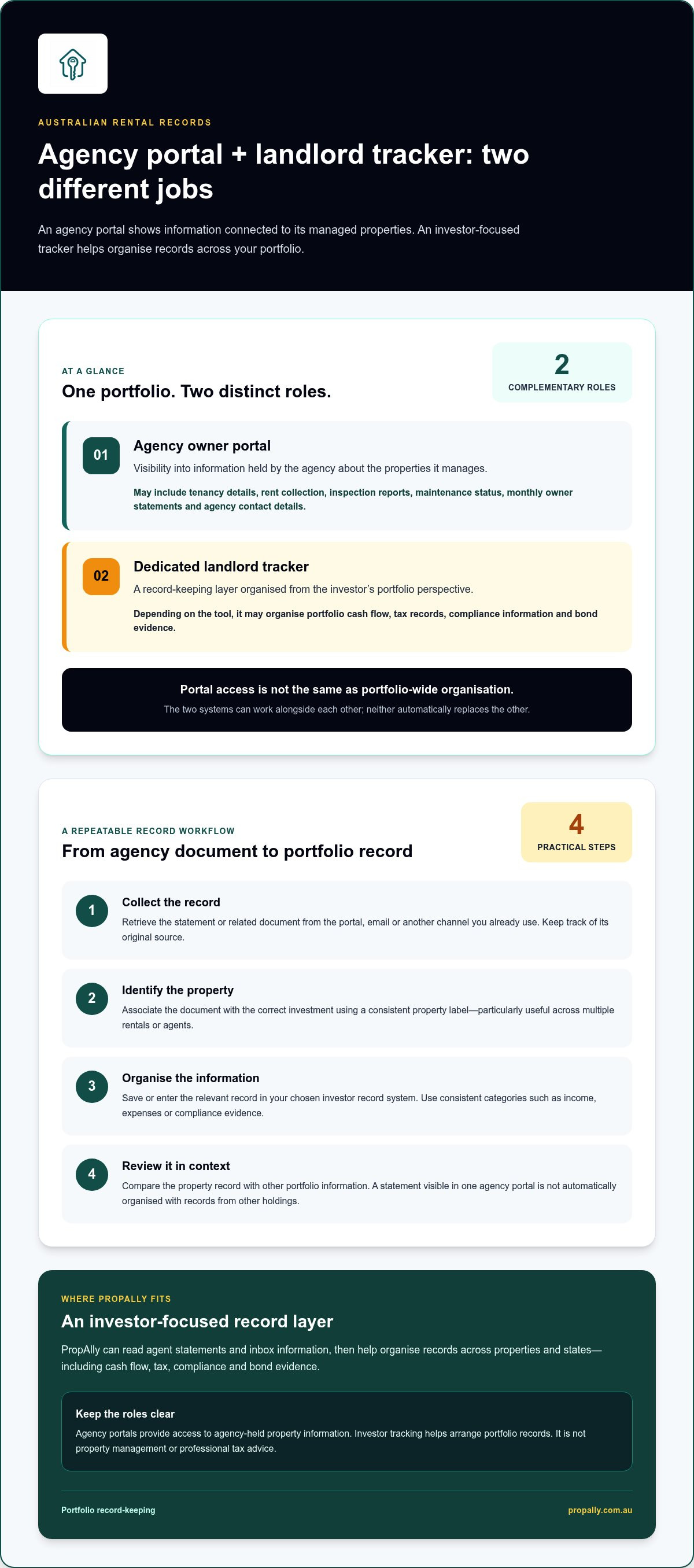
An agency owner portal provides visibility into information held about a managed property, while a dedicated landlord tracker organises records from the investor’s portfolio perspective. The two can complement each other. Neither is automatically a substitute for the other, and a tracker doesn’t take over the agent’s property management role.
What information does a Console Cloud owner portal show?
A Console Cloud owner portal is connected to an agency relationship and the information associated with properties that agency manages. This can include tenancy details, rent collection, inspection reports and maintenance status. Owners may also be able to access monthly owner statements and agency contact details through the portal.
This is useful when you need to check property activity or retrieve information held by the agency without searching through an email chain. For example, you can use the portal to locate an available monthly statement or review a maintenance update. Its scope is tied to the agency’s managed-property records, so don’t assume it contains your complete records across other agents or properties.
What does a dedicated landlord tracker organise?
A dedicated tracker is designed around the investor’s records, rather than the workflows of a single agency. Depending on the tool, it may organise portfolio-level cash flow, tax records, compliance information and bond evidence. Features vary, so focus on whether a tracker covers the records you need rather than assuming every product works the same way.
For an Australian investor with properties across states or agents, a central record-keeping layer can bring information from separate sources into one view. PropAlly can read statements from agents and inboxes, then consolidate information across properties and states. It tracks cash flow, tax, compliance and bond evidence, helping you organise records alongside your agency portal access. It doesn’t replace the agent or professional tax advice.
This distinction reflects the different roles involved in rental ownership. Property management provides general context on managing rental property, including the role of technology. In practical terms, the agency portal helps you see information connected to property management; the investor tracker helps you arrange records for portfolio review.
When weighing the console cloud owner portal vs dedicated landlord tracker, start with the job you need done. Use portal access to view available agency-held property information. Use an investor-focused tracker when you need to organise records across multiple properties, information sources or states. Keeping those roles clear makes it easier to find the right record without expecting one system to do both jobs.
How property information moves between agencies, portals and your records
A rental record can begin in an agency portal, arrive as an email attachment or be saved directly to your own files. The process varies by agency. Your aim is to move each useful document from its source into a consistent record for the right property, without mistaking access to a document for portfolio-wide organisation.
From agency statement to portfolio record
A repeatable workflow makes portfolio reviews easier, even when different agencies use different systems or send information through different channels. Use the same steps each time a statement or related record arrives:
- Collect the record. Retrieve the agent statement or related document from the portal, email or other channel you already use. Keep track of its original source.
- Identify the property. Associate the document with the correct investment using a consistent property label. This is especially useful if you own more than one rental or work with several agents.
- Organise the information. Save or enter the relevant record in your chosen investor record system. Use consistent categories for items such as income, expenses or compliance evidence.
- Review it in context. Compare the property record with other portfolio information when preparing for a broader review. A statement you can view in a portal is useful, but it isn’t automatically organised alongside records from your other holdings.
For example, you might access a monthly statement through an agency portal, then file it under the matching property in your own records. The portal gives you access to the agency document; your investor system gives it a consistent place alongside information from other properties. The Real Estate Institute of Australia (REIA) provides an Australian real estate industry reference point, while a consistent record structure helps keep documents useful for your portfolio.
Keeping records across properties and Australian states
As a portfolio grows, a clear naming pattern helps prevent records from becoming difficult to distinguish. Use the same property identifier across statements, emails and saved documents. Keep state-specific compliance material associated with the relevant property rather than relying on memory or storing it in one mixed folder. This makes records easier to navigate without assuming the same compliance details apply everywhere.
PropAlly supports records across multiple properties and states in its dashboard, and can automatically read statements from agents and inboxes. This can reduce the manual work of gathering and sorting information from separate sources. Keep the original source and property association clear so you can identify what each record relates to.
In the console cloud owner portal vs dedicated landlord tracker workflow, the portal can remain your access point for agency-held information while your investor records provide the structure for portfolio review. PropAlly’s investor tracking dashboard brings investor records together in one place.
Compare an owner portal and landlord tracker against your needs
The useful comparison isn’t which tool is better overall. It’s whether you need access to information held by a managing agency, a structured view of your investment records, or both. An owner portal and a landlord tracker can work alongside each other: one supports visibility into agency-held property information, while the other helps organise your records for portfolio oversight.
An owner portal shows you what’s available through an agency; an investor tracker gives you a way to organise records across your portfolio. That distinction can prevent duplicate effort. Use the portal to access an available statement, then arrange the relevant record alongside information from other properties or sources.
| Comparison point | Agency owner portal | Dedicated landlord tracker |
|---|---|---|
| Purpose | Access available information about agency-managed properties. | Organise an investor’s property records for portfolio review. |
| Primary user | The property owner accessing information connected to their agency relationship. | The investor arranging records across their holdings. |
| Information scope | Examples include tenancy details, rent collection, inspection reports, maintenance status and available monthly owner statements. | Can include investor-level cash flow, tax, compliance and bond evidence, depending on the tracker. |
| Portfolio organisation | Centred on information available for properties managed through the agency. | Designed to bring records into an investor-focused view across properties and sources. |
When an owner portal may cover your immediate needs
If you have one managed rental and mainly want to check agency-held updates or access available owner statements, portal access may meet your immediate record-viewing needs. It gives you a place to see relevant information without creating a separate process for every document. Information and functions can vary between agencies and account setups, so treat the portal as a source of property information, not as a guaranteed complete archive of your investment records.
When a dedicated tracker adds portfolio-level structure
A tracker becomes more relevant when you’re bringing together records across multiple properties, agents or sources. It can help organise cash flow, tax, compliance and bond evidence into an investor-level overview, rather than requiring you to review each property in isolation. PropAlly supports these record-keeping needs across multiple properties and states. Choose a setup based on what you need to review and where those records currently sit.
For a practical test, list the records you use for an investment review, then note where each one comes from. If they’re already accessible in one agency portal and your portfolio is straightforward, that may be enough for now. If you repeatedly combine statements, emails and separate records, an additional tracking layer may provide useful structure. Moneysmart.gov.au’s property investment guidance provides Australian context on managing investment costs and responsibilities, which can help you decide what to keep organised.
Choose a tracking setup for your Australian rental portfolio
The right setup depends less on the name of the portal and more on how many properties you oversee, how many agents manage them and how many places your records arrive from. A single property managed by one agency may need little beyond portal access and a tidy record of key documents. With several properties, agents or email sources, a central investor record can make portfolio review more manageable.
Start by checking what you can already access through each agency portal. Then identify gaps in your own records, especially for income, expenses, tax documents, compliance information and bond evidence. You don’t need to collect every document twice. You do need to know where each important record belongs and how you’ll find it later.
Questions to assess your current portal setup
Review your current process with these questions. Answer them across the portfolio, not just for the property or agency you deal with most often:
- Can you access the property information and statements you need from each agency?
- Can you find records for every property and the relevant period without searching across several inboxes and folders?
- Do you have a separate way to view portfolio-wide cash flow and compliance records?
- Are income, expenses, tax documents and bond evidence associated with the correct property?
If the answers are mostly yes, your existing arrangement may be working. If you’re piecing together records each time you want an overview, that’s a practical sign to add more structure. Let that gap assessment guide the console cloud owner portal vs dedicated landlord tracker decision, rather than assuming every investor needs the same setup.
A practical record-keeping routine for landlords
Keep the process simple enough to maintain. A consistent routine is more useful than a complicated filing system that’s quickly abandoned.
- Review the gaps. Note what you can access in agency portals and what still arrives through email or sits in personal records.
- Choose a central structure. Set a consistent property name and record categories for income, expenses, tax documents, compliance and bond evidence. For properties in different states, connect relevant compliance records clearly to each property.
- Add records as they arrive. File each statement and supporting document under the correct property and category, rather than leaving a backlog to sort later.
- Review the system regularly. Check that records remain findable across properties and periods, and adjust the structure if you add agents or information sources.
A state-specific Australian property compliance checklist can help organise the compliance records you need to keep in view, without assuming the same items apply to every property. PropAlly supports investor record-keeping across properties and states, including compliance tracking. Explore PropAlly’s property tracking dashboard to see how an investor-focused view can bring portfolio information together.
Use PropAlly as your investor-focused tracking layer
Agency portal access and investor record-keeping serve different purposes. Keep using an agency portal to view information connected to a managed property, while using PropAlly to organise records for your wider portfolio. This distinction is useful when statements arrive from different agents or through separate inboxes. Treat portal access as one source of information, rather than your complete investor record.
PropAlly can automatically read statements from agents and inboxes, helping consolidate information across multiple investment properties and states. Its dashboard tracks cash flow, tax, compliance and bond evidence, so relevant records can sit within an investor-focused system alongside existing agency information. It’s a record-keeping layer, not a replacement for your agent, agency software or professional tax advice.
How PropAlly supports portfolio-level oversight
Portfolio oversight is easier when records are connected to the right property and can be reviewed together. PropAlly supports record-keeping across multiple properties and states, with state-specific compliance checklists to help organise relevant compliance records. Bond authority workflows support the organisation of bond evidence. ATO-aligned tax calculations provide a structured way to track tax information, but they aren’t tax advice and don’t replace guidance from a qualified professional.
For example, use a monthly agent statement as a source document, then organise the related information alongside other property records. When each item is associated with the right holding, you can review portfolio cash flow and locate compliance or bond evidence without relying on one agency’s portal to contain everything.
Start with the right level of tracking
A useful setup doesn’t need to begin with a complicated process. Start with the records you already receive, identify where they’re stored and decide what you want to review across your portfolio. PropAlly’s Starter Plan is its primary plan for investors beginning to organise property records. Consider it in the context of the workflow you need.
Keep the roles clear: agency portals remain a point of access for information held through the management relationship, while PropAlly helps organise investor records across properties and sources. That’s the practical answer to the console cloud owner portal vs dedicated landlord tracker question. One supports agency-linked visibility; the other adds a portfolio-level record structure.
Explore PropAlly and the Starter Plan overview to see how the dashboard can support your record-keeping workflow.
Set up your next stage of portfolio oversight
Your record-keeping setup should keep pace with your Australian portfolio. As you add properties, agents or information sources, revisit how easily you can find the records that support your decisions. The console cloud owner portal vs dedicated landlord tracker choice isn’t fixed forever. It’s a practical decision about whether your current process still gives you a clear, usable view of your investments.
If you’re considering an investor-focused tracking layer, assess how it fits into your existing routine. PropAlly brings cash flow, tax, compliance and bond evidence tracking into a dashboard, and can read statements from agents and inboxes across properties and states. State-specific compliance checklists and bond authority workflows add structure to those records. The goal is an organised record hub alongside agency portal access, not a replacement for your agent or professional advice.
To bring rental property information into an investor-focused record hub, explore PropAlly’s investor-focused property tracking.
Frequently Asked Questions
Can a Console Cloud owner portal show all my investment properties?
Not necessarily. A Console Cloud owner portal provides access to information an agency makes available about properties it manages, so don’t treat it as a complete record of every investment you own. In the console cloud owner portal vs dedicated landlord tracker comparison, account for records held by other agents or in personal inboxes. Map your information sources to see whether a separate portfolio view would help.
Do I need to stop using an owner portal if I use a landlord tracker?
No. You can keep using an owner portal for agency-linked updates while using a tracker to organise your own records. For instance, you might view an inspection report in the portal and file it with other records for that property in your tracking system. Decide where each document belongs, and avoid entering the same information twice unless you have a clear reason to keep a separate record.
What should I do if my property manager sends statements by email?
Include emailed statements in your regular record-keeping routine, and associate each one with the right property and period. Keep the original email or attachment available so you can trace where the document came from. Agencies may use different processes and file formats, so keep a consistent system on your side. PropAlly can read statements from agents and inboxes to help consolidate information for portfolio tracking.
Can a landlord tracker help when I own rental properties in different states?
Yes. A tracker can help organise records for properties across different states, provided you connect each document to the relevant holding. State-specific compliance information still needs careful attention, as details can vary. PropAlly includes state-specific compliance checklists and bond authority workflows to support record organisation. These tools help structure information, but they aren’t legal advice or a substitute for checking what applies to your circumstances.
Is a property owner portal the same as property management software?
No. An owner portal is an access point for landlords to view information made available through an agency relationship. Property management software is used by an agency to support its broader operations. Console Cloud’s Owner Portal provides landlord access and agency communication, while agency software may support wider management workflows. The distinction is mainly about the user and purpose, not a claim that every system has identical functions.
Can PropAlly replace my property manager or tax adviser?
No. PropAlly is a property-investor dashboard, not a property management service or a financial and tax advice service. It helps organise cash flow, tax, compliance and bond evidence, but managing the property and providing professional advice remain separate responsibilities. Use the dashboard to keep relevant records in order, and rely on your property manager and qualified professionals for the services and guidance they provide.
Explore PropAlly’s investor tracking dashboard to organise cash flow, tax, compliance and bond evidence across your rental portfolio.